- Document History
- Subscribe to RSS Feed
- Mark as New
- Mark as Read
- Bookmark
- Subscribe
- Printer Friendly Page
- Report to a Moderator
- Subscribe to RSS Feed
- Mark as New
- Mark as Read
- Bookmark
- Subscribe
- Printer Friendly Page
- Report to a Moderator


Background
The LabVIEW FPGA Advanced Session Resources are provided to enable the creation of flexible middleware that interact with NI FPGA targets. For traditional drivers like DAQmx or instruments, one developer can create a library of VIs and provide them to other developers to use as seen in Figure 1.
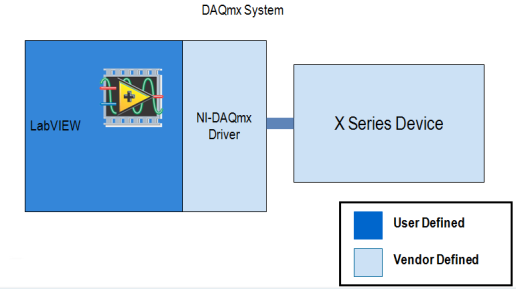
Figure 1
Using the provided new LabVIEW FPGA interface capabilities, a developer can now create this same sort of instrument driver experience by creating a middleware driver on top of the LabVIEW FPGA interface as seen in Figure 2. This middleware driver can be developed flexible enough to still allow the user of this driver to customize the FPGA or change the FPGA target. The middleware can detect the contents of the FPGA, and interface with it according to what it contains. For example, the middleware's standard driver functions could allow configuration and run time interaction with six detected items of PWM IP on any NI FPGA, or four detected items of PWM IP on any NI FPGA while exposing a consistent API to the user.
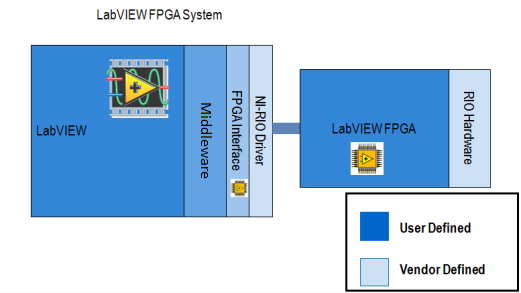
Figure 2
Specific Capability
LabVIEW FPGA Advanced Session Resources installs two new LabVIEW nodes:
- "Get Resources"- Provided an FPGA session, returns an array of clusters where each cluster describes one of the registers or FIFOs in the FPGA and gives information about that resource.
- "Open By Name" - Provided an FPGA session, the name of a register or FIFO you want to interact with, as well as the data type of the register or FIFO, returns a new child session that only contains one resource. The original name of the register or FIFO has been stripped from the session so the session can be used in reusable subVIs that do not need to know the actual name of the item programmed into the FPGA.
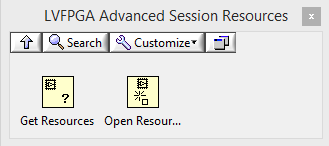 Figure 3
Example Usage
In the example in Figure 4, a bitfile is opened by path dynamically, queried for resources, the first resource is opened and written to. In a real application you might want to do some detection to make sure the first resource is actually what you want, either by looking at the type (register or FIFO), the name, or the data type.
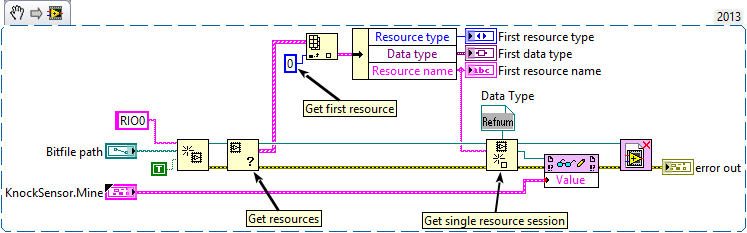
Figure 4
Note that when the top level session is closed, all child sessions are also closed.
This example opens the FPGA VI reference to inspect the session's available resources with the Get Resources node. However, in some cases you might want to inspect the bitfile prior to opening a reference because opening a reference requires RIO hardware be present. To inspect a bitfile without hardware, do not use the new Get Resources node, but rather use the already shipping VI: <\vi.lib>\rvi\Bitfile\Public\nirviGetControlsFromBitfile.vi.for controls and indicators and <LabVIEW>\resource\RVI\compilationResultUtilities\niLvFpgaGetDmaChannelInfoFromXML.vi for FIFOs. A snippit of using both of these is shown in Figure 5.
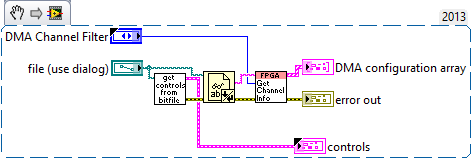
Figure 5
Please note the data type refnum for a control or indicator must have the resource name set to Value and must be only one item. After importing from a bitfile or VI, delete out everything but one item and change the name to Value. See Figure 6.
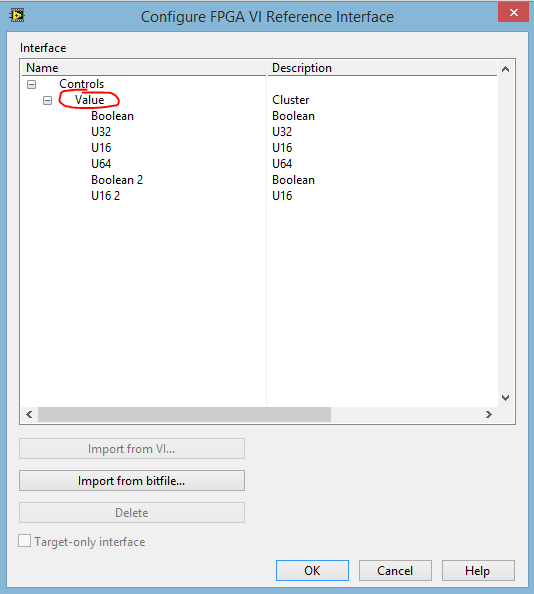
Figure 6
For FIFO resources, the name must be FIFO. See Figure 7.
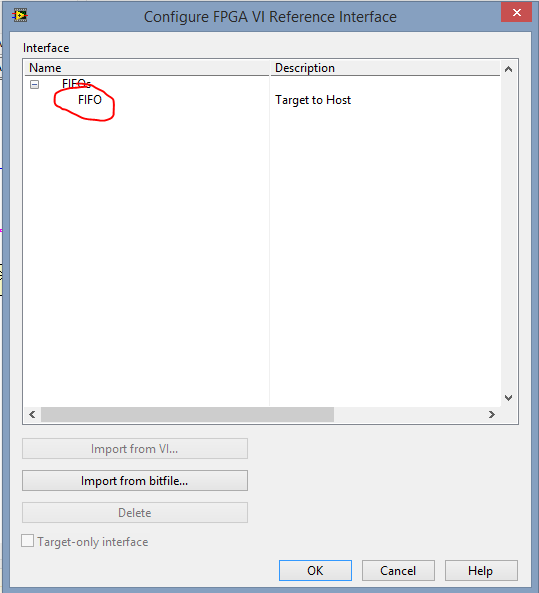
Figure 7
Installation Instructions
Download the attached VI Package file and double click it to begin the install.
Supported Platforms
All operating systems that LabVIEW FPGA and NI-RIO supports.
Requirements
- LabVIEW 2013 or later
- NI-RIO 13.0 required, 13.1 or later recommended
Known Issues
- Opening more than 16 FPGA sessions can cause slightly degraded performance and FPGA nodes will return warnings. Workaround: On Windows open or create %ALLUSERSPROFILE%\National Instruments\NI-RIO\nirio.ini and modify TableSegmentSize=16 to a higher value. On RT, the file is at, or must be created at c:/ni-rt/system/nirio.ini. The key must be under a section in the ini named [General]
- When using NI-RIO 13.0, single resource sessions are not automatically closed by closing the top level FPGA reference nor by LabVIEW automatically if the calling VI is aborted or closed. They are only closed explicitly by user code so it is easy to leak these sessions, requiring a reboot of the PC/Controller. Fixed in RIO 13.1.
- There is no context help available for the Open by Name function
- The Open by Name function does not have the 'Name' input set as required, which it is
- Using a cluster type with the Open by Name function containing an element named 'Value' will not work correctly.
- Due to an NI-RIO limitation, you cannot open up more than 7 references to a remote RIO target, including child references from LabVIEW FPGA Advanced Session Resources. Therefore, this download has limited usefulness for remote RIO targets.
Version History
15.0
- Added support for LV 2015
14.0
- Added support for LV 2014
1.0
- Release
Support and Contact
The LabVIEW FPGA Advanced Interface Tools is provided as unsupported software. If you encounter a problem with this library, or if you have suggestions for a future revision, please post to the support forum for this download: LabVIEW FPGA Advanced Session Resources Feedback Do not call National Instruments for support of this library.
The attached Code is provided As Is. It has not been tested or validated as a product, for use in a deployed application or system, or for use in hazardous environments. You assume all risks for use of the Code and use of the Code is subject to the Sample Code License Terms which can be found at: http://ni.com/samplecodelicense

- Mark as Read
- Mark as New
- Bookmark
- Permalink
- Report to a Moderator
The download for the 2017 installer is located here (cannot be attached to this page due to limits on size of attachments)
https://download.ni.com/pub/gdc/NI_Labs/LVFPGA%20Adv%20Session%20Resources%2017.0.zip
Matt Pollock
National Instruments


- Mark as Read
- Mark as New
- Bookmark
- Permalink
- Report to a Moderator
I am interested in the "Known Issue" of opening more than 16 sessions. I am interested in using this method, but I would be doing hundreds of sessions (if it is one session per FPGA front panel control/indicator). If I set the ini key to be hundreds of sessions will I see a performance degradation? How much degradation is expected?
Thanks,
Casey
Casey Lamers
Phoenix, LLC
CLA, LabVIEW Champion
Check Out the Software Engineering Processes, Architecture, and Design track at NIWeek. 2018 I guarantee you will learn things you can use daily! I will be presenting!


- Mark as Read
- Mark as New
- Bookmark
- Permalink
- Report to a Moderator
Hello Casey,
Have you got any progress on the topic?
I am also looking for this technique in more massive IO sessions (but tens rather than hundreds). Do you (or anyone else here) know whether the limitation applies to number of "sub sessions" to one FPGA target, or total amount of those in running system?


- Mark as Read
- Mark as New
- Bookmark
- Permalink
- Report to a Moderator
There shouldn't be significant performance degradation from using a large number of sessions, and the default value has been bumped from 16 to 128 since this post was created. The performance degradation you'll see is as follows when looking up each session:
0 - 128 sessions: O(1)
128+ session: O(n/128)
You'll only see the -63186 warning if you use more than 128 sessions, and you'll see the warning any time you get the performance degradation. Either way, the change in performance is likely trivial for your application.
TJ G


- Mark as Read
- Mark as New
- Bookmark
- Permalink
- Report to a Moderator

- Mark as Read
- Mark as New
- Bookmark
- Permalink
- Report to a Moderator
Why is this still considered NI Labs? For so many years it is being updated and apparently people use. I am not comfortable using NI Labs code or proposing it to my end users. Could it be rolled into LabVIEW FPGA?
Certified LabVIEW Architect, Certified Professional Instructor
ALE Consultants
Introduction to LabVIEW FPGA for RF, Radar, and Electronic Warfare Applications

- Mark as Read
- Mark as New
- Bookmark
- Permalink
- Report to a Moderator

- Mark as Read
- Mark as New
- Bookmark
- Permalink
- Report to a Moderator
Thank you for the source!
But there is a problem. Where can I find the ctl file??
File does not exist in source\submodule.
Am I the only one who doesn't have a control file??
캡처.PNG

- Mark as Read
- Mark as New
- Bookmark
- Permalink
- Report to a Moderator
Hi all, hoping someone can provide some assistance on this.
Long story short I am running LabVIEW 2024 and Veristand 2024 will the 2019 version listed above (ni_lib_lvfpga_adv_session_resources-1.0.0.18 LabVIEW 2019.vip) be sufficient?
A little background but in 2014 and 2016 I deployed two HIL setups that utilized the custom device found here (GitHub - NIVeriStandAdd-Ons/Sensor-Simulation-Custom-Device) which is now deprecated. Part of the requisite dependencies was the LabVIEW FPGA Advanced Interface Tools - NI Community which is also deprecated and replaced by the tools on this page along with NI VeriStand FPGA-Based I/O Interface Tools which also seems very old (2010) but doesn't appear to be deprecated.
I am now trying to develop a third HIL setup with this custom device and the latest NI SW and new HW that uses LinuxRT instead of the old Pharlap. I did not create the custom device but it no longer works and looks like the source code needs to be recompiled with the latest tools, but I am clearly missing some of the above dependencies when trying to open the source files. I am behind a huge learning curve here but wanted to verify, if at all possible, these tool suites are compatible with the 2024 versions of LabVIEW and Veristand before just blindly installing them.
*Edit* I always forget to check the package manger (still getting used to the new SW structure) but there was an x64 2024 version of the FPGA Advanced Session Resources so I went ahead and installed that. Problem is the custom device project is still looking for dependencies in C:\Program Files\National Instruments\LabVIEW 2024\user.lib\_FPGA Interface Advanced Tools... definitely got a big hill to climb it seems.


