LabVIEW Utility VIs for Base64 and Base32Hex Encoding Using LabVIEW
 Christian_L
 Example_Scrubber_Tolgahan
09-21-2017
08:21 AM
Example_Scrubber_Tolgahan
09-21-2017
08:21 AM
- Subscribe to RSS Feed
- Mark as New
- Mark as Read
- Bookmark
- Subscribe
- Printer Friendly Page
- Report to a Moderator
Products and Environment
This section reflects the products and operating system used to create the example.To download NI software, including the products shown below, visit ni.com/downloads.
- LabVIEW
Software
Code and Documents
Attachment
Overview
This example can be used to convert (encode and decode) strings between ASCII, Base64, and Base32Hex encoding.
Description
Base64 encoding is commonly used for encoding passwords and attachments (MIME) in e-mail and other online communication.
Note that Base64 and Base32Hex encoding are not encryption and do not add any security to the information. It is intended to convert any string into a format that can be reliably transferred across any network. In that example, there is a "Main VI" that contains all the operations front panel.
Requirements
Software:
- LabVIEW 2012 (or compatible)
Steps to Implement or Execute Code
1. Run VI.
2. Select which operation you want to handle and enter the input for converting it.
Additional Information or References
2012.PNG
Reference:
https://en.wikipedia.org/wiki/Base64
https://en.wikipedia.org/wiki/Base32
http://tomeko.net/online_tools/base64.php
*This document has been updated to meet the current required format for the NI Code Exchange.**
Christian L, CLA
Systems Engineering Manager - Automotive and Transportation
NI - Austin, TX
Example code from the Example Code Exchange in the NI Community is licensed with the MIT license.


- Mark as Read
- Mark as New
- Bookmark
- Permalink
- Report to a Moderator
awesome, you save me a lot of times, thankssss!
Certified TestStand Developer (CTD)
Using LabVIEW 8.5.1 (2008) to LabVIEW 2024

- Mark as Read
- Mark as New
- Bookmark
- Permalink
- Report to a Moderator
Thanks man! Saved me quite some time!

- Mark as Read
- Mark as New
- Bookmark
- Permalink
- Report to a Moderator
thank you very much! i have tried many other VIs, but this one is really helpful.


- Mark as Read
- Mark as New
- Bookmark
- Permalink
- Report to a Moderator


- Mark as Read
- Mark as New
- Bookmark
- Permalink
- Report to a Moderator
Hi,
I am currently writing a GUI for the Mission Control client of our little Cube Satellite built by the students of the Aachen university in germany as part of an educational space program of QB50. This Satelite will send his Housekeeping data down to earth over 70cm band and the housekeeping data is encoded as Base32Hex. Does anybody know if there are some utils for encoding/decoding Base32Hex to Hex?
One example:
The satellite will for example send down to earth this Beacon as a little seqence of strings by morse-code signals:
"ON04DLXASJJG1A4000008O31JPG003NH0036BHQ5O00000000000032"
The first digits "ON04DLX" is the Satellite's world-wide amateur-radio designator name and is not part of the housekeeping data to be decoded, so they can be ignored.
The Housekeeping data is incorporated in the Base32Hex encoded string:
"ASJJG1A4000008O31JPG003NH0036BHQ5O00000000000032"
As the satellite sends it down to earth in form of morse codes the char set is restricted to capital letters and the numers fro 0 to 9: "0123456789ABCDEFGHIJKLMNOPQRSTUV"
The Beacon string decoded from base32Hex to Hex string looks exacltly like:
"572738054400000023030CF30000778800332E3A2E000000000000000062"
I got the decoded hex-message of the example above by use of the following web-page:
http://tomeko.net/online_tools/base32hex.php?lang=en

If i have the beacon decoded in the hexadecimal form, i am able to translate the data into human readable strings that would
contain data about the health of the satellite. In fact i was able to modify the little peace of Labview code posted in this threat above such that it exactly translates this Hexstring in decimals like we need it:
87 39 56 5 68 0 0 0 35 3 12 243 0 0 119 136 0 51 46 58 46 0 0 0 0 0 0 0 0 98
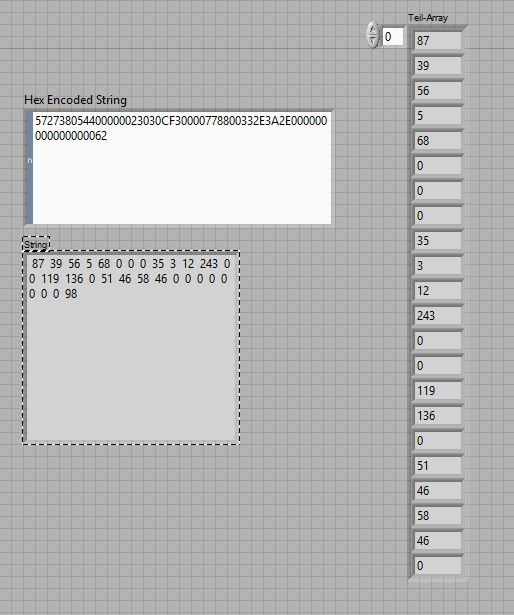

And finaly those decimals would be the Data of our satellite which would tell us about the health of the satellite
like this:
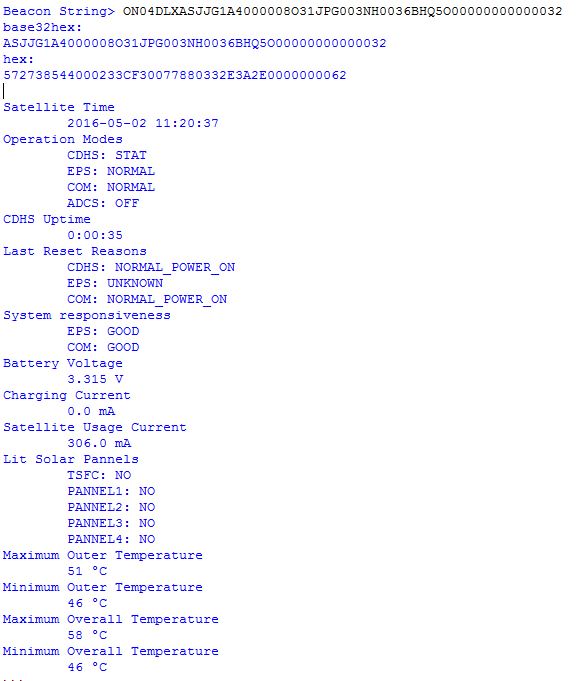
So what i really need is a peace of code in Labview that could decode from Base32Hex strings to Hex-String.
Can anybody help me to find a Base32Hex to Hex decoder or help me how i could build one in Labview because i
don't have any idea how to write such a decoder?
Greets
Sash

- Mark as Read
- Mark as New
- Bookmark
- Permalink
- Report to a Moderator
I added the Base32Hex conversion VIs to the document above.
Christian L, CLA
Systems Engineering Manager - Automotive and Transportation
NI - Austin, TX
- Mark as Read
- Mark as New
- Bookmark
- Permalink
- Report to a Moderator
Dear Christian_L
A:W:E:S:O:M:E !!!!!!!
Thank you verry much, you saved me a lot of time
Greets from germany
Sacha
- Mark as Read
- Mark as New
- Bookmark
- Permalink
- Report to a Moderator
Glad to help out students and space research. I'm originally from Germany myself, and worked at the NI office in Aachen for a year about 15 years ago.
Christian L, CLA
Systems Engineering Manager - Automotive and Transportation
NI - Austin, TX
- Mark as Read
- Mark as New
- Bookmark
- Permalink
- Report to a Moderator
Hi Christian,
Yes you did,in any case! Not only for our team, but also for the amateur radio comunity. Besides of the main mission control client, i will build a small App that translates the beacon and housekeeping text (CW already decoded by FLDIGI or the like) that shows the data in a nice fashion which will be offered for download from within our website and also here.
As a little thank you, i leave a video about some aspects of our Mission control client (it's in french unfortunately):
https://www.youtube.com/watch?v=DbXR5xjWykA
And an interview i gave for a TV-show at ARTE, there you will see an older version of the client of our former satellite project (WREN) in action:
http://future.arte.tv/de/gesichter-der-zukunft/der-satellitenbauer
Cheers,
Sash
- Mark as Read
- Mark as New
- Bookmark
- Permalink
- Report to a Moderator
Reading through the rest of your original comment, I realized that the human readable form of the data (byte array), is one of the intermediary steps in my code before getting to the ASCII and Hex output. I updated the attached Base32Hex conversion VI to also output the byte array which will save you the step of converting from Hex to Byte array.
Christian L, CLA
Systems Engineering Manager - Automotive and Transportation
NI - Austin, TX

- Mark as Read
- Mark as New
- Bookmark
- Permalink
- Report to a Moderator
Thanks alot ! Working superb :D.

- Mark as Read
- Mark as New
- Bookmark
- Permalink
- Report to a Moderator
Thanks for sharing code.


