- Subscribe to RSS Feed
- Mark Topic as New
- Mark Topic as Read
- Float this Topic for Current User
- Bookmark
- Subscribe
- Mute
- Printer Friendly Page
Interfacing Arduino Nano with LabVIEW

 gaurav_sharma
04-18-2012 07:48 AM
- Mark as New
- Bookmark
- Subscribe
- Mute
- Subscribe to RSS Feed
- Permalink
- Report to a Moderator
Hello guys
I'm testing LabVIEW 2010 interface of arduino with nano ver3.0
Program I made is of simple making led on/off. But even for simple task like led on/off the program taking about 5 sec (too much). I'm attaching this vi (Digital Write). Same applicable for analog read.
Is it same for Uno or Mega ?
Or I'm doing something wrong ?
Please help !!
Thanks and Regards

 rgpadin
04-24-2012 12:46 PM
- Mark as New
- Bookmark
- Subscribe
- Mute
- Subscribe to RSS Feed
- Permalink
- Report to a Moderator
Hi!
I have an Arduino Nano v3.0, I tried your code, but I had some errors.
I changue few things in your program and I solved it.
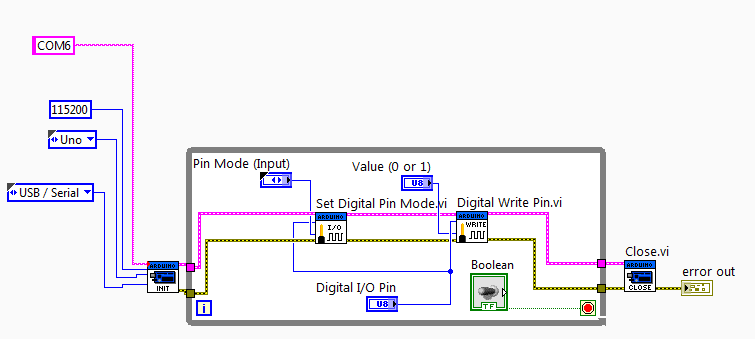
Try with this program, changue the name of the serial port that your arduino is using, in my case it was the COM6.
I hope this solve your problem!
Cheers!
04-24-2012 06:34 PM
- Mark as New
- Bookmark
- Subscribe
- Mute
- Subscribe to RSS Feed
- Permalink
- Report to a Moderator
Hi. Thanks for replying.
Its working on your nano. Its good.
As on now my Arduino nano got some problem. I'm trying to fix it. As soon as it got fixed. I'll try.
 P51MUSTANG
08-15-2014 11:15 AM
- Mark as New
- Bookmark
- Subscribe
- Mute
- Subscribe to RSS Feed
- Permalink
- Report to a Moderator
I think you must be sure about you write here...i tried to do the same that you said but NANO did not work with labview.
 Nathan_B.
08-15-2014 10:09 PM
- Mark as New
- Bookmark
- Subscribe
- Mute
- Subscribe to RSS Feed
- Permalink
- Report to a Moderator
IIRC, there is a good discussion about the Arduino Nano over in the LINX forums. You might check that out if you want to interface LabVIEW with the Nano.
rgpadin
08-20-2014 07:05 PM
- Mark as New
- Bookmark
- Subscribe
- Mute
- Subscribe to RSS Feed
- Permalink
- Report to a Moderator
I'm sorry, it works few time ago.
You can check here other cases:
https://decibel.ni.com/content/message/39313#39313
https://decibel.ni.com/content/message/42282#42282
Maybe It can help you.
 HTS2020
02-25-2017 01:29 PM
- Mark as New
- Bookmark
- Subscribe
- Mute
- Subscribe to RSS Feed
- Permalink
- Report to a Moderator
 sanjeevreddy444
08-06-2017 01:42 AM
- Mark as New
- Bookmark
- Subscribe
- Mute
- Subscribe to RSS Feed
- Permalink
- Report to a Moderator
Can you please do a program for interfacing Lcd 16*2 using Arduino Nano(ATmega 328)
