PDF Report with ItextSharp
 J-M
J-M
 JÞB
02-26-2021
06:33 AM
JÞB
02-26-2021
06:33 AM
- Subscribe to RSS Feed
- Mark as New
- Mark as Read
- Bookmark
- Subscribe
- Printer Friendly Page
- Report to a Moderator
 JÞB
JÞB
Code and Documents
Attachment
Exaprom PDF 2.0
LV2009 and LV 2013 w/.net 4.0
After unzipping "Exaprom PDF2.0 (2009).ZIP" (or "Exaprom PDF2.0 (2013).ZIP"), you have a folder and a file:
1) the folder "Exaprom PDF";
2) and the file "exaprompdf.mnu".

The folder "Exaprom PDF" has to be place in:
C:\Program Files\National Instruments\LabVIEW Version\vi.lib\
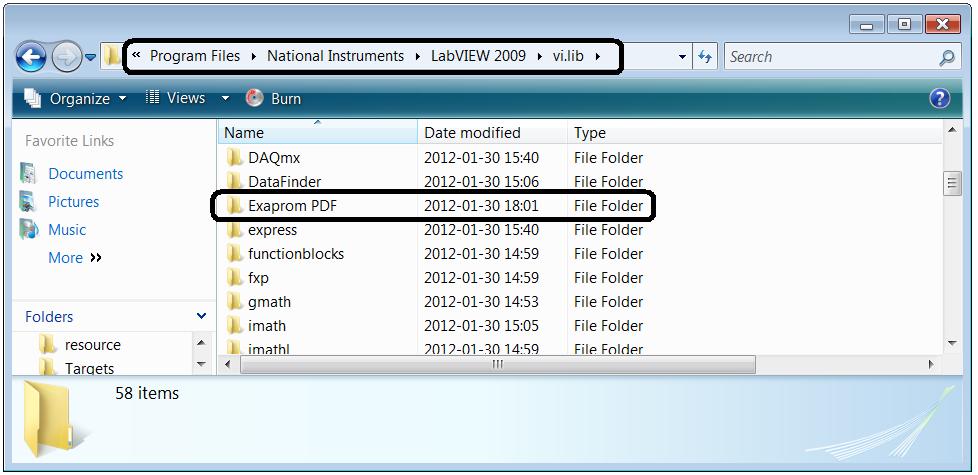
The file "exaprompdf.mnu" have to be place in:
C:\Program Files\National Instruments\LabVIEW Version\menus\Categories\Programming\

After restart LabVIEW, the palette "Exaprom PDF 2.0" will appears.

Note: Replace "Exaprom PDF\VIs\Low level\Table Low level\Create Paragraph for Cell.vi" in "Exaprom PDF2.0 (LV2013).zip" with the new "Create Paragraph for Cell.vi" (LV2013).
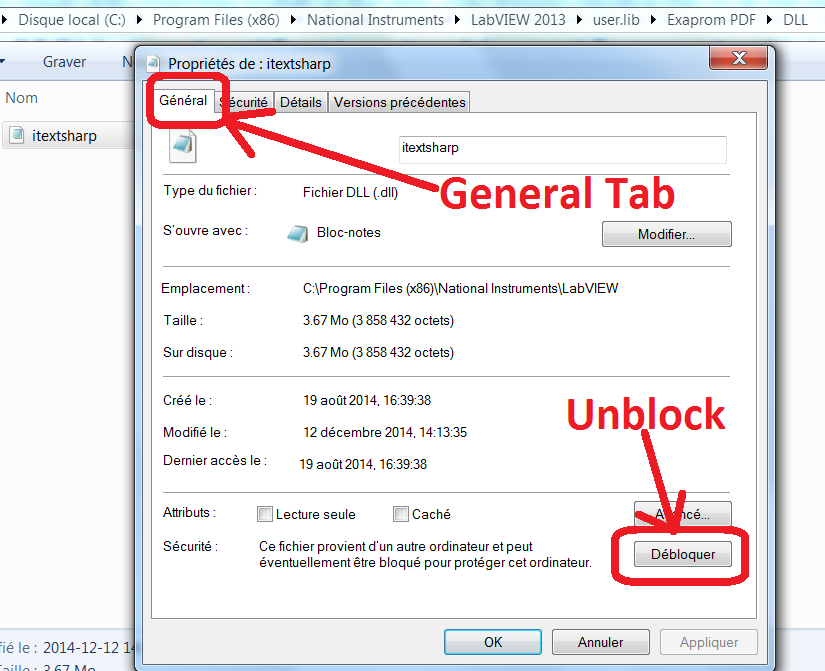
For Windows 7-64 bits with LV2013: right-click the assembly and click Unblock on the General tab to grant an assembly full trust.
Example code from the Example Code Exchange in the NI Community is licensed with the MIT license.


- Mark as Read
- Mark as New
- Bookmark
- Permalink
- Report to a Moderator
You won't be able to do this the same way you are in LabVIEW. When you get an image of a control, LabVIEW has no way of returning it with any transparency layer. The closes LabVIEW has is a mask which can ignore pixels, which can be seen as a way of setting opacity to 0 or 100%.
What you will probably want to do is take the image of your front panel using the VI Server call to the invoke node Front Panel >> Get Image, then crop the image to the part of the front panel you want, then insert that image into the PDF instead of trying to insert the two controls.
Unofficial Forum Rules and Guidelines
Get going with G! - LabVIEW Wiki.
17 Part Blog on Automotive CAN bus. - Hooovahh - LabVIEW Overlord


- Mark as Read
- Mark as New
- Bookmark
- Permalink
- Report to a Moderator
I think you're right, because when i get image of "transparent" XY Graph with cursors, it has white background, not transparent.
Ok then how to crop the image using LabVIEW?
- Mark as Read
- Mark as New
- Bookmark
- Permalink
- Report to a Moderator
Ok then how to crop the image using LabVIEW?
Solved.


- Mark as Read
- Mark as New
- Bookmark
- Permalink
- Report to a Moderator
hi J-M,
First, I want to thank you for sharing this very nice toolbox!
I want to place two images (or tables) side by side. What are the possible solutions?
thank you
Cedric
- Mark as Read
- Mark as New
- Bookmark
- Permalink
- Report to a Moderator
One option is you could combine the two images, and then insert the combined one. You can do this a couple of ways and it might depend on the file format. I've done something like this using .Net and the graphics tools. Then save the combined file to a temp location, then insert that one image.
Unofficial Forum Rules and Guidelines
Get going with G! - LabVIEW Wiki.
17 Part Blog on Automotive CAN bus. - Hooovahh - LabVIEW Overlord

- Mark as Read
- Mark as New
- Bookmark
- Permalink
- Report to a Moderator
You could place the two images in a table of one row and two columns.
You could also use Right or Left (TextWrap) to place two images side by side. The downside is: you couldn't use the automatic numbering for legend (works only for centered image).
For two tables, the only way i see is to use one table to mimic two tables.

- Mark as Read
- Mark as New
- Bookmark
- Permalink
- Report to a Moderator
Salut J-M,
For weeks, I've been trying hard to do, with LabView built-in tools only, what I was able to do in less than one day with this toolkit : save a report in PDF with specific parameters (landscape mode, head/foot page, number of pages,...).
Plus, it's 100 % free !
Que de temps perdu avant de découvrir cette merveille !!!
Kudos to you guys.
Merci infiniment.
Sincèrement vôtre.
- Mark as Read
- Mark as New
- Bookmark
- Permalink
- Report to a Moderator
Je vous en prie.


- Mark as Read
- Mark as New
- Bookmark
- Permalink
- Report to a Moderator
Seems a very nice toolset. However I have difficulties installing it in LabVIEW 2015.
When installing Exaprom PDF2.0 (LV2013).zip according to the procedure I get all the vi's in the programming pallette, but when I try a simple vi to make a pdf, an error occurs and it seems a .NET related issue.
When viewing the .NET Assemblies in Memory, it is stated that "LabVIEW is using CLR version 4.0.30319.42000 to load .NET assemblies".
Then I saw you also have a .NET 4.0 version  . However, when installing this, in the same manner as the other version, things don't go smoothly: a) LabVIEW somehow now expects a lot of vis in the user.lib in stead of vi.lib and b) at least the footer header vi has errors and refuses to run
  .
.
What is the correct installing procedure when using .NET 4 (assuming .NET is the culprit)?
- Mark as Read
- Mark as New
- Bookmark
- Permalink
- Report to a Moderator
What is your configuration?
I have no problem with:
- LabVIEW 2015
- Windows 7 Entreprise
- .NET framework 4.5.2

- Mark as Read
- Mark as New
- Bookmark
- Permalink
- Report to a Moderator
Hi J.M,
I have 3 questions:
1- If I could append vectorial image file .EMF?. You told me I only could use wmf file, and it works. But i cant save the image in wmf in labview. I can only emf. Do you know any way to save images on wmf format or can you add to the exaprom the option to append emf files?. EMF files is supported by labview in export image.
I put one threat:
http://forums.ni.com/t5/LabVIEW/save-image-like-WMF/m-p/3314069/highlight/false#M970593
2- I would like to write text with part of phrase in bold stye. Like " the current time is : 15'11" is it possible without use table?.
3- I added 1 line split in 2 parts and no start from the sides. I want it starts 10mm from left and later finish at middle and later put another line. I can alighment in center and put 96% width, in this way it fix very good in both extremes but I cant split in 2 lines. If I use 1 line from left and 35% and another from right and 60% they show ok in two parts, but start in the extremes from the begining.
I hope you can understand me.


- Mark as Read
- Mark as New
- Bookmark
- Permalink
- Report to a Moderator
Someone previously asked about printing multiple copies with "Print PDF.vi", and you said "You could just repeat "PrintAll" for the number of copy you want."
We've tried that, and to print small PDFs to a label printer it was far too slow due to a programmed delay inside that VI. Shortening that delay caused missed copies.
Do you know of any better solution to print multiple copies as fast as the printer can put them out? It's too bad that the AcroPDFLib contains no method that includes a way to specify number of copies. And it's amazing that a basic need like this is so difficult to figure out a reasonable way of accomplishing. I've been back and forth with Microsoft on seemingly-missing ways of programmatically specifying print settings, preferences and parameters through .NET. It gets really frustrating sometimes.

- Mark as Read
- Mark as New
- Bookmark
- Permalink
- Report to a Moderator
Hello everybody,
thank you for sharing this great piece of code. I would like to use this this toolkit in my project.
I wrote the code and the output is good (PDF has both text and tables and control images etc...)
But I am experimenting unpredictable access violations in the built application (Exception - Access Violation - 0xC0000005).
Exceptions occurs only when I enter the page of my program that contains the VI for PDF generation. They are random and don't occur every time I enter the page, but occasionally (I don't need to invoke the PDF VI, simply I have to load it by opening the page). If I disable this VI and I recompile the exe, these access violations disappear.
What can I do to avoid this?
Thank you in advance
Alberto

- Mark as Read
- Mark as New
- Bookmark
- Permalink
- Report to a Moderator
Thank you so much for sharing the very well developed library! It helped me significantly!
- Mark as Read
- Mark as New
- Bookmark
- Permalink
- Report to a Moderator
Minor bug, in "VIs\Low level\File Low level\Generate Permissions Integer.vi" The unbundle by name has Allow Assembly listed for 1024, and 256, but the 256 should be Allow Fill In.
Unofficial Forum Rules and Guidelines
Get going with G! - LabVIEW Wiki.
17 Part Blog on Automotive CAN bus. - Hooovahh - LabVIEW Overlord

- Mark as Read
- Mark as New
- Bookmark
- Permalink
- Report to a Moderator
Hi there,
Just to let you know that if you download the library and run a Mass compile, it gives many errors.
Please can you clean old vi's and unused ones from the library so no compilation error occurs!
Regards,

- Mark as Read
- Mark as New
- Bookmark
- Permalink
- Report to a Moderator
Hi Jean-Marc & all,
firstly, thank you for Exaprom, it has save me a lot of time and effort and will make my project deployment simpler by removing Word as a requirement to get an acceptable report.
Yesterday I was writing a vi to create a report of all the vis in my project, it includes all the subpanels so runs to a couple of hundred pages. I thought a TOC would be helpful in this situation so added one, then I noticed something that I also noticed in the Exaprom manual, the page numbers are in the wrong place within the TOC. Instead of being at the end of the dotted line separator they are at the start just after the bookmark name (see attached image - examples circled in red).
I tried for a while to fix the Exaprom code concerned but wasn't successful, I assumed the issues lies in \Low level\Chapter Low Level\Create TOC Line.vi
If anyone knows of a fix I'd be grateful to hear it. Many thanks.
SimonG

- Mark as Read
- Mark as New
- Bookmark
- Permalink
- Report to a Moderator
Hola, necesito de su ayuda, tengo el siguiente error que solo se genera al hacer un ejecutable error 1172, adjunto imagen para saber si alguien lo a resuelto, muchas gracias
- Mark as Read
- Mark as New
- Bookmark
- Permalink
- Report to a Moderator
hola, busque y encontre el problema en especifico, y es que el nodo constructor hay que usar FileStream: mscorlib(2.0.0.0) pero labview 2017 no me deja usar FileStream: mscorlib(2.0.0.0), solo me deja usar FileStream: mscorlib(4.0.0.0) y eso produce el error.

- Mark as Read
- Mark as New
- Bookmark
- Permalink
- Report to a Moderator
Hello fellows,
is there a version of Exaprom that inherits the function to VMerge cells of a table? I've seen that there is the function called Rowspan, but I guess it will not be easy to implement this without hugh amount of work and testing.
Greetz,
Eydrian
- Mark as Read
- Mark as New
- Bookmark
- Permalink
- Report to a Moderator
Hi,
I've been using Exaprom tool since years in different project with almost no problems.
In a recent project I've found that, if the PDF is created using a windows user account (in this example "pippo") and then the PDF is opened with a different account without admin rights (let's call "pluto") the PDF file opening in a reader e.g. Acrobat, fails due to the fact that the user hasn't got right to open the file. Looking at the file security properties:
is visible that the PDF creator has set the security option only for logged user, in this example "pippo" so when "pluto" or any other user without admin rights tries to open the file the operation fails.
I cannot say that the generation of PDF file is somehow wrong, but for example CSV data saved by the same user in the same program (LabVIEW executable) have also read/write rights for "Authenticated users", so this problem doesn't occur.
Any way to avoid this behaviour?
Many thanks


- Mark as Read
- Mark as New
- Bookmark
- Permalink
- Report to a Moderator
Hey J-M,
thanks for all your work on this great tool!
If ever you build a new version, it might be helpful to pack it into a .lvlib to prevent name space issues. I just ran into such a name space issue as I have a vi on a project with a same very generic name "Color.vi" as one of the vis in the Exaprom pdf tool.

- Mark as Read
- Mark as New
- Bookmark
- Permalink
- Report to a Moderator
This would work great for what I am trying to accomplish if it weren't for one thing.
My company publishes documents as secured PDF documents with form filling enabled. So, using Adobe Reader, I can open the file, fill out the form fields, and then save as a new file name.
I'd love to automate this so my Labview application can complete the document, but trying to access a protected PDF without the admin password (which I do not have access to) results in a BadPasswordException being thrown.
Apparently, this can be overridden by setting PdfReader.unethicalreading = true; but I don't think that can be done within Labview?

- Mark as Read
- Mark as New
- Bookmark
- Permalink
- Report to a Moderator
This is amazing. The user manual to use the code is actually generated with the code! Brilliant!

- Mark as Read
- Mark as New
- Bookmark
- Permalink
- Report to a Moderator
Hi Jean-Marc,
Exaprom 2.0 is just great. congratulations JM.
I am facing one issue and maybe someone can help:
if I select the Hebrew keyboard in windows, start Labview, I can write hebrew in a string control, no problem till there.
I'd like to have that same text (hebrew) in my pdf output but it doesn't seem to work!
I have read the manual but it didn't help me to figure out how it could or if it could work.
Any help, example, hint, solution is welcome!

- Mark as Read
- Mark as New
- Bookmark
- Permalink
- Report to a Moderator
Hi
Great Tool, but it would not be bad if a dialog could be activated during PDF printing.
For this reason, I have the printing VI a bit tight, maybe you could take that into the library.
- Mark as Read
- Mark as New
- Bookmark
- Permalink
- Report to a Moderator
Hi
Does anybody knows what this error means?

- Mark as Read
- Mark as New
- Bookmark
- Permalink
- Report to a Moderator
Great Tool, really like it.
I have one question regarding tables, how to align text inside table cells to left?
Probably it is stupid question but in half hour I try all options that I found and no result, text is always centered in table.

- Mark as Read
- Mark as New
- Bookmark
- Permalink
- Report to a Moderator
I'm working on labview 2013 32-bit (Windows 7 - 64 bit) and i am using Exaprom PDF 2.0. I have a issue with closing pdf function. When we create or replace a file then generated pdf file shows the below error message
"there was an error opening this document.the file is damaged and could not be repaired".
I have try in another laptop but problem is still there.
Here i have attached two images with the generated error.
Please provide solution for this.
Error from Exaprom pdf close function
Generated pdf file error from Exaprom pdf 2.0

- Mark as Read
- Mark as New
- Bookmark
- Permalink
- Report to a Moderator
Dear J-M,
how to print Chinese characters? I set the font to SimSun Regular and character encoding to UTF-16, kept Encoding=CP1252, but nothing on output file. Later i tried to print string "ab你好cd", only got "ab" and "cd", the two characters "你好" are disappeared.
thanks

- Mark as Read
- Mark as New
- Bookmark
- Permalink
- Report to a Moderator
Dear Jean-Marc,
I work on labview 2014 32-bit (Windows 7 - 64 bit) with Exaprom PDF 2.0.
I cannot figure out how to do vertical merging cells in the table. I looked through the VIs and didn't find the VMerge field is used. Does the VMerge work?
Can you help me?

- Mark as Read
- Mark as New
- Bookmark
- Permalink
- Report to a Moderator
It seems that this thread, and Jean-Marc's pdf writer project has been dormant for some time. I had a recent need for a library like this, but found some compatibility problems between the library with newer versions of LabView.
So, here is my small contribution to further this project. I basically moved the install directory to user.lib, eliminating the need to place the .mnu file in a separate directory. Also, I recompiled the itextsharp 4.1.6 dll for anyCPU, allowing it to be used in both 32 bit and 64 bit projects. Tested on Labview 2019, 32 bit and 64 bit.
You can find the updated source on github here:

- Mark as Read
- Mark as New
- Bookmark
- Permalink
- Report to a Moderator
Why can't I generate headers and footers?

- Mark as Read
- Mark as New
- Bookmark
- Permalink
- Report to a Moderator
Is this compatible with labview 2024?
- « Previous
-
- 1
- 2
- Next »


