Overview
This example shows how to sort a multicolumn listbox by simply clicking the column header. These are modifications of code written by user LaRisa_S (Her code is located here: MCL Sorting).
Description
This example is designed to allow the user to sort a multicolumn listbox by any of the columns just by clicking the header. The main VI uses the subVI to sort the multicolumn listbox. As seen in the main VI, to use this, the user will drop the MCL Sort By Column.vi on to the block diagram, and use an event structure to fire on the event of the user's mouse coming up while on the listbox. The MCL Sort By Column.vi will receive a reference to the listbox, and will then sort the elements either ascending or descending (based on the last click).
Requirements
- LabVIEW Base Development System 2012 (or compatible)
Steps to Implement or Execute Code
- Unzip the attached folder to your computer
- Open the VI "Multicolumn Listbox Sort 2012 NIVerified.vi"
- Run the program
Additional Information or References
VI Front Panel
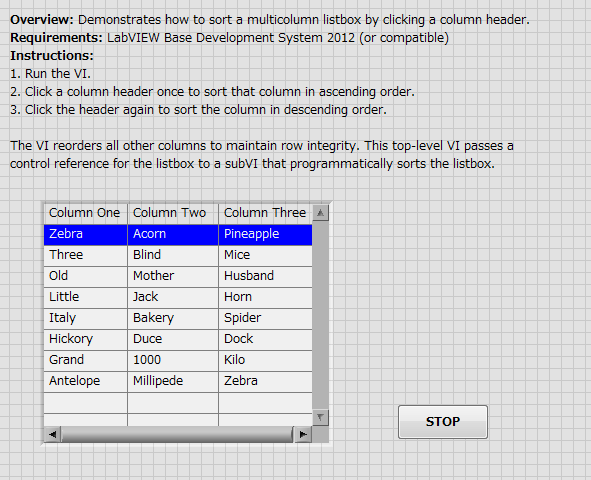 Multicolumn Listbox Sort 2012 NIVerified Front Panel.png
VI Block Diagram
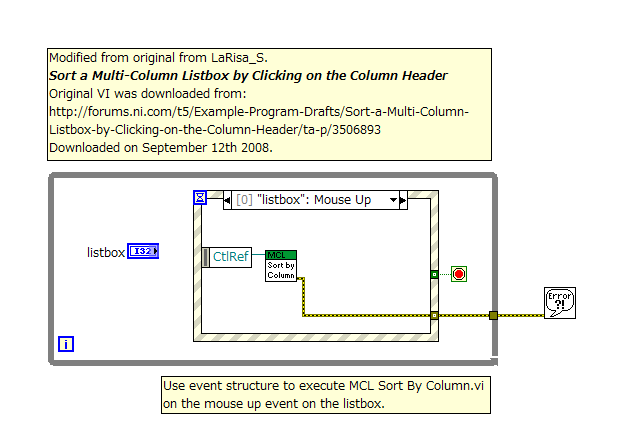 Multicolumn Listbox Sort 2012 NIVerified Block Diagram.png
**This document has been updated to meet the current required format for the NI Code Exchange.**


 ?
? .
.

