VLC scripting in LabVIEW
 GriffinRU
 GriffinRU
01-30-2017
09:19 AM
GriffinRU
01-30-2017
09:19 AM
- Subscribe to RSS Feed
- Mark as New
- Mark as Read
- Bookmark
- Subscribe
- Printer Friendly Page
- Report to a Moderator
Code and Documents
Attachment
VLC media control's ActiveX (while great under Internet Explorer) crashes LabVIEW upon insertion (LabVIEW Vers. 09/10/11/12 - R&D - any ideas why?), and functionality is limited due to security attributes applied to ActiveX itself. With examples below much more advanced features can be accessed and utilized while building interface in LabVIEW enviroment.
Requires VLC media player installed. No Error check provided if VLC not installed
Tested under Windows XP/VISTA/7 32bit and 64bit
Get Program Location (path).vi was created to simplify integration into 32-64 bit systems, other methods can be used or constants can be wired instead.
Supports:
- Video/Audio file playback
- IP cameras stream playback
- DirectShow playback
- Video/Audio streaming
- Video/Audio encoding/decoding
- see more details on VideoLAN forums and documentations
VLC media player can be used with command prompt (.NET implementation):
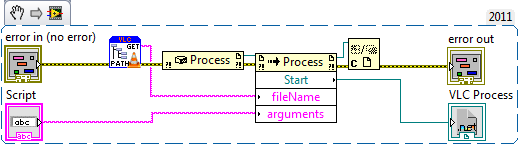
Process refnum can be used to control VLC application, i.e. proper closing (close main or kill process methods)
Note: --drawable-hwnd command from command prompt doesn't work properly, VLC media player end up creating it's own Direct3D output window. Tryied to create non-LabVIEW generated windows over API/DOTNET/VB scripting with no success. (with or without WS_CHILD and WS_CLIPSIBLINGS flags).
Or over DLL (example where VLC embedded into LabVIEW window):
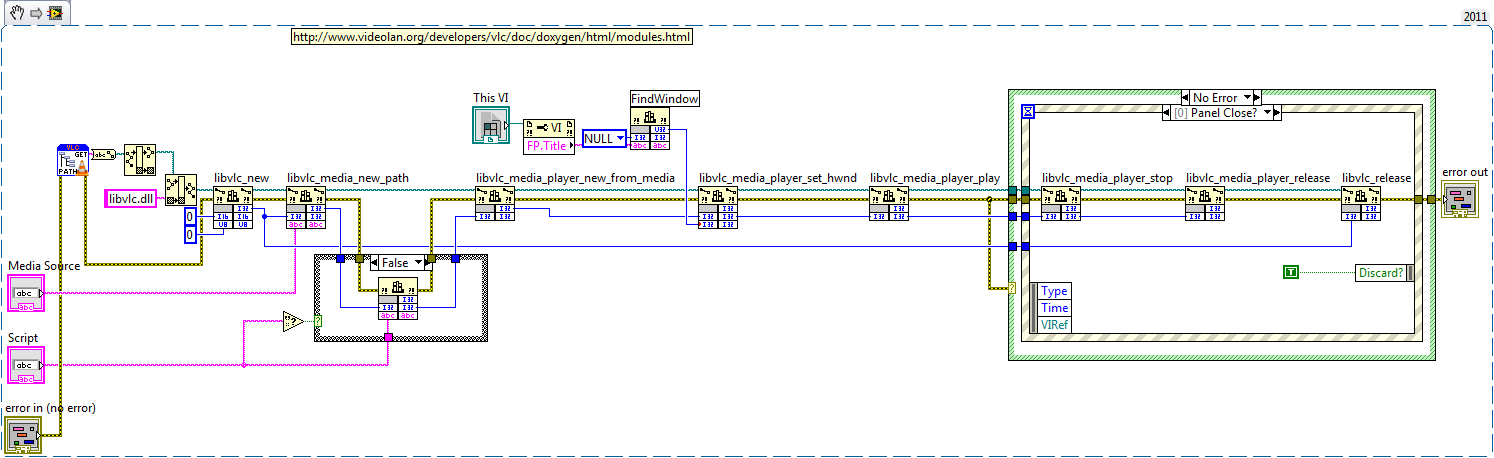
Check for tipstrips...
Update: 8/19/2013
VLC - Fullscreen.vi - example how to pass options to VLC media player and fullscreen option.
Update: 7/30/2014
VLC - Convert Video to mp4.vi - example how to convert video file for Iphone/IPad playback (Web hosting)
Update: 8/19/2014
VLC - Play Stream&Snapshot.vi
Update: 9/03/2014
VLC - Save Stream.vi - save video stamp with text and logo
Note: snapshot function doesn't work...https://forum.videolan.org/viewtopic.php?f=14&t=104610
One of the solutions can be to use 'scene" filter instead...
Update: 08/31/2015
VLC - Play Stream&Snapshot&speed.vi
-Artur
Example code from the Example Code Exchange in the NI Community is licensed with the MIT license.


- Mark as Read
- Mark as New
- Bookmark
- Permalink
- Report to a Moderator
Many thanks for this - Based on your VIs I was able to capture an image using VLC.

- Mark as Read
- Mark as New
- Bookmark
- Permalink
- Report to a Moderator
Hi,
Thank you for comments,
Let me know if you need further help, there are some tricks in acquiring codecs information and data streams statistics as well as capturing video and taking snapshots at the same time.
I was planning to create extended library but found some performance issues with directshow devices (working progress).
-Artur


- Mark as Read
- Mark as New
- Bookmark
- Permalink
- Report to a Moderator
This is a very important idea for me. I've been looking to embed VLC into a labview application. However, I cannot get your VI to run. It asks me tof the libvlc.dll, which I point to in the VLC directory. However the program will not run, giving me the error "Call Library Function Node 'libvlc.dll:libvlc_media_add_option': Library not found or failed to load".
Ideas?
- Mark as Read
- Mark as New
- Bookmark
- Permalink
- Report to a Moderator
This example was tested with VLC v. 2.0.3 and should be compatible with later versions. Which VLC version installed on your system?
In provided example, required DLL location should be extracted from Windows registry, you do not need to point directly, unless you really want.
If DLL not found this example would fail to operate, check VLC version, installation, DLL location and try again.
-Artur
- Mark as Read
- Mark as New
- Bookmark
- Permalink
- Report to a Moderator
Wow, I did not really expect a reply, let alone one so quickly. Kudos.
I am using VLC 2.0.4. I thought it was odd it wanted me to point to it. The .dll is obviously in the same directory as VLC. I will try to reinstall.
Thanks again.
- Mark as Read
- Mark as New
- Bookmark
- Permalink
- Report to a Moderator
I tried it on another machine, it asked me to point to the .dll just the same, but this time when I pointed to it, the program worked.
Is the program suppose to make the entire front panel the VLC video playing? If so, I'm going to attempt to alter the code to make it an embedded window within the front panel, so other things can be viewed at the same time as an IP stream. Do you have any advice on how to do this? I have also been working with other labview applications that do this very thing in Google Earth and it is very impressive.
- Mark as Read
- Mark as New
- Bookmark
- Permalink
- Report to a Moderator
Ok, you probably need to tweak your system or my example a little bit and you will be fine.
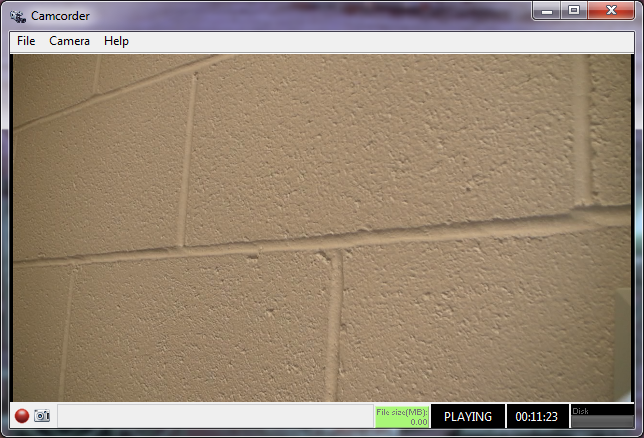
And, yes in provided example VLC would use entire front panel for video display. You have plenty options here, you can create floating windows, you can place ActiveX or Dotnet object and pass window handle, you can split front panel...
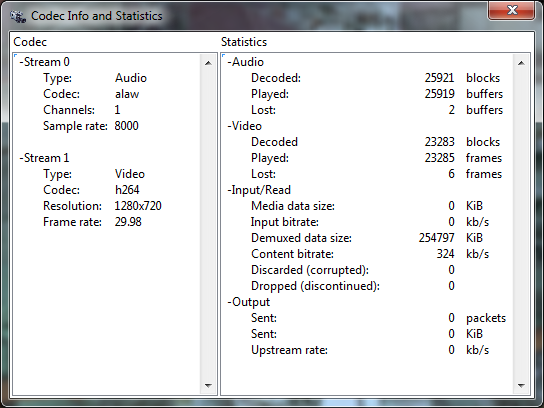
Stats window:
-Artur
- Mark as Read
- Mark as New
- Bookmark
- Permalink
- Report to a Moderator
Hi,
As previously mentioned I am using a modified version of the VLC Embedded VI you prodivded to capture images from a live stream.
Sometimes I have issues with the following calls hanging and hnece the VI hangs..
- libvlc_media_player_stop
- libvlc_media_player_release
Have you ever expereince this?
Thanks & Regards,
Don1.
- Mark as Read
- Mark as New
- Bookmark
- Permalink
- Report to a Moderator
Hi Don,
I do not have problems with "stop" and "release" commands, in my application I check VLC status every second by running libvlc_media_player_get_time, libvlc_media_player_get_state and libvlc_media_get_tracks_info and if "state" returns bad I just execute libvlc_media_player_release and libvlc_release. It should be alright to execute "player release" only and reconnect, but I had some problems with VLC in the past, so now I only reconnect to live streams from scratch.
With Regards,
-Artur
P.S. How you capture images, with libvlc_video_take_snapshot?
Does it executes properly, any file use violation?
- Mark as Read
- Mark as New
- Bookmark
- Permalink
- Report to a Moderator
HI Artur,
Thanks for the fast reply.
Yes for capturing an image I am using libvlc_video_take_snapshot (use libvlc_video_get_width & libvlc_video_get_height to get the width/height inputs for libvlc_video_take_snapshot). This seems to execute fine - no issues that I have noticed with it yet.
I will add in addin some extra checks as you have done to make sure the state of VLC is still ok - it may be that I am trying to take a snap shot when the feed is lost/not available and this is messing things up for the cleanup stage (libvlc_media_player_release and libvlc_release)??
Thanks for all the help!
Regards,
Shane.

- Mark as Read
- Mark as New
- Bookmark
- Permalink
- Report to a Moderator
Hi Arthur,
Thanks for these great VIs! Could you tell me how to insert the video inside an activex container?
thanks again for your contribution!
- Mark as Read
- Mark as New
- Bookmark
- Permalink
- Report to a Moderator
Get window handle from activeX control and pass it instead of LabVIEW window handle.
Do you have particular ActiveX in mind?
Some ActiveX controls might not have this property available (can be windowless), so you need to find the way how to get it programmatically, or overlay video as a backup plan.
-Artur
- Mark as Read
- Mark as New
- Bookmark
- Permalink
- Report to a Moderator
Hi Arthur,
So in your .NET example it opens a new VLC player. Am I correct in saying I should then be able to make calls to the DLL to create/play a new media source and then pipe the video to the open VLC player (from .NET). I couldn't seem to get this to work with the libvlc_media_player_set_hwnd command.
The problem I am having is sometimes my video stream dies and LabVIEW hangs when I initiate a media release. So I was hoping to move to process refnum implementation as you suggested for proper closing/killing. i am able to open my video stream via the command/.NET implemenation.
How would I go about taking video snap shots from here - Is it possible to take this VLC process/pass it to DLL/libvlc_video_take_snapshot function to take my snapshot..??
Have you an examples of using VLC with command prompt??
Many thanks,
Shane.
- Mark as Read
- Mark as New
- Bookmark
- Permalink
- Report to a Moderator
Hi Shane,
I have two examples (3rd just a subversion of embed. version) one where I call VLC player via command prompt script and another one calling VLC's DLL directly.
Example with command prompt is somewhat limited, due to the fact that you can only pass parameters at launch only. To extract more functionality from running VLC Media Player (picture snap, record...) you need to use built-in VLC interfaces or hack into VLC's window.
Example with direct DLL call has more flexibility, and yes it allows you to create media/players and such as if you are running from within VLC itself. I think this method should be prefered, but feel free to attach your implementation, maybe it is something easy to fix.
I do not think it is possible to link VLC Media Player and libvlc.dll instance of player, but I do not know for sure, maybe a good question to ask on VLC forums, they are pretty knowledgeable and friendly.
-Artur
P.S. In command prompt version, you can use VLC Media Player shortcuts (keystrokes) to execute popular functions, just need to make sure that VLC Media Player most top window and generate keystroke.
- Mark as Read
- Mark as New
- Bookmark
- Permalink
- Report to a Moderator
Hi Arthur,
Thanks for the extra info and your offer to review my code!!
Can I attach to this thread or just send you a private email with the attachment??
Thanks,
Shane.
- Mark as Read
- Mark as New
- Bookmark
- Permalink
- Report to a Moderator
Hi Arthur,
I uploaded my code to a new post (.zip file). I think you should get an email to this effect.
https://decibel.ni.com/content/docs/DOC-26397
Any help appreciated!
Thanks,
Shane.
- Mark as Read
- Mark as New
- Bookmark
- Permalink
- Report to a Moderator
- Mark as Read
- Mark as New
- Bookmark
- Permalink
- Report to a Moderator
Hi,
Downcoverted to 2011 - let me know if you have any issues with it!
Thanks again!
Shane.
- Mark as Read
- Mark as New
- Bookmark
- Permalink
- Report to a Moderator
Hi Shane,
Mods to your code:
- Moved Delay into "Media Player Get State. - You would like to sleep while in "Get State" only and response ASAP in other cases
- Disabled "Media Release" on stop. - Media need to be released earlier, right after creating Media Player (VLC docs). You can actually create Media Player from Media...
- After "Media Player from Media" -> "Media Release" - > "Play Media Player" to reflect comment above
Run couple times without problems.
-Artur
- Mark as Read
- Mark as New
- Bookmark
- Permalink
- Report to a Moderator
Hi Artur,
Thanks for taking the time to review my code and suggest mods. I will make the changes as suggested and let you know how I get on - It will be tomorrow before I can test it hangs when stopping the player after the video stream has died.
Thanks & Regards,
Shane.
- Mark as Read
- Mark as New
- Bookmark
- Permalink
- Report to a Moderator
- Mark as Read
- Mark as New
- Bookmark
- Permalink
- Report to a Moderator
Hi Artur,
I tired the new mods and again everything runs fine until I loose the video stream.
Here is my test case.
1. Run VI with active video stream - take picture and stop functions work as expected - PASS
2. Run VI with active video stream, then disconnect video - initiating a stop call hangs VI. When I reconnect the video stream the stop function completes execution as expected..
Any thoughts/ideas on how to fix the issue I am seeing with test case 2.
Many thanks!
Shane.
- Mark as Read
- Mark as New
- Bookmark
- Permalink
- Report to a Moderator
Hi Shane,
I am sorry, I miss understood you earlier...
Looks like you are correct if stream breakes VLC is not happy about it. It even fails to admit over state feedback (which executes without hanging, upon disconnect).
I was able to stop LabVIEW execution properly without hanging by following:
- move 25ms delay from state check case to running case, and wire 25ms to timeout
- in timeout case point state to state check case
- in state check case add time check (libvlc...get_time)
- if time stooped changing exit without stopping player
Now (with your code)you are going to be stuck with floating orphan window, which need to be killed or it would crash LabVIEW on following re-start. With embedded window, need to be checked, you might be able to re-claim and fix it's state.
I think it is VLC related bug, I was able to re-produce it even with VLC itself, so bad news keep your connection alive or monitor disconnect and stop VLC player before (difficult, but can be done), good news I bet it would be fixed if somebody would post this as a problem, or might someone from VLC forums has a solution.
-Artur
P.S. I am wondering if something in VLC preferences can be tuned up to resolve the issue...
I can attach sample code again if you need it, By the way previous attachement was incomlete, I guess my LabVIEW played me a little bit...
- Mark as Read
- Mark as New
- Bookmark
- Permalink
- Report to a Moderator
Hi Arthur,
Thanks for the feedback once again! Your awesome.
I can add these extra steps to my VI to close the VI correcty if the time has not changed.
As you said the floating orphan window is my big problem.
I am open to moving to an embedded windows in the LabVIEW if as you say I can reclaim/fix it's state..
I will post the bug on VLC forums and pass on the link for your interest!
Thanks,
Shane.
PS: This was the reason I was hoping to set the Video output to the VLC process open with command prompt - so I could avoid this orphan window on hang and simply kill the VLC process..
- Mark as Read
- Mark as New
- Bookmark
- Permalink
- Report to a Moderator
Sounds good,
Just in case you would like to detect camera removal event, try to catch WM_DEVICECHANGE message (x0219 d537). It can be done with Windows Message Queue routines, example provided, just add x0219...
I just don't like killing programs.
-Artur
- Mark as Read
- Mark as New
- Bookmark
- Permalink
- Report to a Moderator
Hi Artur,
I added to the following on the VLC forum - seems like a known issue where someone has tried to use WM_DEVICECHANGE to detect device removal & stop media player with no joy..
http://forum.videolan.org/viewtopic.php?f=32&t=104750
Thanks for the link to the windows message queue routines - Not something I have had to use to date so it is some great info for me!
I will keep you posted on any update from VLC forums..
Thanks,
Shane.
- Mark as Read
- Mark as New
- Bookmark
- Permalink
- Report to a Moderator
FYI - Bug submitted to VLC


- Mark as Read
- Mark as New
- Bookmark
- Permalink
- Report to a Moderator
Hi all,
The code worked very well for me....
But, after i build .exe it ask for libvlccore.dll missing....
Still working on the error.
Any guesses....... ?
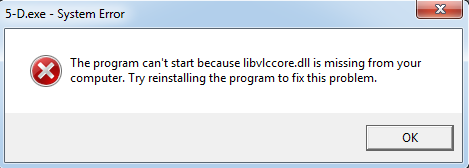
- Mark as Read
- Mark as New
- Bookmark
- Permalink
- Report to a Moderator
Hi,
I think one of your DLL's calls inside your program is set without "Specify path on diagram" option checked.
-Artur
P.S. I assume that error pops up when you trying to run executable, not when you trying to compile it...
- Mark as Read
- Mark as New
- Bookmark
- Permalink
- Report to a Moderator
Thanks fro the reply,
But i sorted it by adding libvlccore.dll in the main project but now when i call the avi on my local PC then it returns an error.
only in exe not in vi.
PFA error in execuatable & image of the code block diagram & the for your reference.
Looking forward for the quick reply.
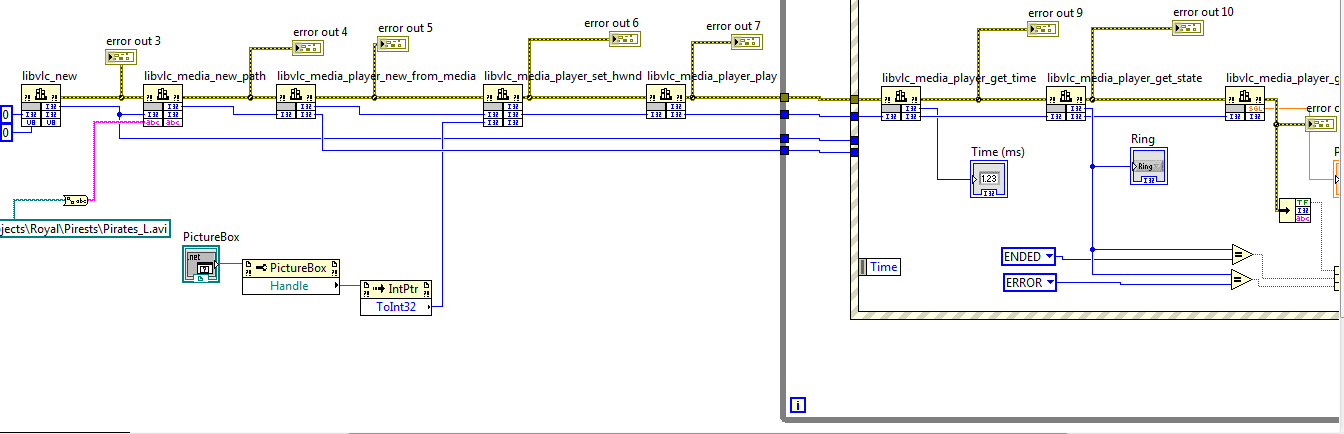
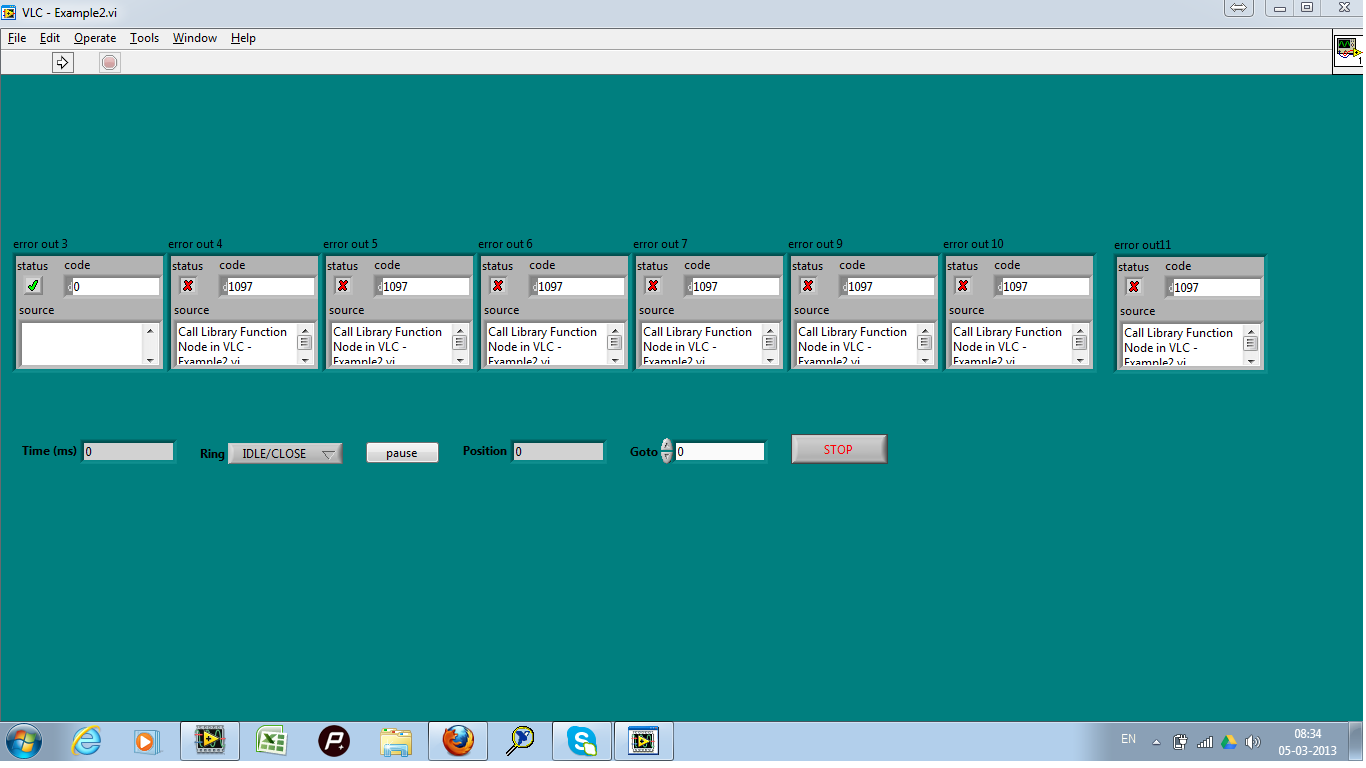
- Mark as Read
- Mark as New
- Bookmark
- Permalink
- Report to a Moderator
Use "specify path on diagram" option otherwise you will be fighting with LabVIEW compiler and keeping track of all dll's from VideoLAN folder...
-Artur
- Mark as Read
- Mark as New
- Bookmark
- Permalink
- Report to a Moderator
Success....!
A Big thanks

- Mark as Read
- Mark as New
- Bookmark
- Permalink
- Report to a Moderator
Hi, I need in playing video in fullscreen mode. I use VLC - Script Run (DOTNET).vi. How does it make in this vi?
Regards, Kvanto!
- Mark as Read
- Mark as New
- Bookmark
- Permalink
- Report to a Moderator
Thanks, GriffinRu! But I think, I need in libvlc.dll. In what LV toolkit I can find it?
- Mark as Read
- Mark as New
- Bookmark
- Permalink
- Report to a Moderator
Install VLC...
-Artur


- Mark as Read
- Mark as New
- Bookmark
- Permalink
- Report to a Moderator
I have the same problem. Can you please help me how to fix this problem? Thank you!
- Mark as Read
- Mark as New
- Bookmark
- Permalink
- Report to a Moderator
If it is related to "specify path on diagram" for which solution was idenified than what kind of problem do you have?
-Artur
- Mark as Read
- Mark as New
- Bookmark
- Permalink
- Report to a Moderator
Dear Artur,
It works fine in vi. When I built into exe, it shows 1097 error message. I done "specify path on diagram" and copy four dll files into data folder.
B/R
Ancle
- Mark as Read
- Mark as New
- Bookmark
- Permalink
- Report to a Moderator
- Mark as Read
- Mark as New
- Bookmark
- Permalink
- Report to a Moderator
Dear Artur,
When I done "specify path on diagram" and built exe again. The exe file works fine. But when I run the exe file in first time, it shows "Find the libvlc.dll" message. When I manual to point to "C:\Program Files (x86)\VideoLAN\VLC" only once. It works fine, and didn't show the message again. Can you tell me why? Thank you again.
PS. When I close exe and open exe, it shows "Find the libvlc.dll" again. I will send my project to you. Thank you!
B/R
Ancle
- Mark as Read
- Mark as New
- Bookmark
- Permalink
- Report to a Moderator
Hi,
You left (or I left...) one DLL inside true-false case under {Event "pause" value Change} without "specify path on diagram" checked. Fix that and everything would work as it should.
-Artur
- Mark as Read
- Mark as New
- Bookmark
- Permalink
- Report to a Moderator
Dear Artur,
Sorry, I left. Everything works fine. Thank you again.
B/R
Ancle
- Mark as Read
- Mark as New
- Bookmark
- Permalink
- Report to a Moderator
I have another question. I have many mov files want to play repeat. When I play first one, I have to use"libvlc_media_player_stop" to stop and play second one. If I didn't do that. The second one will play on a floating window and so on. How can I play those mov files repeat on the picturebox? Thank you!
- Mark as Read
- Mark as New
- Bookmark
- Permalink
- Report to a Moderator
Hi,
Have you tried to add mov. files to playlist and then start-stop playlist?
And instead of creating new media player (second floating window) work with existing -> start-stop-load... (But solution above as better for your case)
Overall, get familiar with VLC first and then script your steps with LabVIEW.
-Artur

- Mark as Read
- Mark as New
- Bookmark
- Permalink
- Report to a Moderator
Thanks for your complete example

- Mark as Read
- Mark as New
- Bookmark
- Permalink
- Report to a Moderator
Hi GriffinRU,
I'm able to display video stream with the help of your example.
Big thanks for that!
I'm trying to retrieve those information with labView :
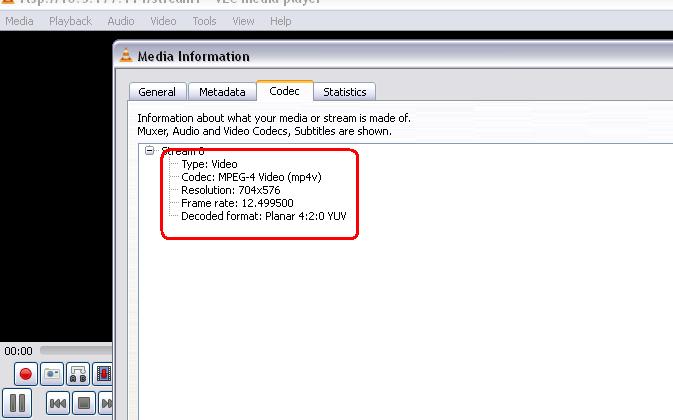
I'm not sur of how I can do that.
I tried to use "libvlc_media_get_meta" but even if it's the good function i'm lost with parameters.
Thanks for your help!
- Mark as Read
- Mark as New
- Bookmark
- Permalink
- Report to a Moderator
Thank you for positive feedback, again.
I was able to retrieve codec's information from VLC with attached vi's (VLC Codec's Lib.llb).
I'm not sure if there are other ways to acquire same properties, sometimes folks here at NI.com not happy playing with pointers, while it was working fine for my project. (And might give you some other ideas )
-Artur
- Mark as Read
- Mark as New
- Bookmark
- Permalink
- Report to a Moderator
It works perfectly! And I have a lot of new possibilities now!
Many thanks!!
- Mark as Read
- Mark as New
- Bookmark
- Permalink
- Report to a Moderator
Hi Artur
i watch this post but i also can not display the video in the Activex windows. your example looks great and this function is also what i want(To record video). So may i ask whether your example code can share to me to study it.
Thanks
Daniel
