We are trying to run a simple program in Labview to measure the power from a Thorlabs Power Meter (PM5020). We connected the power meter and laptop with the USB. There are the steps we were trying to make it work:
1) Connect the Thorlabs Power Meter with USB cable to laptop;
2) Scan the instruments via 'Driver switcher' provided by the software of PM5020, switch the instrument to NI readable driver (TLPMX). Close 'Driver Switcher' completely;
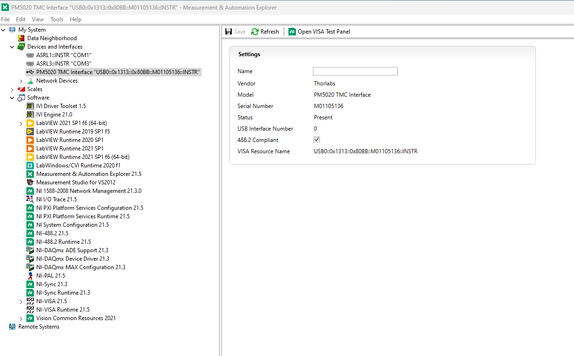
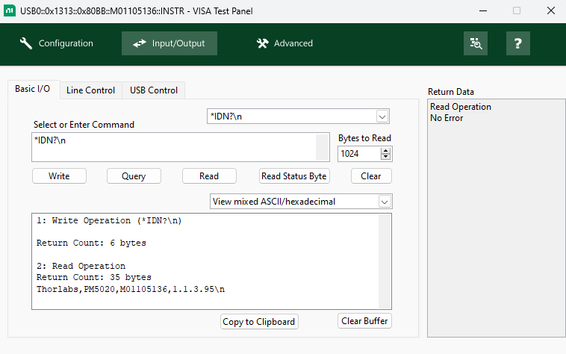
3) Open NI Max, showed blow. The PM5020 was identified and tested via VISA Test panel without error.
 Fiona_Wang_0-1733159137036.png
 Fiona_Wang_1-1733159229959.png
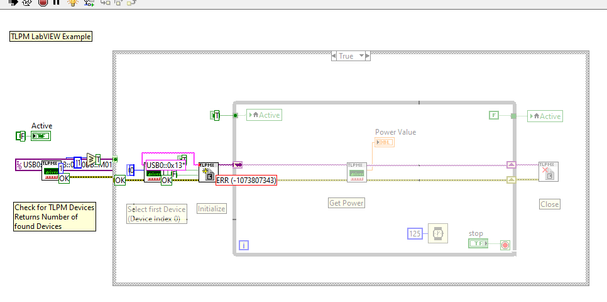
4) Run the 'measure the power.vi' project, the error occurred after initialization;
 Fiona_Wang_2-1733159326299.png
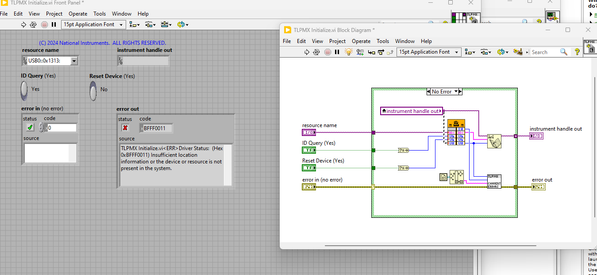
5) Then checked the 'initialization.vi', gave the error code 'BFFF0011': insufficient location information or the device or resource is not present in the system;
 Fiona_Wang_3-1733159455536.png
6) We might think one of the reason is the the Thorlabs USB devices is not under USB test and measurement devices?
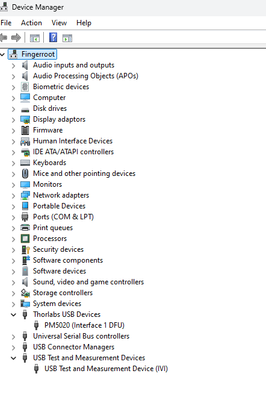 Fiona_Wang_4-1733159534054.png
I would appreciate any suggestions that people have. Thanks in advance!


