- Document History
- Subscribe to RSS Feed
- Mark as New
- Mark as Read
- Bookmark
- Subscribe
- Printer Friendly Page
- Report to a Moderator
- Subscribe to RSS Feed
- Mark as New
- Mark as Read
- Bookmark
- Subscribe
- Printer Friendly Page
- Report to a Moderator


Author: Darren (NI)
Note: This plugin is included in LabVIEW 2018 and later. You only need to download and install it from here if you are using LabVIEW 2017 or previous.
Has this ever happened to you?
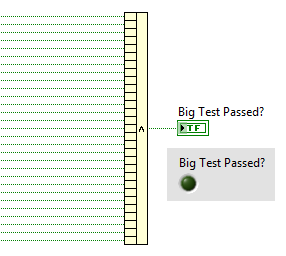
Great, my test failed, and now I need to probe every one of those wires until I find the one (or more) that is FALSE. One trick I've seen in the past is to replace the Compound Arithmetic with a Build Array then probe the Boolean array wire. But even then, you have to count the terminals to find the input that corresponds to whichever array elements are FALSE.
But now, we can use my new shortcut menu plug-in to automatically generate probes on all the Compound Arithmetic input wires, which makes it very easy to see which value(s) caused the test to fail (and double-clicking in the Probe Watch Window takes me right to the offending wire):
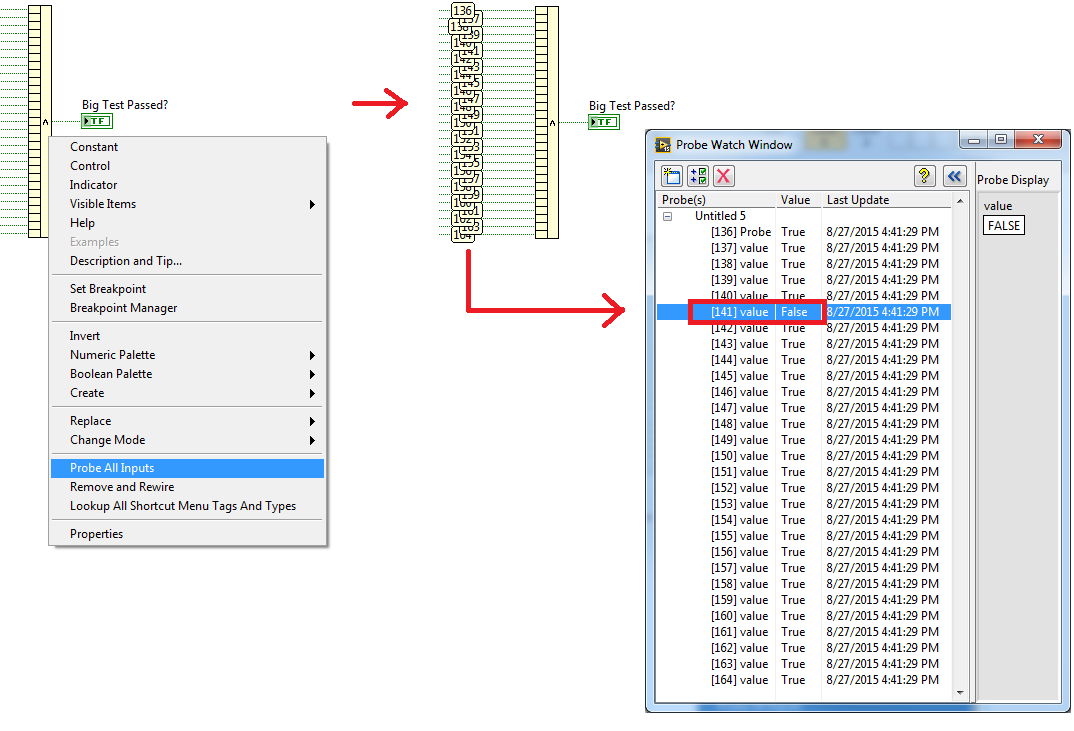
Since this functionality is useful at both edit-time and run-time, you should install this plug-in file into BOTH the edit-time and run-time directories.
Attachement is saved in LabVIEW 2015. For install instructions, go here.


- Mark as Read
- Mark as New
- Bookmark
- Permalink
- Report to a Moderator
Neat! I would use this. It is a significant step toward the Locals and Autos probes that Visual Studio creates when debugging C dialects, which are an incredibly handy and low-barrier entry-point to debugging issues.
The next level is invoking this on a diagram (or perhaps a more narrowly-scoped subdiagram) with a "probe all wires" option. Usability may get unwieldy... would have to just try.

- Mark as Read
- Mark as New
- Bookmark
- Permalink
- Report to a Moderator
Jack: Are there other nodes you would want this on? Darren and I didn't want to pollute the top-level context menu of all nodes by putting it on nodes generally. He and I also couldn't think of any other node where we had wanted this feature. At best it came up on some arithmetic nodes, but even there, it is easy to probe two wires and it didn't seem worth it to cloud the menu.
We discussed Concatentate String and Build Array, but both of us felt that those two nodes were usually easy to judge an error just by looking at the output results.
- Mark as Read
- Mark as New
- Bookmark
- Permalink
- Report to a Moderator
No, not talking about adding more nodes this shortcut would work with -- Darren's post here got my mind started wandering toward "right click on a subdiagram, then create probes on all wires within that scope".
I'm actually thinking more along the lines of how Autos and Locals work when single-stepping into a C function in Visual Studio.
Here, probes are "automatically created" for you for all variables within the scope, and it doesn't even take a developer-action to see what are probably relevant/important fields of interest.
It's not perfect, but it's a low-barrier way to hit a lot of use cases debugging, and then developer action can then hone in on new types of probes.
The "automatic creation" would not happen using these Shortcut Menu Plugins for LabVIEW, but you could create a plugin that "create probe for all wires" when right-clicking on empty subdiagram space.
- Mark as Read
- Mark as New
- Bookmark
- Permalink
- Report to a Moderator
By "subdiagram" you mean structure node? You can't click on a diagram... that brings up the palettes.
> but you could create a plugin that "create probe for
> all wires" when right-clicking on empty subdiagram space.
No, you can't. Empty space is the palettes.
Assuming you mean structure... the idea has some merit, but low in my opinion. The scope of "autos" in Visual Studio is just your current line of execution. It updates as you single step. And I've never found Locals to be useful... too much noise for a list view, IMHO.

