- Subscribe to RSS Feed
- Mark Topic as New
- Mark Topic as Read
- Float this Topic for Current User
- Bookmark
- Subscribe
- Mute
- Printer Friendly Page
Reading instrument data through a serial connection as it is transmitted

 SGrange
01-11-2007 11:04 AM
- Mark as New
- Bookmark
- Subscribe
- Mute
- Subscribe to RSS Feed
- Permalink
- Report to a Moderator

 Dennis_Knutson
01-11-2007 12:14 PM - edited 01-11-2007 12:14 PM
- Mark as New
- Bookmark
- Subscribe
- Mute
- Subscribe to RSS Feed
- Permalink
- Report to a Moderator
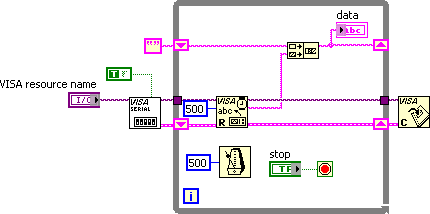
As long as the data has a LF at the end, something like the code below should work. The VISA Configure Serial Port has a enable termination input and the default termination character is a LF. That means that the VISA Read will automatically terminate whenever it sees this character. You can specify some large number of bytes to read and it will just read the actual number of bytes up to the termination character. If there is not so much data that it takes more than 500 msecs to read, the Wait Until Next ms Multiple should keep up with the instrument. If you are doing a lot of processing in the read loop, you might want to move it out so that the read does not fall behind.
Message Edited by Dennis Knutson on 01-11-2007 11:15 AM
 MKalkbrenner
01-11-2007 01:24 PM
- Mark as New
- Bookmark
- Subscribe
- Mute
- Subscribe to RSS Feed
- Permalink
- Report to a Moderator
Dennis_Knutson
01-11-2007 01:38 PM
- Mark as New
- Bookmark
- Subscribe
- Mute
- Subscribe to RSS Feed
- Permalink
- Report to a Moderator
01-11-2007 03:04 PM
- Mark as New
- Bookmark
- Subscribe
- Mute
- Subscribe to RSS Feed
- Permalink
- Report to a Moderator
Dennis_Knutson
01-11-2007 03:33 PM
- Mark as New
- Bookmark
- Subscribe
- Mute
- Subscribe to RSS Feed
- Permalink
- Report to a Moderator
01-11-2007 07:01 PM
- Mark as New
- Bookmark
- Subscribe
- Mute
- Subscribe to RSS Feed
- Permalink
- Report to a Moderator
01-23-2007 01:27 PM
- Mark as New
- Bookmark
- Subscribe
- Mute
- Subscribe to RSS Feed
- Permalink
- Report to a Moderator

 johnsold
01-23-2007 02:16 PM
- Mark as New
- Bookmark
- Subscribe
- Mute
- Subscribe to RSS Feed
- Permalink
- Report to a Moderator
Is there something in the instrument which causes it to run on 16 ms increments?
Lynn
01-23-2007 05:04 PM
- Mark as New
- Bookmark
- Subscribe
- Mute
- Subscribe to RSS Feed
- Permalink
- Report to a Moderator
The documentation on the instrument says that is transmits every half second, but I found out after I got my program working that it is actually close to 4 Hz; I even checked to make sure that I'm getting a unique reading every quarter second. I don't know why it is only in multiples of 16 ms and I can't change the frequency that the instrument automatically transmits data. I posted a jpg of that part of the program, is there something there that is messing stuff up?
Spencer
