- Subscribe to RSS Feed
- Mark Topic as New
- Mark Topic as Read
- Float this Topic for Current User
- Bookmark
- Subscribe
- Mute
- Printer Friendly Page
How can I get a smooth (distortionless) PWM signal from NI 9476 using FPGA in cRIO?

 auree123
03-28-2011 05:14 PM
- Mark as New
- Bookmark
- Subscribe
- Mute
- Subscribe to RSS Feed
- Permalink
- Report to a Moderator
Hey,
I was struggling to get a nice PWM output from cRIO H/W. I tried several example VIs and also some VIs from NI.com to generate PWM output.
I get PWM but not in a satisfactory level.
Lastly I tried the attached example for making the FPGA VI.
Can anybody tell me what might be the reason behind this peculiar behavior?
//In my VI: Mod 7 is used for PWM out and MOD 1 for PWM in.
I have checked in osscilloscope and found the validity behind my asking question.
Thank You//

 srm@viewpointus
03-28-2011 08:17 PM
- Mark as New
- Bookmark
- Subscribe
- Mute
- Subscribe to RSS Feed
- Permalink
- Report to a Moderator
you really havn't described your problem very well. what behavior are you seeing?
03-28-2011 10:30 PM
- Mark as New
- Bookmark
- Subscribe
- Mute
- Subscribe to RSS Feed
- Permalink
- Report to a Moderator
The distortion is like this:
amplitude gets weaker and bended instead of smooth transition from low to high (and vice versa) what we desire. I checked for variable frequencies with the same result. If you are not cleared yet, please let me know what else data you feel needed.
Thank You.
 smithd
03-29-2011 11:34 AM
- Mark as New
- Bookmark
- Subscribe
- Mute
- Subscribe to RSS Feed
- Permalink
- Report to a Moderator
Hi Auree,
I tried to open up the VIs you posted, but was unable to do so due to some missing VIs. Can you save a copy of your entire project, zip it, and post it here. That way we can look at all of the missing dependencies.
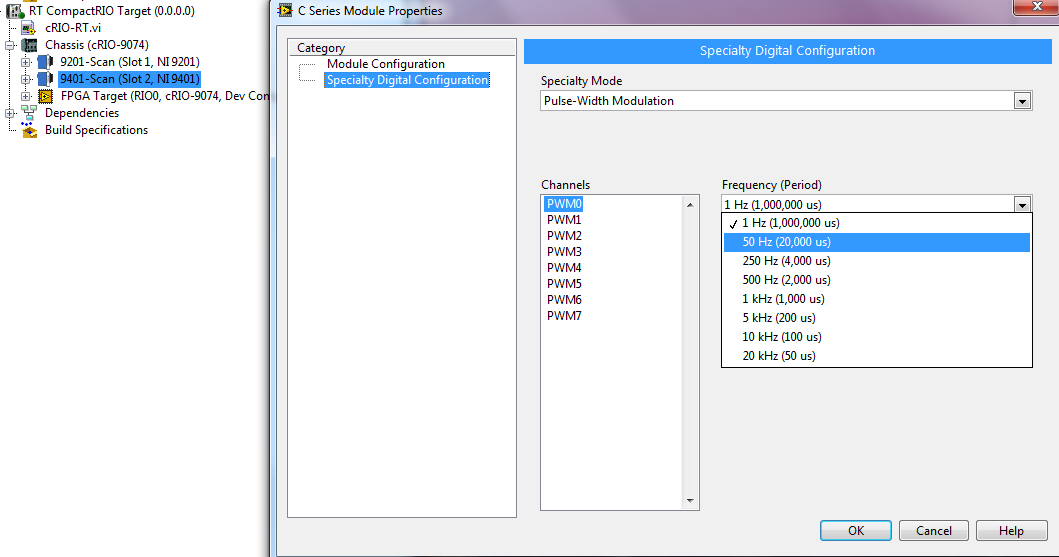
Do you have this same problem when you use the PWM specialty digital configuration (if it is available on your device?)
Finally, what are the frequency ranges you've been trying? Some modules are slower than others. I would imagine you are not pushing the limits of your device, but it is worth thinking about.
Thanks,
03-30-2011 10:05 AM
- Mark as New
- Bookmark
- Subscribe
- Mute
- Subscribe to RSS Feed
- Permalink
- Report to a Moderator
Here it is.
srm@viewpointus03-30-2011 10:22 AM
- Mark as New
- Bookmark
- Subscribe
- Mute
- Subscribe to RSS Feed
- Permalink
- Report to a Moderator
I am assuming that you are describing the measured output with an oscilloscope. is there any way for you to capture the scope image and post it? it is not likely that what you are seeing is software related.
03-30-2011 10:25 AM
- Mark as New
- Bookmark
- Subscribe
- Mute
- Subscribe to RSS Feed
- Permalink
- Report to a Moderator
@ D. Smith,
Is specialty mode option available for Module 9476? cause I am using this module to generate PWM output. I tried and did not find that option for this module.
btw, can doing the same proj in scan interface yield desired result? Though I have to do by modular config.
Thank You.
smithd
03-31-2011 01:17 PM
- Mark as New
- Bookmark
- Subscribe
- Mute
- Subscribe to RSS Feed
- Permalink
- Report to a Moderator
Hey Auree,
No, that option is not available for the 9476. As such, scan mode will not work for what you need.
I still cannot see your code, as you did not include the measure loop rate or pulse width modulation (FPGA) VIs. What I wanted to confirm is the code which determines the speed at which the output switches. That module is limited to a switch speed of 500 us (2 kHz PWM), so if you are commanding the module to switch too quickly, I could see how that could cause a problem. I am not sure how that would manifest, but it is possible that it would have the result you are seeing.
Past that, I believe Stu is right. If you see this same problem when you are flipping the DO on and off while in scan mode, then that is likely to be a hardware problem. The attached test VI should flip the output high and low at 5 Hz. Hook up your o-scope and check to see if the output has the same behavior.
Thanks,
04-04-2011 04:38 PM
- Mark as New
- Bookmark
- Subscribe
- Mute
- Subscribe to RSS Feed
- Permalink
- Report to a Moderator
Hi,
I am getting almost the smooth PWM signal (at the desired frequency) in oscilloscope now.
But, I am feeling problem regarding the data acquisition from this PWM in a analog module like 9215 or 9225.
I tried using FIFO, but not getting consistent data like in oscilloscope. Attachment shows how I coded to log data using 9215.

 smithd
04-05-2011 12:19 PM
- Mark as New
- Bookmark
- Subscribe
- Mute
- Subscribe to RSS Feed
- Permalink
- Report to a Moderator
Hi Auree,
It would be helpful to know what you are seeing on the 9215 to help narrow down what is going on. However, I have a few things that can/should be corrected:
FPGA VI:
**You wait on an IRQ every loop. This is fine, I suppose, but there is no reason for that IRQ to exist. Your RT VI resets everything, so the IRQ doesn't matter.
Top Loop:
**You are building a 1-element array out of your data, passing it through a shift register, and then pulling the data back out of the array. I'm not sure why you are doing this. Why dont you just wire the data directly into the FIFO?
**You are converting the fxp data into a U32, but not converting it back on the RT side. In fact, I am not sure how you would convert it on the RT side. Take a look at this doc for one way to convert the data, and take a look at the attached conversion.vi for other options.
http://digital.ni.com/public.nsf/allkb/1ED1B0CC0E7170FF862573620078D44B?OpenDocument
This is also going to be helpful:
http://zone.ni.com/devzone/cda/tut/p/id/9221
And finally, you can change the FIFO data type and just convert the FXP on the RT controller.
-Using a shared variable as the stop button for your loop works, but you would have to manually reset the variable. If you used a read/write control and a stop button on the FPGA, the latching action would eliminate this requirement.
Middle Loop:
-Same comment about the stop button
-Since you seem to have a variable which tells you whether or not the output was changed, I would use it (as you did in the bottom loop). Outputting a value to a digital line takes time.
Bottom Loop:
**What is the scan engine clock doing? (if that is what it is) Why are you waiting for its rising edge?
RT VI:
**You have run inside the loop. This should be outside the while loop. It will not do anything if the VI is already running, but it takes time to execute.
**You wait 200 ms on an IRQ every time you go through the loop. This should happen outside the loop, so that you do not wait 200 ms for an IRQ that never arrives.
**You ack the irq every time you go through the loop. This should be outside the loop.
-There is no real reason to poll the number of elements left in the FIFO because it doesn't matter to you if the fifo empties (you reset the fifo every time you start the VI). Just pull out something like 2000 points per iteration.
After making the ** changes, post a screenshot of the data you do get out of the waveform graph on your RT controller.
