FFMPEG scripting in LabVIEW (.NET)
 GriffinRU
 GriffinRU
01-30-2017
09:19 AM
GriffinRU
01-30-2017
09:19 AM
- Subscribe to RSS Feed
- Mark as New
- Mark as Read
- Bookmark
- Subscribe
- Printer Friendly Page
- Report to a Moderator
Code and Documents
Attachment
Overview
 "CONVERTING VIDEOS AND AUDIOS HAS NEVER BEEN SO EASY." - And Finally in LabVIEW
How to use "Zeranoe FFmpeg" static 32/64-bit FFmpeg executables with LabVIEW under Windows OS.
FFmpeg examples provided below can be used with any supported sources, i.e DShow devices, network streams, files.
FFmpeg can be used for video analysis and data broadcasting, for more details on how to use FFmpeg refer to https://www.ffmpeg.org/
Description
Attached examples were created in response to question posted at "RTSP over TCP with LabVIEW" thread.
.NET implementation explained:
- Create process (FFmpeg.exe)
- Set process parameters
- Subscribe to process-related Events
- Use pipes (stdin/pipe0/stdout/pipe1/stderr/pipe2) to move data from FFmpeg to LabVIEW and back
Steps to Implement or Execute Code
- Download and install "Zeranoe FFmpeg" latest static build and place into FFMPEG directory.
Folder snapshot:
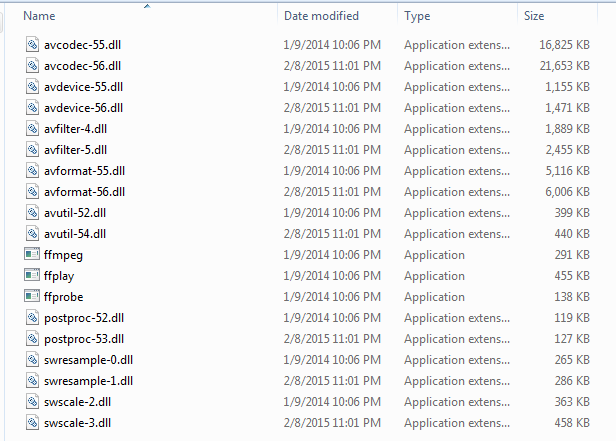
- Enjoy FFMPEG scripting with LabVIEW
Requirements to Run
Software
- LabVIEW 11.0 or later
- "Zeranoe FFmpeg" 32/64-bit static build - http://ffmpeg.zeranoe.com/builds/
- "RTSP over TCP with LabVIEW" library for RTSP examples - https://decibel.ni.com/content/docs/DOC-35217
Hardware
1. USB (DShow device) or IP camera or video/audio files
Snippets
***SORRY for broken VI's - LabVIEW's snippet tool backfiring... Files inside zip archive are not broken. I will fix snippets later...***
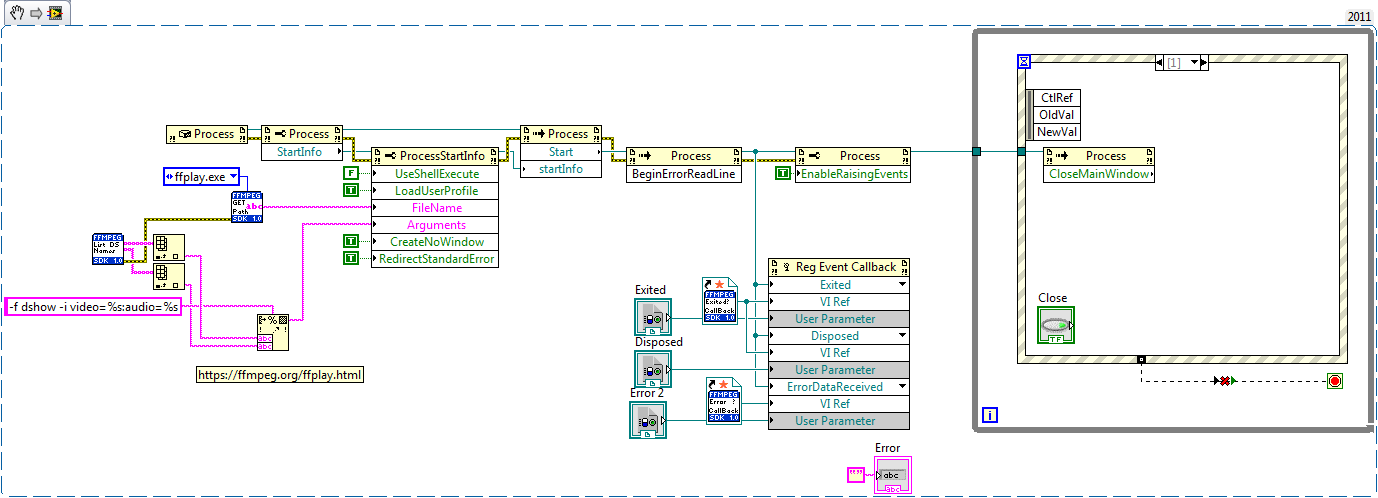
"FFPLAY - Example - DShow device.vi" - opens user specified DShow device.
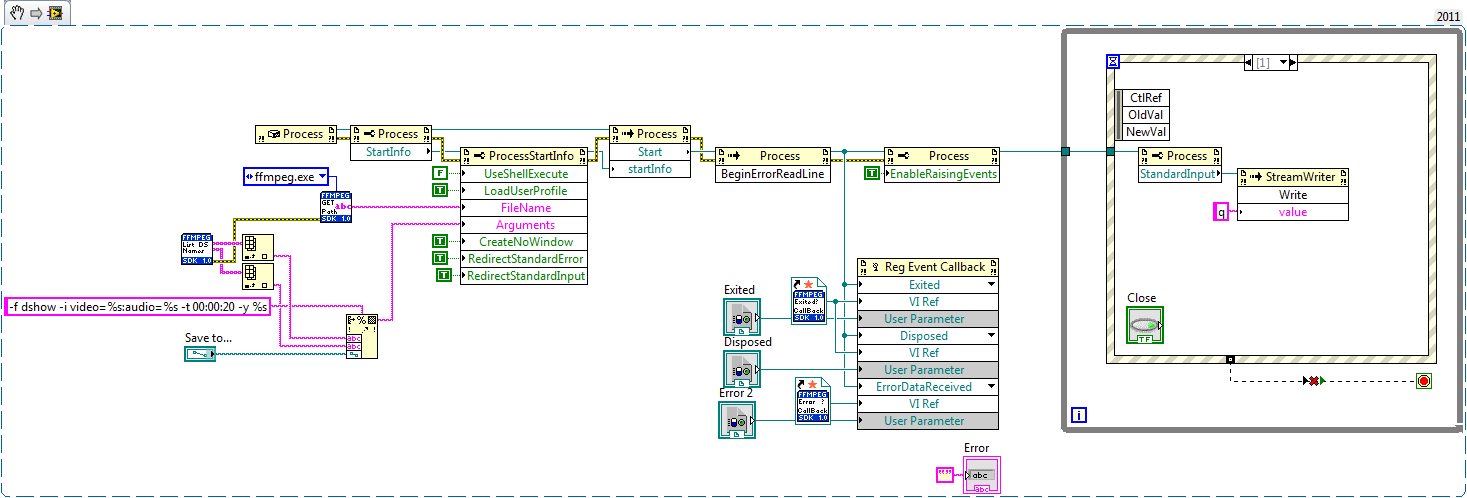
"FFMPEG - Example - DShow - stream to file.vi" - Saves DShow device data to mp4 container, user can specify duration or cancel recording at any time.
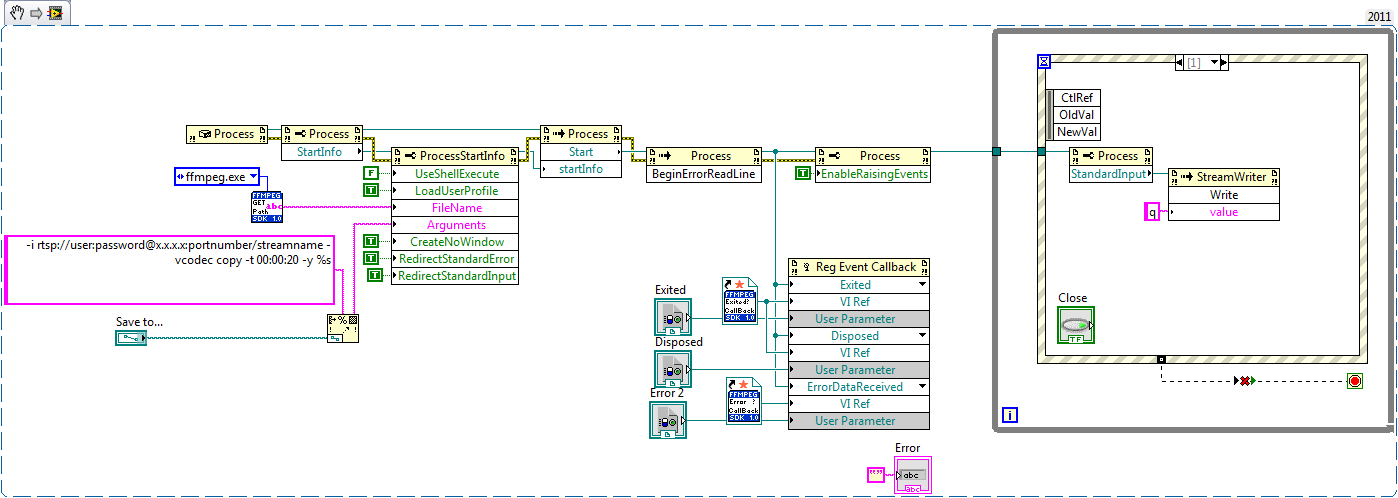
"FFMPEG - Example - RTSP - stream to file.vi" - Saves RTSP stream to mp4 container, same as above.
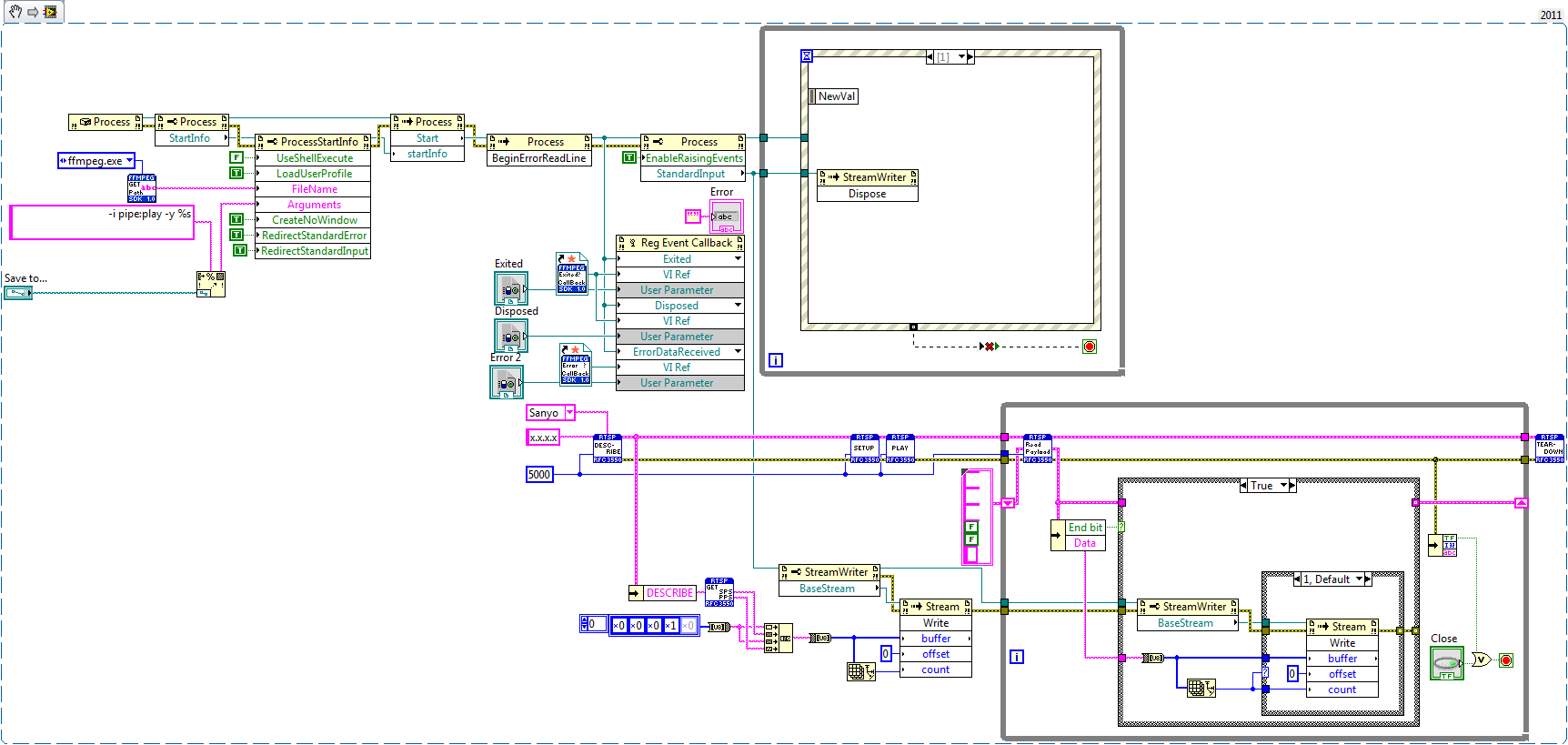
"FFMPEG - Example - RTSP-LabVIEW-FFMPEG - stream to file" - Sometimes when FFMPEG fails to establish connection with network device you can relay data with LabVIEW over the pipes (stdin/pipe0 and stdout/pipe1 and stderr/pipe2).

"FFMPEG - Example - RTSP - Extract frame as JPEG.vi" - Extracts single frame from network stream, passes it over pipe to LabVIEW and saves as JPEG file.
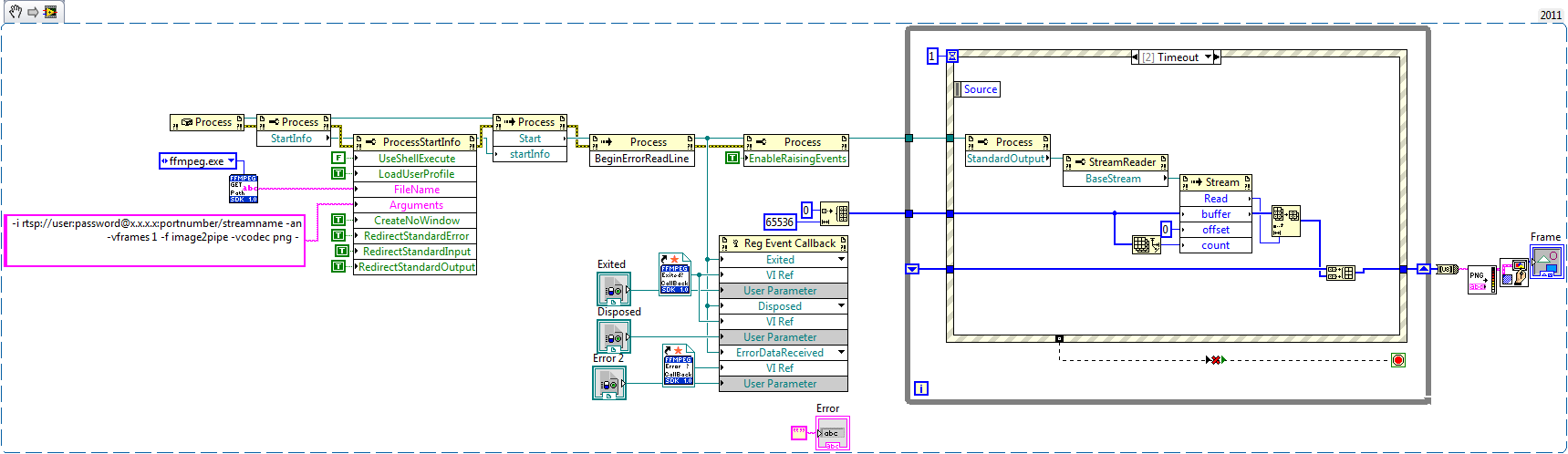
"FFMPEG - Example - RTSP - Extract frame as PNG.vi" - Extracts single frame from network stream, passes it over pipe to LabVIEW and draws it.
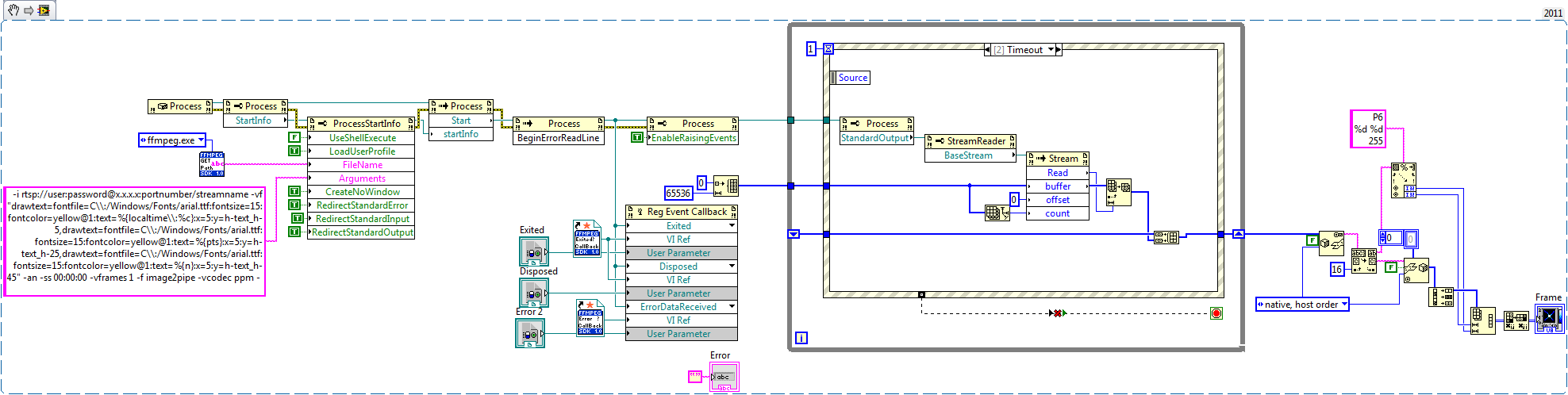
"FFMPEG - Example - RTSP - Extract frame as PPM.vi" - Extracts single frame, stamps image with timestamp, frame count and duration. Pipes resulting frame to LabVIEW, converts PPM data to 2D Image array.
More examples would come later...
Update 06/29/2015:
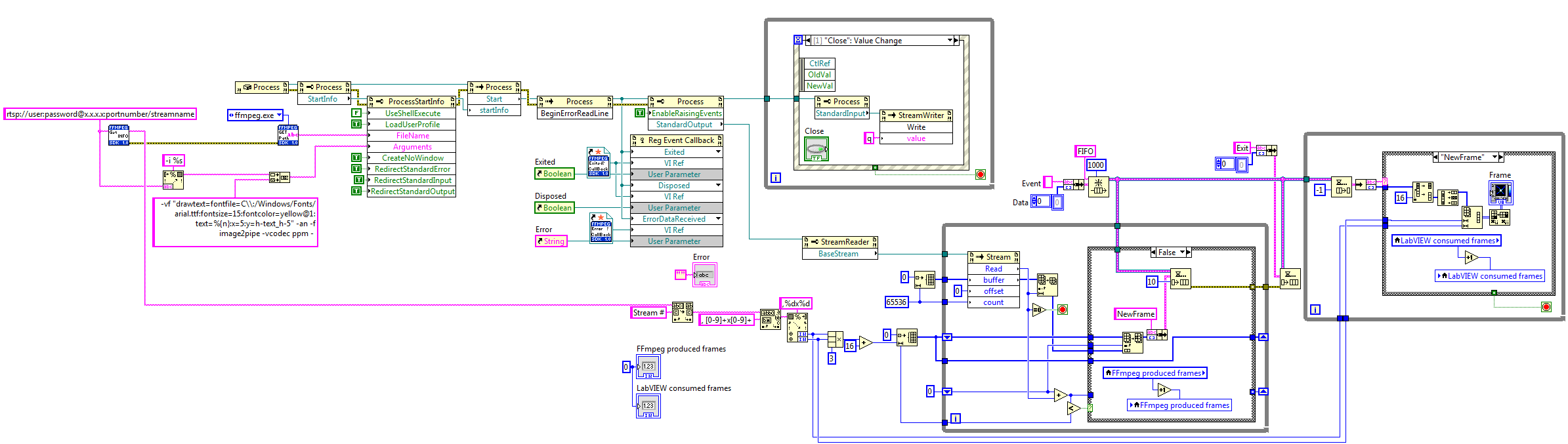
"FFMPEG - Example - RTSP - Extract frames (PPM).vi" - FFmpeg processes video stream and passes individual frames to LabVIEW.
Update 07/01/2015:
"FFMPEG Examples v1.1.zip" - updated with "yuv420p" and NI Vision Graph examples.
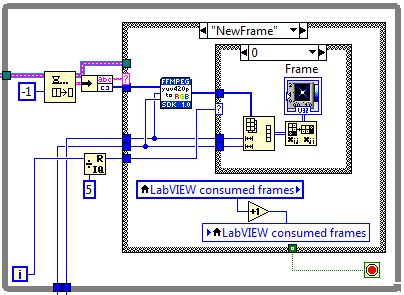
"FFMPEG - Example - RTSP - Extract frames (yuv420p) Intensity Graph.vi" - yuv420p to 2D RGB
Note: To improve performance, Intensity graph update rate was reduced to 1/5 of frame rate.
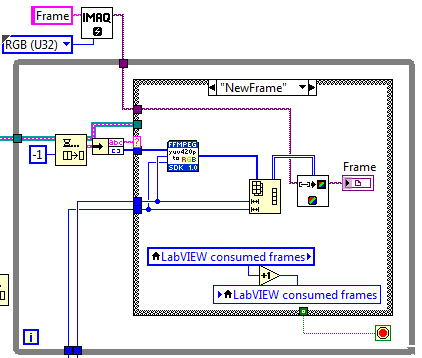
"FFMPEG - Example - RTSP - Extract frames (yuv420p) Vision Graph.vi" - yuv420p to NI Vision Graph
Update 12/30/2015:
With script -f sdl "window name" - you can create FFmpeg rendering window (CPU usage is not great but better than what you can do in LabVIEW)
You can specify size, title, background and window title.
-Artur
Example code from the Example Code Exchange in the NI Community is licensed with the MIT license.


- Mark as Read
- Mark as New
- Bookmark
- Permalink
- Report to a Moderator
Hi. Artur.
i tested your code few days, and recording very well with many codec.
your code include extracting one image, so i trying to make a streaming mode. but(you know) it didn't work.
i used ffmpeg command vframe over 1(ex. -vframe 240) and my computer memory overflow and shut down. i think extract ppm.vi always extract one image.
how to extract few frames like movie. in fact i need streaming. i'm still trying to work and help me if you can. : )
i'm machine vision and vision processing developer... so i am weak in this field.
thank you! your code is always very helpful !

- Mark as Read
- Mark as New
- Bookmark
- Permalink
- Report to a Moderator
Hi,
Well the down side of using pipes is if you do not unspool data fast enogh you are going to lock/crash LabVIEW or any other application. Examples above were for single frame extraction, I can show how to extract frames as they become available, but you need to make sure that your code is keeping up.
What is your final goal, real-time or post processing? And you should be able to script ffmpeg to dump as many frames as you want in any format to a given directory...
-Thanks for comments,
-Artur
- Mark as Read
- Mark as New
- Bookmark
- Permalink
- Report to a Moderator
hi
my final goal is real-time. i can play ip camera in real-time using vlc player in labview. but i have to use labview machine vision tools in my field. so i need image available in labview.
i'm still trying to work with your examples.
i don't know what is the missing link. haha
thank you! and you r the best in this labview community!
- Mark as Read
- Mark as New
- Bookmark
- Permalink
- Report to a Moderator
Hi,
Example attached,
In some cases you might also consider "yuv420p" format, I have "yuv420p to RGB.vi" inside "SubVIs" folder.
-Artur
- Mark as Read
- Mark as New
- Bookmark
- Permalink
- Report to a Moderator
omg. what a great code!
it works very well!
why images are showed black & white? because of allocated memory ?
i'll change b&w image to color image. i am seeking color control in your code.
thanx a lot!
ps. if you know why images are gray, teach me plz
- Mark as Read
- Mark as New
- Bookmark
- Permalink
- Report to a Moderator
FFmpeg does the job, LabVIEW sits and relax
Images are grayscale, because provided example uses only one component... 2D intensity graph is not the best tool for 32-bit color images. To display color images in 2D intensity graph you need to either index values with custom color table, or create color table and convert array to RGB values.
I think, what you need is attached in latest examples (yuv420p and Vision Graph), let me know if that's true.
Enjoy,
-Artur
Note: PPM vs yuv420p (if supported) half the payload from FFmpeg.exe to LabVIEW over pipes.
Treat examples as prototypes and add error checking and cleanup accordingly.
- Mark as Read
- Mark as New
- Bookmark
- Permalink
- Report to a Moderator
omg you did it again! professional!
i'll use this code in my image processing works and share with you later.
very helpful and amazing code.
- Mark as Read
- Mark as New
- Bookmark
- Permalink
- Report to a Moderator
hi Artur.
i'm testing your code at few computers and i encouter some error(In fact, not my pc)
< error > ----------------------------------------------------------------------------------------------------------------------------
error 1172: FFMPEG - Get Stream Info.vi->FFMPEG - Example - RTSP - Extract frames (yuv420p) Vision Graph.vi invoke node System.Reflection.TargetInvocationException: Exception has been thrown by the target of an invocation.
Inner Exception: System.ComponentModel.Win32Exception: cannot find file
------------------------------------------------------------------------------------------------------------------------------------------
i trying to find some solution and all solution had bad result. what's wrong with my pc?
thank you.
- Mark as Read
- Mark as New
- Bookmark
- Permalink
- Report to a Moderator
Hi,
Can you identify what part of the code gives you an error?
Sounds like "FIREWALL" settings...
-Artur
- Mark as Read
- Mark as New
- Bookmark
- Permalink
- Report to a Moderator
< error > ------------------------------------------------------------------------------- ---------------------------------------------
error 1172: FFMPEG - Get Stream Info.vi->FFMPEG - Example - RTSP - Extract frames (yuv420p) Vision Graph.v event callback
labview : .net external assembly exception occured.
---------------------------------------------------------------------
error 1172 occured. ffmpeg example - rtsp - extract frames(yuv420p) vision graph.vi event call back
=---------------------------------------------------------------------
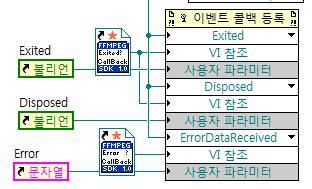
error occured here. call back fuction
thank you for your reply and i'll check my pc's fire wall
thanx!
- Mark as Read
- Mark as New
- Bookmark
- Permalink
- Report to a Moderator
Hi,
LabVIEV's "brain-freeze" - to solve this do the following:
1. Delete register for events code
2. Save vi and exit LabVIEW completely
3. Open LabVIEW, open blank vi and check if register for events works (you can load any LabVIEW provided examples)
4. If works - rebuild my examples (they are simple) - do not copy and paste
5. If doesn't - follow NI support on how to handle 1172 error
-Artur

- Mark as Read
- Mark as New
- Bookmark
- Permalink
- Report to a Moderator
hi
please help me.
FFMPEG - Example - RTSP - Extract frames (yuv420p) Vision Graph.vi working very good for one IP camera.How read Two IP camera RTSP Address and display in Two labview vision graph?
Thank you
- Mark as Read
- Mark as New
- Bookmark
- Permalink
- Report to a Moderator
Hi,
It should work with as many cameras as you want, up to system limits, just change IMAQ image name... and of you go.
If you compile the code you can just call clones as many as you want.
Maybe, attach your code, so I can point what to fix?
-Artur
- Mark as Read
- Mark as New
- Bookmark
- Permalink
- Report to a Moderator
hi
Thank you for reply
Now working correct and no problem.change IMAQ and FIFO name for another camera.
Thank you


- Mark as Read
- Mark as New
- Bookmark
- Permalink
- Report to a Moderator
Hi Artur,
Great code - thanks so much for posting it! I was looking for a way to extract a single frame into a LabView picture, so I made a variation of your examples. I put it in the list of attachments - I hope you don't mind. It seems to work with any video format - what a great utility.
Thanks again,
George
- Mark as Read
- Mark as New
- Bookmark
- Permalink
- Report to a Moderator
Hey George,
You are welcome, and i am glad my example helped you out and i do not mind adding examples to my thread.
-Artur
- Mark as Read
- Mark as New
- Bookmark
- Permalink
- Report to a Moderator
i think some pc has a problem
some pc are encounterd error in BeginErrorReadLine(invoke node).
what's wrong in this node.
- Mark as Read
- Mark as New
- Bookmark
- Permalink
- Report to a Moderator
Hi,
Can you attach your code?
-Artur
- Mark as Read
- Mark as New
- Bookmark
- Permalink
- Report to a Moderator
hi artur.
i still have used your code because its great.("FFMPEG - Example - RTSP - Extract frames (yuv420p) Vision Graph.vi")
but i have some problems.
when i connect my ip camera(1920x1080) cpu use rate is too high! about 50%!
and other problem is consumed frames don't follow produced frame.
so, if play this code long time, produced frame got all my pc's memory and stuck.
why this happend?
can you give a solution to make lower cpu using rate, and memory issue ?
- Mark as Read
- Mark as New
- Bookmark
- Permalink
- Report to a Moderator
Hi,
I think you need to check if you parsing stream correctly, I would wire constants for sizing array first and stop execution after successful frame received.
Get some probes and post results.
-Artur


- Mark as Read
- Mark as New
- Bookmark
- Permalink
- Report to a Moderator
Nice code Artur
When having an output pipe from FFMPEG to Labview, have you tried configuring FFMPEG to convert the frames to RGB32 by using the output command "-pix_fmt rgb32", instead of needing to convert YUV to RGB in labview?
- Mark as Read
- Mark as New
- Bookmark
- Permalink
- Report to a Moderator
Thank you,
I have not used "-pix_fmt rgb32", I am glad you found it, should be more efficient
-Artur
- Mark as Read
- Mark as New
- Bookmark
- Permalink
- Report to a Moderator
I just tried it, and the first test gave good results.
Downside is that you'll end up with more data through the pipe (to be precisely its 2.67 times more data), but the upside is that LV is not converting it.
Note: when using the command "-pix_fmt rgb32" this gives you rgba values at the pipe. Imaq wants to have argb values. Instead of converting these from rgba to argb values in labview, rather use the command "-pix_fmt argb" (instead of "-pix_fmt rgb32")
- Mark as Read
- Mark as New
- Bookmark
- Permalink
- Report to a Moderator
There is always a catch but still great tool to have...
-Artur
- Mark as Read
- Mark as New
- Bookmark
- Permalink
- Report to a Moderator
You can request "pix_fmt bgr24" or "pix_fmt rgb24" and while doubling memory transfer -> you can optimize performance by skipping data manipulation in LabVIEW...
-Artur

- Mark as Read
- Mark as New
- Bookmark
- Permalink
- Report to a Moderator
Hello,
I was trying to use your Vi's for getting an image from Usb 2.0 camera. But i got multiple errors (Actually same error 1172 and it loops back). I am not sure why its happening. I think it is due to one thing but not sure. Snapshots of errors are attached for review.
Kindly guide,
Khan.

- Mark as Read
- Mark as New
- Bookmark
- Permalink
- Report to a Moderator
Hi Artur,
I had tried your program for two cameras (vision graph) and it works. But i having trouble when my one of camera is in offline mode. When either one camera is offline, i cannot get image from another working fine camera. I found that the program is stuck in the ffprobe.exe. May i know how to add timeout for ffprobe.exe to stop it if it failed to connect the camera? I am duplicate same program in a vi and rename the IMAQ&FIFO for second camera.


- Mark as Read
- Mark as New
- Bookmark
- Permalink
- Report to a Moderator
Hi GriffinRU,
Great work.
I have tried your code and works like a charm for my IP camera. Is there any possibility to play the raw h.264 byte stream in to an IMAQ compatible format using FFMPEG scripting?

- Mark as Read
- Mark as New
- Bookmark
- Permalink
- Report to a Moderator
Hi Mr. Artur,
It is a great code to push data from LabVIEW in to FFPMEG, do conversion and pull it back to LabVIEW for display or further processing purpose. I am using your code for converting H264 video data from camera in to RGB format to be used further in LabVIEW. I am converting live stream of video data from camera. Steps followed,
1. I am collecting camera video data through hardware interface in to LabVIEW
2. Pushing this video data from LabVIEW in to FFPMEG via a TCP port 35001 as below,
2. Do conversion in FFPMEG and pull it back to LabVIEW via pipe buffers as below,
I am able to get converted RGB data back to LabVIEW. This works good for live streaming. This works fine for one single camera live streaming purpose.
Now I am trying to scale this up to two camera live streaming. I am doing pre allocated reentrant for the code shown in both the above images. The conversion for live streaming for two cameras still works fine. Now I am doing close camera / disconnect camera 1 and expecting first instance of the FFMPEG process closed down independent of second camera live conversion process. But first process pauses at read FIFO that I highlighted in second image. Please provide solution to avoid this pause at pipe buffer read (by doing different way of configuring process and pipe?). And also please note that if I do close / disconnect camera 2, then first instance of the process reads out certain amount of data the gets closed without any issue and both the instances are closed. So my observation is, if I do close / disconnect camera, there is some residual amount of data left out at the buffer (less than 65536 the buffer size that is configured), and the buffer is waiting indefinitely to get data of array size 65536 get accumulated / filled up. And once if the second instance is also closed, then both the process instances closed after reading residual amount of data (ignoring 65536 data to get accumulate) and closed without any error / issue.
So the solution needed is to flush out buffer residual data and close the process independent of other parallel process once if the particular camera closed / disconnected.
Thanks for your help,
Ramesh
- Mark as Read
- Mark as New
- Bookmark
- Permalink
- Report to a Moderator
Hi Mr. Artur,
It is a great code to push data from LabVIEW in to FFPMEG, do conversion and pull it back to LabVIEW for display or further processing purpose. I am using your code for converting H264 video data from camera in to RGB format to be used further in LabVIEW. I am converting live stream of video data from camera. Steps followed,
1. I am collecting camera video data through hardware interface in to LabVIEW
2. Pushing this video data from LabVIEW in to FFPMEG via a TCP port 35001 as below,
2. Do conversion in FFPMEG and pull it back to LabVIEW via pipe buffers as below,
I am able to get converted RGB data back to LabVIEW. This works good for live streaming. This works fine for one single camera live streaming purpose.
Now I am trying to scale this up to two camera live streaming. I am doing pre allocated reentrant for the code shown in both the above images. The conversion for live streaming for two cameras still works fine. Now I am doing close camera / disconnect camera 1 and expecting first instance of the FFMPEG process closed down independent of second camera live conversion process. But first process pauses at read FIFO that I highlighted in second image. Please provide solution to avoid this pause at pipe buffer read (by doing different way of configuring process and pipe?). And also please note that if I do close / disconnect camera 2, then first instance of the process reads out certain amount of data the gets closed without any issue and both the instances are closed. So my observation is, if I do close / disconnect camera, there is some residual amount of data left out at the buffer (less than 65536 the buffer size that is configured), and the buffer is waiting indefinitely to get data of array size 65536 get accumulated / filled up. And once if the second instance is also closed, then both the process instances closed after reading residual amount of data (ignoring 65536 data to get accumulate) and closed without any error / issue.
So the solution needed is to flush out buffer residual data and close the process independent of other parallel process once if the particular camera closed / disconnected.
Thanks for your help,
Ramesh


- Mark as Read
- Mark as New
- Bookmark
- Permalink
- Report to a Moderator
Hi Artur,
I hope you are doing well. I modified the FFMPEG - Example - RTSP - Extract frames (yuv420p) Vision Graph and gave the following source for mjpeg instead of mpeg4:
-i rtsp://admin:admin@192.168.1.93:554/mjpg?source=0 -an -f image2pipe -vcodec rawvideo -
The first few frames appear OK, but the image immediately shifts, and the lower portion becomes partially corrupted. Thinking it was the -vcodec rawvideo causing this, I tried -vcodec mjpeg, but this results in an RGB noise image.
I have seen as many as the first 50 frames come through OK, and the stream remains stable and responsive, even with the corruption, so it must be something to do with parsing. Any thoughts?
Best regards,
John

- Mark as Read
- Mark as New
- Bookmark
- Permalink
- Report to a Moderator
Hi GriffinRU
How can I use this development using a video file stored in local, instead of a TCP IP streaming?
