LabVIEW WebSockets Library
 samsharp99
 Sam_Sharp
 02-19-2020
05:24 AM
02-19-2020
05:24 AM
- Subscribe to RSS Feed
- Mark as New
- Mark as Read
- Bookmark
- Subscribe
- Printer Friendly Page
- Report to a Moderator
Products and Environment
This section reflects the products and operating system used to create the example.To download NI software, including the products shown below, visit ni.com/downloads.
- LabVIEW G
Programming Language
Description
Description-Separate-1Earlier this year I posted about the myRIO Giant Tetris project I worked on which ended up appearing at NI Week in Texas and NI Days in the UK this year. One of the coolest features of this was the ability to control the game using a web browser from a computer or mobile device. The technology for doing this was WebSockets which allows you to create and maintain an open WebSocket connection (using TCP/IP) and send data with low-latency and overhead between a modern web-browser and a server (in this case LabVIEW RT).
I have finally been able to tidy up the code and offer it to the community to play with!
Here's what I originally wrote about WebSockets for the Giant Tetris:
WebSockets.
WebSockets is a web technology that allows a browser and a server to communicate in a way similar to TCP/IP. The browser sends a WebSocket upgrade request (very similar to a HTTP request), the server sends a HTTP response with specific headers and then you can send/receive data through the open connection. To implement this in LabVIEW I used the TCP/IP VIs and some additional VIs for performing the HTTP handshaking and framing the websockets data. In my case, the browser is communicating directly with the myRIO (or it could be other RT targets or PCs) with no intermediate server.
I've been waiting for an excuse use WebSockets as a tech demo for my work - we have used LabVIEW Remote Front Panels in the past for communicating with LabVIEW (a cRIO). Although it was easy to setup, it requires the LabVIEW run-time engine to be installed and only works with certain browsers (Internet Explorer). Having done quite a lot of web development, I know that there is an absolutely vast pool of resources for using a web browser for displaying data and doing asynchronous communications using JavaScript and I'd like to leverage that to create great looking user interfaces (using HTML and CSS) that anyone can view/use with any web browser - including mobile devices (and especially tablets - iPad etc.)! WebSockets fulfils the requirement of having data update in real-time and allow the user to press buttons & enter values.
The library I have produced acts as a wrapper for the TCP Read/Write VIs and includes a handshaking VI for reading and responding to an incoming handshake request from the browser.
API - Server
Here's an overview of the API for the LabVIEW Side:
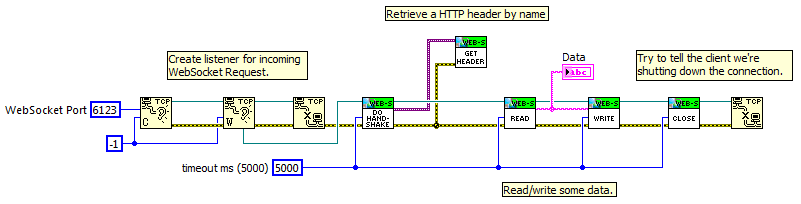
Do Handshake: Performs the WebSocket handshaking after a connection is made - reads the headers from the HTTP request and replies with the appropriate WebSocket key to open the connection.
Do Client Handshake: This VI allows you to initiate a connection acting as a WebSocket client, communicating to an existing WebSocket server (either implementing in LabVIEW or otherwise). It sends the necessary HTTP header to start a WebSocket connection and waits for the reply from the server.
Get Header: I store the header name/value pairs as variant attributes, you can use this VI to retrieve a header value.
Read: Wrapper for the TCP Read primitive that splits out the data from the WebSocket frame. The returned Opcode is as per the WebSocket standard.
Write: Wrapper for the TCP Write primitive that packages the data into a WebSocket frame and sends to the connection.
Close: Sends the WebSocket close Opcode to the browser. According to the WebSockets spec, both sides of the connection are supposed to send the close Opcode before terminating the TCP connection so this VI doesn't close the TCP connection.
As it's just a wrapper for TCP/IP functions with some maths/string manipulation (for hashing the WebSocket key) it works on RT and Windows targets.
API - Client
For writing your javascript for establishing the connection and sending/receiving data from the server I suggest you check out the wealth of tutorials and information available on the internet. The included example (see below) has the basics and I wrote a little more about the Javascript side at the link for the myRIO Giant Tetris which includes some sample code.
Example
The included example VI, when run, acts as a server for an incoming WebSocket connection, displays the string data received from the connected browser and allows you to send string data back to the browser. The included index.html file in the installed package acts as a client to connect and display the string data:

Known Limitations:
- Currently only supports sending/receiving string data even though the WebSocket spec supports binary data transfer. I figured that this wouldn't be a huge problem as I figured the most likely use case is using strings or json-encoded data and if you used binary you would need to be able to do the conversion between javascript and LabVIEW formats yourself.
- It hasn't been tested for sending frames with a long data segment. The WebSocket spec packages the header differently depending on data length and I haven't fully tested that these are correctly prepared for longer data segments.
Usage / Disclaimer:
I've published this in an attempt that it will be useful for the NI community. The package/source is released under the MIT License. The source code and releases are available on GitHub: https://github.com/MediaMongrels-Ltd/LabVIEW-WebSockets-API
If you find anything wrong with it then I hope you'll let me know in the comments so it can be improved and built upon.
If you use it, it would be great if you credit me (Sam Sharp - MediaMongrels Ltd - sam@mediamongrels.com - http://www.mediamongrels.com) but I'm not going to demand it. 
Installation/Usage:
The VI package is available/installed through the LabVIEW Tools Network VIPM repository at the following link: vipm://mediamongrels_ltd_lib_websockets_api
The VI Package is for >=LV2013. You can probably save for a previous version - I don't think it uses anything specific to LV2013 but I was using it with a myRIO hence LV2013 (plus LV2013 has those neat JSON encode/decode which is great for converting between LV and Javascript data types!).
Description-Separate-2
Example code from the Example Code Exchange in the NI Community is licensed with the MIT license.


- Mark as Read
- Mark as New
- Bookmark
- Permalink
- Report to a Moderator
This is awesome!
http://chrislarson.me


- Mark as Read
- Mark as New
- Bookmark
- Permalink
- Report to a Moderator
This is excellent, thank you. I'm using IE11 and the handshake was failing on the 'Is Websocket Request?' check because 'Upgrade' was returning 'Websocket' and not 'websocket'. I cast the string to lower case before doing the IsEquals check and it works fine now.
In Firefox, it wasn't working for me - the browser was saying the connect() function was not defined. I moved the curly brace in websockets.js from line 69 to line 10 which fixed it.

- Mark as Read
- Mark as New
- Bookmark
- Permalink
- Report to a Moderator
Hi Martin,
Nice find - thank you.
I will update the library and post a new version soon.

- Mark as Read
- Mark as New
- Bookmark
- Permalink
- Report to a Moderator
This is absolutly awesome! I was looking for such a thing for months and wanted to code it on my own ... thx a lot man!!! 🙂


- Mark as Read
- Mark as New
- Bookmark
- Permalink
- Report to a Moderator
Brilliant! Good work Sam. I have been banging on about Websockets for ages - this will really help the community to embrace them! Thanks.
- Mark as Read
- Mark as New
- Bookmark
- Permalink
- Report to a Moderator
Great job Sam! This is just the thing I've been looking for. One question tho, you've included a sample LabVIEW server and a web page client in your package. How would one go about making a LabVIEW websocket client that uses your VIs? I don't see a "send handshake request" subVI in your API.
- Mark as Read
- Mark as New
- Bookmark
- Permalink
- Report to a Moderator
Hi John, I haven't implemented the websocket client side of things to connect to an existing websocket server as:
1) I didn't need to...I was only interested in having LabVIEW act as a server to talk to a browser rather than have LabVIEW communicate with an existing WebSocket server/API
2) It's slightly more complicated as the client implementation must mask outgoing data where as it is optional for a server
Like I said above - it's not a full implementation of the WebSockets standard - but I am open to suggestions/contributions on how to improve it and make it better!


- Mark as Read
- Mark as New
- Bookmark
- Permalink
- Report to a Moderator
The presentation of this at CLA Summit Europe 2015 was great! And the wireless connection from the phones in the audience worked perfectly! Thanks for a very nice and inspiring piece of software.
Now I have a lot of things to try out....
Thanks Sam.
CLA, CTA


- Mark as Read
- Mark as New
- Bookmark
- Permalink
- Report to a Moderator
I tried your similar code but when i tried to send message from client to server through javascript socket.send() it will gave an exception and connection is closed.
Exception is - 'Invalid Frame Header'
Please provide some solution for this problem.
Thanks !

- Mark as Read
- Mark as New
- Bookmark
- Permalink
- Report to a Moderator
Is it possible to use this with data other than strings?
- Mark as Read
- Mark as New
- Bookmark
- Permalink
- Report to a Moderator
What do you have in mind? The WebSockets protocol itself supports binary data transfer but then you have the complexity of converting between LabVIEW and JS native data types and I haven't implemented this functionality in my library.
For anything else, you can use the convert to/from JSON functions in LabVIEW for other data types (e.g. clusters) to flatten them to a string that you can read in JavaScript. If you need to transfer binary data (e.g. files/pictures) - you could base64 encode/decode the data to send it as a string.
- Mark as Read
- Mark as New
- Bookmark
- Permalink
- Report to a Moderator
Also, is it possible to have multiple connections through the same websocket and port? I am trying to have multiple users read and write data to and from the myRIO. If so, would this be done in Labview or in JavaScript?
- Mark as Read
- Mark as New
- Bookmark
- Permalink
- Report to a Moderator
Websocket rides on TCP, so no. One connection per port.
- Mark as Read
- Mark as New
- Bookmark
- Permalink
- Report to a Moderator
You listen on one port, but once the connection has been established the TCP connection negotiates it's own port for maintaining each connection to free up the listener port for another connection.
Take a look at the multiple client / server examples in LabVIEW or take a look at my WebSockets Chat demo code here: https://decibel.ni.com/content/docs/DOC-41778


- Mark as Read
- Mark as New
- Bookmark
- Permalink
- Report to a Moderator
Staab_Engineering wrote:
Websocket rides on TCP, so no. One connection per port.
Actually that is not exactly correct. A TCP connection is characterized by the two endpoints with IP address and port number each and for TCP to work, every connection needs to be different in at least one of the 4 elements involved here (2 endpoints with 2 characterization values each).
The server can only handle one incoming connection request at the same time but typically it simply hands that incoming connection of to some other code, either a loop going through each connection repeatedly (works well for a few connections but scales very badly for larger number of connections) or starting of a new reentrant handler for it, and then goes back waiting for the next connection request.
The code as presented in the image in the post would need some modifications to allow handling multiple incoming connections seemlessly but it isn't impossible at all.

- Mark as Read
- Mark as New
- Bookmark
- Permalink
- Report to a Moderator
Absolutely correct, rolf. I'm not sure where my head was at when I made that post, but I'm a little emabarrased of it. I've since written a couple of multi-connection server implementations with this library, and it works fine serving mutiple clients through a single port (because all that code is outside the scope of the library).

- Mark as Read
- Mark as New
- Bookmark
- Permalink
- Report to a Moderator
After I download v1.3.0.13 and double click to launch, I get the message:
"This package is not compativle with any LabVIEW version on this computer."
I have LV 2009, 2011, 2012, 2014 installed on this computer and have used all of them.
I'm new to this "package" stuff.
Am I missing something? Does it require LV2013?
thanks!
- Mark as Read
- Mark as New
- Bookmark
- Permalink
- Report to a Moderator
AHA!
My Package Manager was too old so I updated it.
It is now "compativle" (ha ha)!
It worked. Sweet.
still, thanks

- Mark as Read
- Mark as New
- Bookmark
- Permalink
- Report to a Moderator
Hi Sam,
Thank you for creating this and sharing with the community -- now this Library is being used across the globe for variety of amazing projects!
We have recently come across a small problem when using the Library on cRIO (same would happen for Linux or any other Unix-alike) when communicating to ROS framework (http://www.ros.org/).
InitiateClientHandshake.vi uses 'End of Line' constant in 'Search and Replace String' function, which differs between OS'. Instead of using LabVIEW constant, '\r\n' (which has the same meaning in Windows) would make the parsing to work cross-platform as expected. To use '\' as part of the string, you need to right click on a string constant and select "'\' Codes Display" instead of "Normal Display".
Thanks,
Edvin
- Mark as Read
- Mark as New
- Bookmark
- Permalink
- Report to a Moderator
Hi edvin - this is an issue that I am aware of, I just haven't gotten around to fixing it in the 'initiate client handshake' VI (it is fixed in the server-side handshake VI). I'm aware of the difference between 'normal' and '\ codes' display  . Glad to hear you are making good use of the library!

- Mark as Read
- Mark as New
- Bookmark
- Permalink
- Report to a Moderator
Hi, Sam,
The websocket interface you designed is perfect. It helps me a lot since I want to communicate with web app. Thanks you very much.
I have tested the "WebSockets Chat" which is based on "intelligent_energy_lib_websockets_api-1.2.0.9.vip". It can works perfectly.
I know you have updated the vip to V1.3.0.13 (20/04/2015) . It seems to be more easy and convenient than the old version.
But I don't know how to use the new version V1.3.0.13. Would you please share some examples or detailed guidances.
Thanks a lot.
- Mark as Read
- Mark as New
- Bookmark
- Permalink
- Report to a Moderator
Been using this API happily for a long time. One of my applications needs to face the public Internet, which means I need to move to WSS protocol (Websocket over TLS). Do you -- or does anyone who sees this -- have an upgraded API that provides that protocol to LV?
- Mark as Read
- Mark as New
- Bookmark
- Permalink
- Report to a Moderator
Hi, I have not needed it (always using local connections) so I haven't implemented it in the library. It should be relatively easy to replace the TCP/IP VIs with a secure equivalent as I believe that is the only difference. I'm not too familiar with the inner workings of SSL and how it relates to a socket connection.
It looks like someone has done SSL communications in LabVIEW here: https://decibel.ni.com/content/docs/DOC-34833
It might also be possible using .NET to do the TCP/IP calls over a secure socket.
There is also a discussion about SSL TCP/IP here: http://forums.ni.com/t5/LabVIEW/TCP-IP-using-SSL/td-p/2583817


- Mark as Read
- Mark as New
- Bookmark
- Permalink
- Report to a Moderator
I haven't used this yet, but am starting to question why I didn't investigate this when beginning to work with web services. This looks awesome, but why has NI not fully embraced this as part of the standard toolset yet?
- Mark as Read
- Mark as New
- Bookmark
- Permalink
- Report to a Moderator
Hi,
Thumb up for Engineer. SamSharp,It’s really a priceless effort from Samsharp.
Dear All,
I have a quick questions related to the Topic as well
1-I’ve small LabVIEW Code running on Raspberry –pi3 platform where I have couple of devices to be monitored and controlled .
My Question is How to Read and write to those Peripheral remotely while my Raspberry PI is connected to internet through WIFI?
I’ve created Web services to use NI UI Web-builder but stuck with “How to connect OR access Raspberry PI over WIFI” ?
Could you please advise me how to use SamSharp libraries to achieve this OR would be great if there is any example etc. OR any advice would be welcome and appreciated .
Thanks for your time and consideration guys.

- Mark as Read
- Mark as New
- Bookmark
- Permalink
- Report to a Moderator
Hi Sam, The Client Handshake VI doesn't work for me. Within it, you construct a TCP message with this payload:
GET ws://%s:%d/ HTTP/1.1
Host: %s:%d
Connection: Upgrade
Upgrade: websocket
Sec-WebSocket-Version: 13
Sec-WebSocket-Key: %s%s
When targeting this at my ASP.NET Core webservice, it causes BadHttpRequestException to be thrown with the message "Invalid request target: 'ws://172.16.1.65:36364'".
Looking online, it seems like this isn't what you should be sending anyway. I made a copy of this VI and changed the first line to GET / HTTP/1.1 instead based on what I read online, and this works.
GET / HTTP/1.1
Host: localhost:36364
Sec-WebSocket-Version: 13
Sec-WebSocket-Key: dKP/0gJzWzXMAh6SYdQ/sA==
Connection: Upgrade
Upgrade: websocket
- Mark as Read
- Mark as New
- Bookmark
- Permalink
- Report to a Moderator
There are major issues with the way that "Websockets.lvlib:Read.vi" works. If I give it a 1000 ms timeout (or some other timeout) it will hang my program for an extremely long time unless the webservice it's listening to sends a message.
This seems to be because the implementation of "WebSockets.lvlib:Read.vi" has like half a dozen "TCP Read.vi" calls but only wires the specified timeout to the first.
The whole point of a timeout is that it should provide a guarantee on the maximum time a VI will run for. Without that guarantee you can't really use this in an application where you want stuff to deinitialise in a neat and timely manner during application shutdown...

- Mark as Read
- Mark as New
- Bookmark
- Permalink
- Report to a Moderator
Hi David, thanks for bringing that to my attention. When I was programming the read, I expected that you would either receive a valid websocket frame (which would read the first byte successfully, then all subsequent reads should happen without issue as the data is either already there or on its way) or the first read would timeout (and throw an error, causing all subsequent reads to be bypassed due to standard error handling), although I agree that at the very least, the timeout should be wired through to the subsequent VIs (where if a timeout occurs, the remaining reads will be bypassed due to the error in). The only obvious situation I can think that would cause what you're describing, is if you send one byte of data, but not a complete frame - that would cause the first read to execute successfully and then get stuck at the timeout of the subsequent ones.
- Mark as Read
- Mark as New
- Bookmark
- Permalink
- Report to a Moderator
Hi Sam,
@samsharp99 wrote:
When I was programming the read, I expected that you would either receive a valid websocket frame (which would read the first byte successfully, then all subsequent reads should happen without issue as the data is either already there or on its way) or the first read would timeout
That makes sense, yeah. I realised this after I tried implementing my own VI to handle reads and looked at the RFC for the websocket spec. It seems like your implementation should work fine if a valid websocket payload is read, so I'm not exactly sure why I encountered problems with it.
@samsharp99 wrote:
although I agree that at the very least, the timeout should be wired through to the subsequent VIs (where if a timeout occurs, the remaining reads will be bypassed due to the error in)
This is what I've done in my implementation, but I think the best approach would be to only wire the timeout control to the first TCP Read, and to wire a small constant (possibly even 0) timeout to the following TCP Reads. This embodies the assumption that if the first TCP Read succeeds, all subsequent TCP Reads should succeed if we're handling a valid websocket packet. Wiring the same timeout constant to all the TCP Reads and relying on error 56 to short-circuit them is problematic - consider if the client specifies a timeout of 1000ms and a websocket packet is received within 990ms from the time that WebSocket Read is called. The first TCP Read (reading the first byte) would succeed after 990ms, but if the packet is invalid and that's the only data, the next TCP Read will block execution for 1000ms before continuing. The client expecting a max execution time of 1000ms would find WebSocket Read actually blocks for at least 1990ms.
I'm not sure what the significant difference is but my implementation works perfectly for communicating with my webservice, whereas using WebSockets.lvlib:Read.vi I get truncated messages.
My implementation:
Websockets.lvlib implementation:

- Mark as Read
- Mark as New
- Bookmark
- Permalink
- Report to a Moderator
Anyone had success using this with raspberry pi?
I deployed the whole example folder to the rasperry pi and made "SingleConnection.vi" run on startup.
Things that are not an issue:
- I can ping the rasperry pi from the same computer opening the webpage
- I updated the .js file with the address that I was pinging
- SingleConnection.vi works great when my PC is hosting it and another PC on the network connects to it
Studying for CLA.
LabVIEW, inherit from social media habits!
- Mark as Read
- Mark as New
- Bookmark
- Permalink
- Report to a Moderator
The issue stated above was solved by removing this code
Studying for CLA.
LabVIEW, inherit from social media habits!

- Mark as Read
- Mark as New
- Bookmark
- Permalink
- Report to a Moderator
Hi everyone.
This is a very good API, thanks a lot.
I just found a little bug implementing the reading of data divided into many packages. To do this, the Read.vi should be called many times and check every time if the transmission has finished. This should be done checking the 8th bit (=128) of the first byte, and not the 1st bit (=1) as it was originally implemented.
Please see little change below.
Any comments?
Andre
- Mark as Read
- Mark as New
- Bookmark
- Permalink
- Report to a Moderator
@ANDRÉ_CARVALHO It looks like you are correct - I have it correctly set in the Write.vi but not in the Read.vi. I will correct and release a new version soon.

- Mark as Read
- Mark as New
- Bookmark
- Permalink
- Report to a Moderator
Ok,
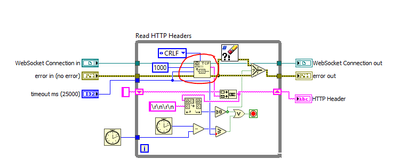
So I can run the code out of the box, and it works great with standard Web-socket connections. However, when I modified the javascript to use 'wss' and added 'Sec-WebSocket-Protocol' to the DoHandshake.vi I get an error 56 when trying to read the header information.
What am I missing to get wss to work?
Thanks in advance.
- Mark as Read
- Mark as New
- Bookmark
- Permalink
- Report to a Moderator
Hi Matthew,
The library does not support wss - there is no native SSL implementation in the TCP/IP VIs which this wraps and no way to tap into the SSL implementation used by the HTTP Client VIs. I am working on wss support, but it's a pretty low-priority project for me at the moment but I may have something in Q1/Q2 of next year.
Sam
- Mark as Read
- Mark as New
- Bookmark
- Permalink
- Report to a Moderator
Sam,
Thanks for letting me know and a tentative road-map!

- Mark as Read
- Mark as New
- Bookmark
- Permalink
- Report to a Moderator
This is a very good API.
Do you have an example for multiple connections?
Another thing to share if anyone has problem on the client web using MS. Edge.
This link is useful:
Special configuration may be necessary to access localhost type of addresses as Microsoft Edge runs with network isolation by default for security reasons. To enable loopback, kindly run the following command in an elevated command prompt:
CheckNetIsolation LoopbackExempt -a -n=Microsoft.MicrosoftEdge_8wekyb3d8bbwe
Let's also check if loopback is enabled in the developer settings. To check, follow the steps below:
- Open Edge.
- In the address bar, type about:flags.
- Under Developer settings, make sure that Allow localhost loopback is checked.
Irfan
(CLD)
https://haliatech.com/


- Mark as Read
- Mark as New
- Bookmark
- Permalink
- Report to a Moderator
This is awesome work - thank you Sam.
A clarifying (and potentially stupid) question: it looks like this API is designed around the assumption that the LabVIEW application will be a server and non-LabVIEW clients will subscribe for the purposes of a UI, right?
I'm playing around with a LabVIEW application for a BeagleBone that I want to act as a client to a 3rd party websocket so I can stream data about the position of my car. Is this something I should be using your API for?
NI Director, Software Community
- Mark as Read
- Mark as New
- Bookmark
- Permalink
- Report to a Moderator
Hi Elijah, thanks for the kind words about the library. The library does support acting as a WebSocket client, but it hasn't been extensively tested. I have tested it with a LabVIEW server (i.e. a VI acting as a client and a VI acting as a server - both using my library) but I haven't tried it with many 3rd party WebSockets services. The only difference is that you use the client handshake VI instead of the server one after opening the TCP connection.

- Mark as Read
- Mark as New
- Bookmark
- Permalink
- Report to a Moderator
- Mark as Read
- Mark as New
- Bookmark
- Permalink
- Report to a Moderator

- Mark as Read
- Mark as New
- Bookmark
- Permalink
- Report to a Moderator
Hi everyone.
I send JSON data through a websocket to access the server on a remote computer.Test failed, check my screenshot。why?
but ,This method is OK, using an online websocket testing tool.

- Mark as Read
- Mark as New
- Bookmark
- Permalink
- Report to a Moderator
Hello
I am trying to establish a websocket connection using localhost. I can successfully establish and communicate over a websocket connection using labVIEW NXG but I can not get the websocket library for traditional LabVIEW to connect. My initial attempt looks like this:
Which always threw the error:
Error 52 occurred at WebSockets.lvlib:WebSocket Client.lvclass:Handshake.vi:4830001

Possible reason(s):

Invalid handshake received.
So I started poking around in the Handshake.vi and found that I was getting an error 400 from the ReadHTTPHeader.vi
HTTP/1.1 400 Bad Request
Date: Thu, 06 Feb 2020 18:01:08 GMT
Server: Python/3.7 websockets/8.1
Content-Length: 91
Content-Type: text/plain
Connection: close
The requests is:
GET / HTTP/1.1
Host: localhost
Connection: Upgrade
Upgrade: websocket
Sec-WebSocket-Version: 13
Sec-WebSocket-Key: -mUHw?`x^I,R@U<w
Which looks reasonable to me but when compared to the LabVIEW NXG request it has some differences.
GET / HTTP/1.1
Host: localhost:8089
Connection: Upgrade
Pragma: no-cache
Cache-Control: no-cache
Upgrade: websocket
Origin: http://localhost:63197
Sec-WebSocket-Version: 13
User-Agent: Mozilla/5.0 (Windows NT 6.2; Win64; x64) AppleWebKit/537.36 (KHTML, like Gecko) Chrome/64.0.3282.119 Safari/537.36
Accept-Encoding: gzip, deflate, br
Accept-Language: en-US,en;q=0.9
Cookie: mjx.menu=
Sec-WebSocket-Key: kCW5jq2q4Nf6XXoOV/Lk9Q==
Sec-WebSocket-Extensions: permessage-deflate; client_max_window_bits
The response from this request is: (the keys are different as they were captured on different connections)
HTTP/1.1 101 Switching Protocols
Upgrade: websocket
Connection: Upgrade
Sec-WebSocket-Accept: N72tcktCH4MYz4Et9PBKpZuDlQY=
Sec-WebSocket-Extensions: permessage-deflate
Date: Thu, 06 Feb 2020 16:47:31 GMT
Server: Python/3.7 websockets/8.1
And after that everything works great on the LabVIEW NXG system.
I tried to modify the Handshake.vi to send a similar request as the NXG request. At that point it does not throw an error 400 but it also does not send a header or upgrade the connection to a websocket. This is the code:
Does anyone have any advice for getting it to go in LabVIEW?
For reference this is the LabVIEW NXG code that works:
I also have pcap files for both connections if that helps solve anything.
Have a pleasant day and be sure to learn Python for success and prosperity.

- Mark as Read
- Mark as New
- Bookmark
- Permalink
- Report to a Moderator
Hello, I think Websocket server is not sending back the key
Sec-WebSocket-Key: -mUHw?`x^I,R@U<wI had the same problem, so i removed checks for Invalid handshake, and now connection is estabslished.
- Mark as Read
- Mark as New
- Bookmark
- Permalink
- Report to a Moderator
The library is now on GitHub so please refer there for any future issues: https://github.com/MediaMongrels-Ltd/LabVIEW-WebSockets-API
- Mark as Read
- Mark as New
- Bookmark
- Permalink
- Report to a Moderator
Hello again, Sam!
Sometime ago I suggested a small correction in VI Read.vi to send fragmented packets. I believe that this correction has already been incorporated into the library.
Just to complement it (I don't know if this has already been made), to use the sending of fragmented packages it was necessary for me to make a small correction also in VI Write.vi.
In this case, I just needed to make the control available on the VI connector as shown in the figure below, in order to mark the last package sent.
By the way, I am still looking forward to hear about the SSL functionality. I tried some development myself, but this is hard.
Best Regards!
André

- Mark as Read
- Mark as New
- Bookmark
- Permalink
- Report to a Moderator

- Mark as Read
- Mark as New
- Bookmark
- Permalink
- Report to a Moderator
Can anybody share how to use websocket-sharp.dll in Labview?
