Touch Screen Keyboard and Keypad
 BetaCommunityCo
 Content Cleaner
04-23-2025
02:38 PM
Content Cleaner
04-23-2025
02:38 PM
- Subscribe to RSS Feed
- Mark as New
- Mark as Read
- Bookmark
- Subscribe
- Printer Friendly Page
- Report to a Moderator
Products and Environment
This section reflects the products and operating system used to create the example.To download NI software, including the products shown below, visit ni.com/downloads.
- LabVIEW
Software
Code and Documents
Attachment
Description
Description-Separate-1Overview:
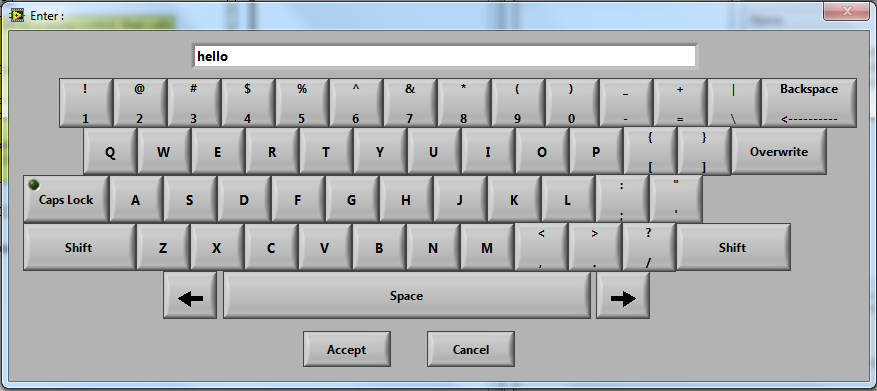
This example provides tools to implement a pop-up alpha-numeric keyboard or numeric keyboard in a LabVIEW VI or application. This is extremely useful in touch screen applications.
Description:
The main elements of this library are the pop-up alpha-numeric keyboard VI (HMI Pop Up Alpha KB.vi), the pop-up numeric keyboard VI (HMI Pop Up Num KP.vi), and an example VI (Sample Usage.vi). The library also includes custom controls and a keyboard driver.
The keyboard VIs can be used as subVIs, as shown in the example, named Sample Usage.vi. In this example, when a user clicks on a control on the front panel, either the alpha numeric or numeric keyboard pops up. This is done using an event structure as shown in the code below.
After the keyboard pops up, the user can type, and then press accept. This will close the pop-up and the words that were typed will be entered in the control. The keyboard VIs include a setup, an event structure, and a finish. The event structure executes each time a button is pressed.
In the event structure, information is passed to the keyboard driver each time there is an event. The keyboard driver performs an operation and then returns the string and the edit position. The keyboard driver is works as a functional global variable. Depending on the command, it will initialize, add a character, replace a character, delete a character, move the cursor to the left or the right, update the edit position, or nothing. The edit position, string, and maximum character length from the previous iteration of the driver are stored in shift registers.
Requirements:
LabVIEW 2012 (or compatible)
No hardware is required, but this would be most useful on a touch panel device.
Information about National Instruments Touch Panel Computers can be found here:https://www.ni.com/en-us/shop/category/hmis-and-displays.html.
Steps to Implement or Execute Code:
- Unzip the attached folder to your computer
- Open the HMI Keyboard Project
- Open and run the Sample usage VI
- Click on the controls "High Limit" or "Low Limit" to use the numeric keyboard
- Click the "Enter Comments" control to use the alpha-numeric keyboard
- Switch to "Admin" in the USER dropdown
- Type the password, "password" and click "Accept" using the alpha-numeric keyboard
- Press "Stop Execution" to stop the VI.
Additional Information or References:
To simply run the keyboard VIs ("HMI Pop Up Alpha KB.vi" or "HMI Pop Up Num KP.vi"):
- Open and run the VI in LabVIEW 2012 or later
- Click (or touch if you're using a touch panel) each letter, number, or symbol to be typed just like on a physical keyboard.
- When finished, click/touch accept to submit the entry. If you do not want to submit, then press cancel.
To implement a keyboard in a VI:
- Use the keyboard VI as a subVI using either of these methods:
- Drag the VI icon from the Keyboard VI front panel to the block diagram of your VI
- In your functions pallette, select "Select a VI..." and then browse to the VI
- If you would like the keyboard to pop up in response to an event such as clicking a text control, place the subVI in an event structure and program it for the appropriate event. This can be seen in the example VI provided (Sample Usage.vi).
Sample Usage Example VI Block Diagram
Alpha-Numeric Keyboard Front Panel
Alpha-Numeric Keyboard Block Diagram
Numeric Keyboard Front Panel
Numeric Keyboard Block diagram
**This document has been updated to meet the current required format for the NI Code Exchange.**
Description-Separate-2Example code from the Example Code Exchange in the NI Community is licensed with the MIT license.


- Mark as Read
- Mark as New
- Bookmark
- Permalink
- Report to a Moderator
moisture vi ?
where are moisture vi ?
We have two ears and one mouth so that we can listen twice as much as we speak.
Epictetus

- Mark as Read
- Mark as New
- Bookmark
- Permalink
- Report to a Moderator
Missing subvi`s
hi ,
i just downloaded the .llb. and found a few subvi`s missing .
Could some one please check that
- Mark as Read
- Mark as New
- Bookmark
- Permalink
- Report to a Moderator
Moisture VI
This was the last VI Project I used The Keyboard and Keypad in. I changed the name before Posting and test ran the Usage.vi. Labview found the files from that project instead of the LLb file.
The Example has been corrected, You can re download it or replace the Alpha KB and Num KP vi's with the ones in the LLB.
- Mark as Read
- Mark as New
- Bookmark
- Permalink
- Report to a Moderator
Missing VIs
The Required VI's are in the llb file. The Alpha KB and Num KP vi's in the Usage.vi pointed to VI's in my last project. Before posting this llb I changed the the names of the VI's. When I test ran the usage.vi on my PC, it worked fine. But Labview found the VI's In another Application llb file.
The Example has been corrected, You can re download it or replace the Alpha KB and Num KP vi's with the ones in the LLB.
- Mark as Read
- Mark as New
- Bookmark
- Permalink
- Report to a Moderator
it works
hey cool it really works
- Mark as Read
- Mark as New
- Bookmark
- Permalink
- Report to a Moderator
license to use this code?
Hi
I duno if I can use your touch screen keyboard VI for commercial usage? Does it need a agreement or license from you perhaps?
- Mark as Read
- Mark as New
- Bookmark
- Permalink
- Report to a Moderator
No licence required
No licence is required, feel free to use this VI as you see fit. Hope you enjoy using it.
Feedback would be very nice, at the time of this post there have been 2321 downloads, but only a few comments have been made. I'm guessing people like this VI since there havent been any bad comments.
Thanks,
Georges


- Mark as Read
- Mark as New
- Bookmark
- Permalink
- Report to a Moderator
Thank you ,you are the best i save a lot of hours of work and i dont think i will make it like this i will include it on my software for disinfectors with touch screen.
- Mark as Read
- Mark as New
- Bookmark
- Permalink
- Report to a Moderator
Thank you BCC!
A note for those using the NI TouchPanelComputers (TPC-2012 here). This llb is not intended for Windows CE targets. That being said, with some relatively minor modifications functionality is maintained, specifically with the "HMI Pop Up Num KP.vi".
Good Luck.


- Mark as Read
- Mark as New
- Bookmark
- Permalink
- Report to a Moderator
Very useful code, thank you for your contributions to the Community 
- Mark as Read
- Mark as New
- Bookmark
- Permalink
- Report to a Moderator
George,
Great utility especially for touch screen equiped systems.
Jeff
- Mark as Read
- Mark as New
- Bookmark
- Permalink
- Report to a Moderator
Wonderfull utility!! Thank you.
Domingo

- Mark as Read
- Mark as New
- Bookmark
- Permalink
- Report to a Moderator
thank you very much BCC!! That code is just what i was looking for.
Ulises
- Mark as Read
- Mark as New
- Bookmark
- Permalink
- Report to a Moderator
Thank you very much BCC!! I looking for Keypad Vis. Finally I found it.

- Mark as Read
- Mark as New
- Bookmark
- Permalink
- Report to a Moderator
Thank you for sharing code.

- Mark as Read
- Mark as New
- Bookmark
- Permalink
- Report to a Moderator
Thank you for sharing. Great code.
- Mark as Read
- Mark as New
- Bookmark
- Permalink
- Report to a Moderator
THANKS

- Mark as Read
- Mark as New
- Bookmark
- Permalink
- Report to a Moderator
Your open square bracket button does not work, this is only because you forgot to add it to the event structrue. Simple mistake especially with so many buttons on the screen. Anyone who needs to add this simply select the correct case on the event structure (the one that has all the numbers, letters and symbols) right click and select edit events handled by this case then add event and find the [{ control and click OK, you are all set to go then

- Mark as Read
- Mark as New
- Bookmark
- Permalink
- Report to a Moderator
Great work! It would be great if handled input from the hardware keyboard as well as the on screen keyboard. When the on screen keyboard or keypad are display, you can press keys on your hardware keyboard and they appear in the entry field. However as soon as you click a key on the screen keyboard/num pad what you typed in gets erased. I understand one should choose one entry method or the other (hw keyboard or on screen keyboard) but you enter values entirely from the hardware keyboard, hitting the Accept button does not return the value to the calling vi.

- Mark as Read
- Mark as New
- Bookmark
- Permalink
- Report to a Moderator
Fantastic work! Thank you for sharing your code.
- Mark as Read
- Mark as New
- Bookmark
- Permalink
- Report to a Moderator
Works Very well, Only issue I found is with the current download the 3 button on the keyboard is not set up in the event structure.
Just required a minor update before full use.

- Mark as Read
- Mark as New
- Bookmark
- Permalink
- Report to a Moderator
This is superb! Many thanks!!


