Vector XL Driver - LabVIEW wrappers
 TroyK
TroyK
 Hooovahh
 08-10-2023
08:25 AM
08-10-2023
08:25 AM
- Subscribe to RSS Feed
- Mark as New
- Mark as Read
- Bookmark
- Subscribe
- Printer Friendly Page
- Report to a Moderator
Products and Environment
This section reflects the products and operating system used to create the example.To download NI software, including the products shown below, visit ni.com/downloads.
- LabVIEW
Software
Code and Documents
Attachment
Description
Description-Separate-1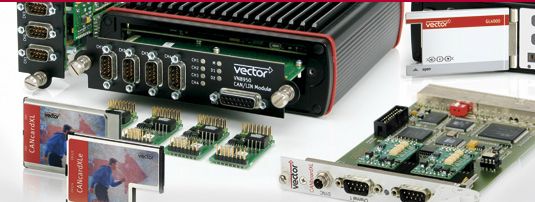 Overview
Vector provides an API for performing low level control of their hardware. The code posted here is primarily wrappers around their XL Driver APIs. These functions come in the form of the vxlapi.dll, and vxlapi64.dll.
Description
Vector has some very nice products for testing vehicle communication buses such as CAN, LIN, MOST and FlexRay.
They sell some very expensive software and some reasonably priced hardware to go along with it.
You can buy just the unlicenced hardware and use the freely available driver that comes along with it in your own custom applications.
Requirements
Vector XL series hardware or VN series hardware and drivers installed. This includes the older CANCase and newer VN16xx USB devices.
Windows Device Driver for the Vector hardware. Check if your device is recognized in Windows Device Manager.
LabVIEW 2020 or later for version 4.
Driver dll Download
The required DLLs are included in the version 4 zip. For those that don't the instructions below are for acquiring these drivers.
To get the dll and driver go to the Vector download page and download it. Just be sure to choose the right options when finding the XL Driver Library containing the dll.
IGNORE THE LABVIEW DRIVER! It is quite restrictive, and requires a rather expensive license.
From the download page select: XL Driver Library > Drivers & Firmware > All
Now click the button that says "Show Results...". You should now have a list of drivers available. Again, ignore the LabVIEW one. Download the XL Driver Library X.X.
Unfortunately the header file supplied with the driver dll doesn't readily import into LabVIEW. We had to make some significant modifications to it before it worked. Then I had to go through and make quite a number of corrections once it was done.
If you're curious the modified header file is called vxlapi3.h.
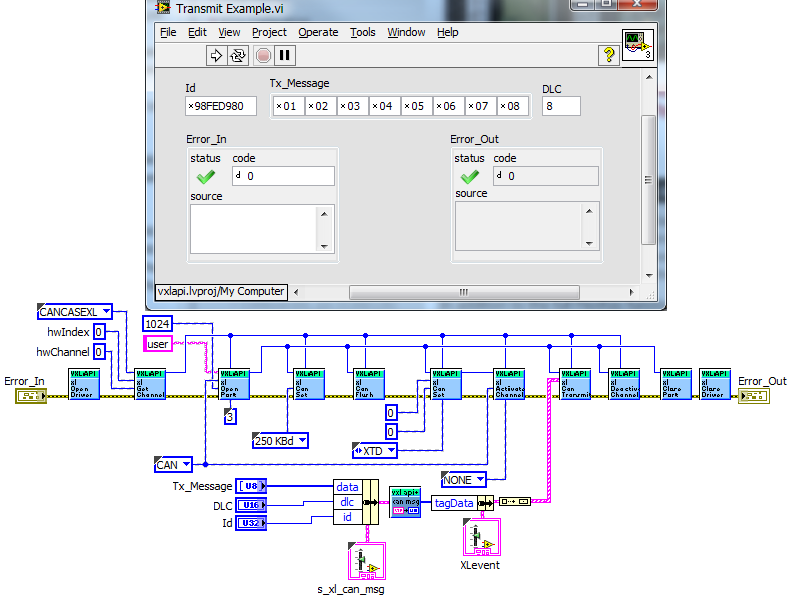
Here I just provide wrappers and an example or two to get you started. Below is one simple example of transmitting a CAN frame.
Version 4 Changes
Hooovahh has made several changes based on user feedback, and released it as Version 4. The two main improvements to this version is to support CAN-FD reading and writing, and to support 64-bit LabVIEW as well. A more clean example also allows for simple reading and writing of frames, along with reading analog and digital values on hardware that supports it.
Version 4 Examples


Other Examples
The "Basic LIN test.vi" assumes you are using the LIN channel to monitor a running LIN connection. It works as a silent slave node on the network.
To actually receive any LIN frames there must already be a LIN master communicating with another LIN slave.
 VI in attached zip file.
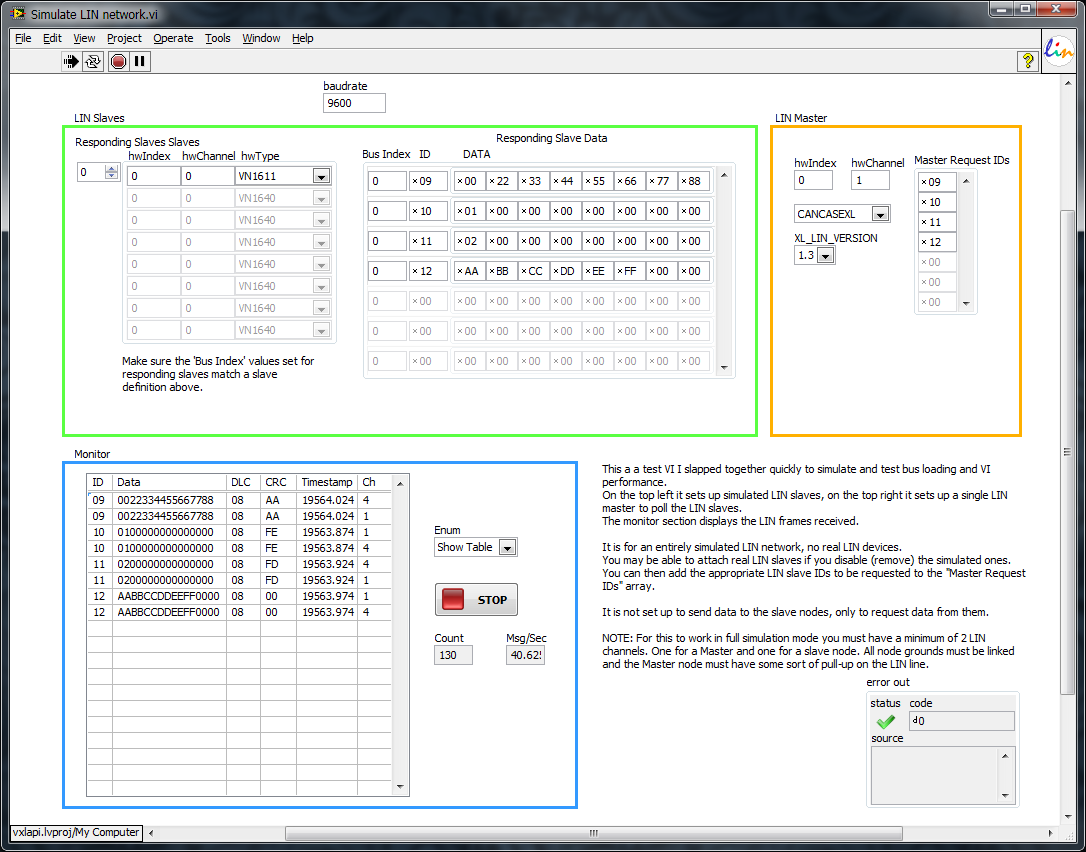
"Simulate LIN network.vi" will transmit from one LIN channel set up as a Master node to other LIN channels set up to respond as Slave nodes.
There is now also a "Simulate LIN network -master transmit.vi" which allows you to transmit data from a Master to Slaves. (Remember that a master node MUST HAVE A PULL-UP!)
CAN Receive example added due to popular demand (updated with documentation and code tidy):
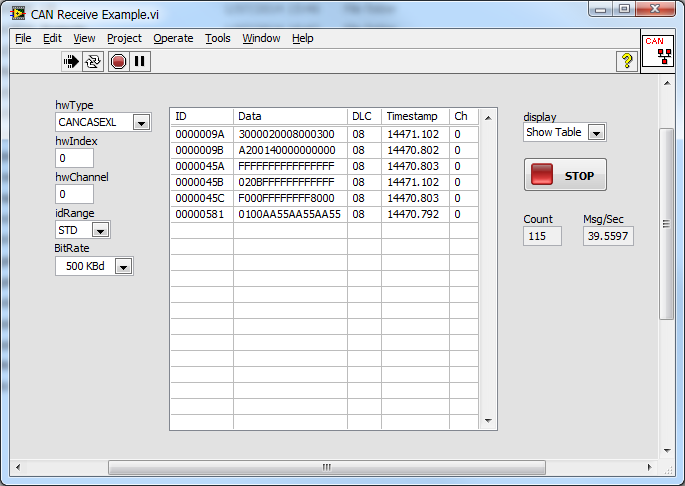
All example VIs and dependencies should now be contained in this latest zip file.
If you find any bugs or updates needed feel free to send me a message.
If you have a support request please post it in the LabVIEW Forum, NOT HERE. I will get a notification and reply in the forum if you add vxlapi as a tag.
Description-Separate-2
Example code from the Example Code Exchange in the NI Community is licensed with the MIT license.


- Mark as Read
- Mark as New
- Bookmark
- Permalink
- Report to a Moderator
Hey Mr. TroyK
I m trying to interface your code with CANcaseXL.
With My ECU for LIN but the problem I m facing is that when I send header 1B to my ECU it show me response but at the same time my CANcaseXL error LED Flashes..so could you please provide the solution for it or could you also help me with error decoding code for LIN.

- Mark as Read
- Mark as New
- Bookmark
- Permalink
- Report to a Moderator
Hello everybody,
first of all many thanks at TroyK for offering these great working VIs!
I've a question depending the CANcaseXL interface, using CAN as bus type and the CANOpen protocol.
If I send e. g. a 601 SDO-Message read with the xlCanTransmit function, I receive with the xlReceive function the 601 SDO-Message and the related 581 SDO-Answer. That works fine, but I want to receive only the 581 SDO-Answer and not the original 601 Message anymore. With the xlCanSetChannelAcceptance and the xlCanAddAcceptanceRange it's only possible to fiter the SDO-Answers.
Is there a way to filter the Transmit messages?
Or am I wrong in using the filter functions?
Thanks for your help!
Best Regards,
Jonas
- Mark as Read
- Mark as New
- Bookmark
- Permalink
- Report to a Moderator
Hello again,
this could be done by switching off the receipts in the xlCanSetChannelMode-function (Tag for tx and txrq: 0).
Thanks to all
Jonas

- Mark as Read
- Mark as New
- Bookmark
- Permalink
- Report to a Moderator
非常非常感谢您的分享,解决了我的大难题。“CANdriver_for_LabVIEW_EN”只能读写信号,无法直接操作帧数据,难以满足柔性化的应用需求。我不知道您是否可以看懂汉语,总之,thankyou!

- Mark as Read
- Mark as New
- Bookmark
- Permalink
- Report to a Moderator
Hello,
I greatly feel it is useful. and I try to use it.
But it fail:
1. when load it, display warning, Capture1.PNG
2. ID display 0x98FED980, and error code 6101
CAN Receive Example.vi<ERR>
vector xl driver error 101 XL_ERR_WRONG_PARAMETER
<b>Complete call chain:</b>
CAN Receive Example.vi

- Mark as Read
- Mark as New
- Bookmark
- Permalink
- Report to a Moderator
A forum user opened two threads about these VIs:
https://forums.ni.com/t5/LabVIEW/communicating-with-ECu-using-FlexRay/m-p/3874152#M1098022
https://forums.ni.com/t5/LabVIEW/FLexRay-xlFrSetConfiguration-VI/m-p/3875133#M1098297
Could you give him some advice, please?
Regards,
Alessia

- Mark as Read
- Mark as New
- Bookmark
- Permalink
- Report to a Moderator
Hello TroyK,
It's a great share, especially for LIN communication.
Recently I have a project refering to FlexRay communication. But I found only fer VIs in FlexRay folder.
So can you kindly share some FlexRay examples or more VIs if you have.
Thank you in advance.


- Mark as Read
- Mark as New
- Bookmark
- Permalink
- Report to a Moderator

- Mark as Read
- Mark as New
- Bookmark
- Permalink
- Report to a Moderator
Hello,
I am new to the community and I am writing for information on the possibility of sending cyclic CAN messages with the Vector CANcaseXL tool (XL libraries).
Your work in Labview is very interesting, I am developing the same application in C # and what I am missing is a cyclic transmission that is precise, like the CANalyzer software.
I currently use a thread that compares the cycle time of each message in the list with the time since the last sending of that ID.
In these iterations, I lose something in terms of periodicity, and therefore I would like to know if there is a more efficient way of managing the transmission messages (e.g. cyclic transmission events).
Were you able to send messages cyclically? How?
Thank you for your availability.
Lello.

- Mark as Read
- Mark as New
- Bookmark
- Permalink
- Report to a Moderator
@cwq421950415 Sorry, I haven't done anything with FlexRay. The VIs included were automatically imported when I ran the dll import wizard on the modified .h file many years ago. They were never tested. Try this forum thread: https://forums.ni.com/t5/LabVIEW/FLexRay-xlFrSetConfiguration-VI/m-p/3875133/highlight/true#M1098297
@amit.bonage3 VN1630 Could have CAN or LIN buses. I assume you're asking if you can send CAN frames out on a bus??? Yes you can (pardon the pun). "writing data to DUT" is dependent on the what is implemented on the DUT.
@lello88 The XL Driver Library does not have a built in method for scheduling cyclic messages in the way you're hoping. You can set up timer schedules, but they only send timer events, it's up to you to then send an event. I get reasonable enough accuracy sending frames on a schedule. Not too much delay added by Windows OS, maybe 1 or 2 ms.
@all Please note the concluding statement in my example document...
If you have a support request please post it in the LabVIEW Forum, NOT HERE. I will get a notification and reply in the forum if you add vxlapi as a tag.

- Mark as Read
- Mark as New
- Bookmark
- Permalink
- Report to a Moderator
MARK_0-1620287799499.png
MARK_1-1620287839183.png
Hi
I use "Can Receive Example" vi,but It show 6112 Error code,
How can i fix it?
Can you tell me the answer?
Thanks you!


- Mark as Read
- Mark as New
- Bookmark
- Permalink
- Report to a Moderator
I'm not certain, but an Invalid Access error might mean that you have the hardware reserved somewhere else. You don't have CANalyzer running on this hardware at the same time do you? Your hardware Index, and Hardware Channel could also be incorrect. I'd check in the Vector Hardware tool to make sure the hardware is recognized.
Unofficial Forum Rules and Guidelines
Get going with G! - LabVIEW Wiki.
17 Part Blog on Automotive CAN bus. - Hooovahh - LabVIEW Overlord

- Mark as Read
- Mark as New
- Bookmark
- Permalink
- Report to a Moderator
ToyK
I would like to combine the receive.vi and the transmitt.vi in one single .vi.
This .vi should be able to receive and transmitt can message in parallel. I dont't know how i can
Can sombody please help me with this problem or had somebody a complete .vi with this
features? I think it should be possible to receive and send in one .vi. OR not?
Best regards!
Luna
- Mark as Read
- Mark as New
- Bookmark
- Permalink
- Report to a Moderator
If you are trying to perform a CAN write, and then wait for a specific response, then I can see some value in a Transmit, that also has a Receive in it. However to do this properly you'd want a way to specify what the ID of the response is expected to be, and then only return those, and then on the next read, return all the frames you read that weren't part of the filtered IDs from the last read, maybe with a VIG, or DVR. When I made the ISO15765 set of VIs here, I created a state machine that would look for a response ID and return it after transmitting a request.
Unofficial Forum Rules and Guidelines
Get going with G! - LabVIEW Wiki.
17 Part Blog on Automotive CAN bus. - Hooovahh - LabVIEW Overlord

- Mark as Read
- Mark as New
- Bookmark
- Permalink
- Report to a Moderator
Hi,
I´m trying to connect LV with Vector but the truth is that im very new in this.
I have 2017 LV version and i already install the XL driver but then i dont know how to run the files attached in the forum
any help?


- Mark as Read
- Mark as New
- Bookmark
- Permalink
- Report to a Moderator
Gentlemen, thank you very much for putting in all this work!
I'm trying to work with a CANcaseXL. I installed all the drivers and tried "\Vector XL LV2018 v3 Hooovahh Edit FD and 64 Bit\CAN\Vector Example CAN Read Write.vi". I'm getting an error 6117 from "CAN Open Channel.vi".
Any ideas?
CANcaseXL Error.png

- Mark as Read
- Mark as New
- Bookmark
- Permalink
- Report to a Moderator
Yeah that is weird. Where do the values for the Channel Settings come from? I recommend calling the CAN Get Channels which should return an array of channels that the XL drivers found. Then you can index the first one, or check for the array size to be what you expect. With my VN1630 it does enumerate the first device as Hardware Index and Hardware Channel at 0, so your settings might be correct.
The drivers seem installed since the error 117 XL_ERR_NOT_IMPLEMENTED is an error from the driver. Can you use this hardware with any other Vector software on this computer? Is the hardware seen in the Vector Hardware Config program? I'm not sure what would cause this error.
Unofficial Forum Rules and Guidelines
Get going with G! - LabVIEW Wiki.
17 Part Blog on Automotive CAN bus. - Hooovahh - LabVIEW Overlord
- Mark as Read
- Mark as New
- Bookmark
- Permalink
- Report to a Moderator
The Channel Settings do come from the CAN Get Channels VI, I just posted the isolated issue.
Vector Hardware Config tool does see the hardware.
Vector HW Config.png
- Mark as Read
- Mark as New
- Bookmark
- Permalink
- Report to a Moderator
Update: I tried Version 3 (instead of 4) with "CAN Open Channel.vi" and that at least got me past this VI without errors. Next error I ran into (vector xl driver error 112XL_ERR_INVALID_ACCESS) was at "CAN Receive.vi".
Just for kicks, I tried using Vector XL LV2011 v2.zip and luckily I was able to communicate with the Vector CANcaseXL module without any errors. I was able to transmit and receive CAN messages.
Since I have a setup where one code set works and one doesn't, please let me know if there are any tests I can run that might help fix any issues.

- Mark as Read
- Mark as New
- Bookmark
- Permalink
- Report to a Moderator
Hello to all
Has anyone made an example with ethernet? I am trying to create it but I am getting an error in the method create driver config.

- Mark as Read
- Mark as New
- Bookmark
- Permalink
- Report to a Moderator
Hello, is there a way to assign a session to a string value for the Automotive Diag Command Set to read the vector device as something like CAN1?
From what I can understand, the ADC set needs a string value of the Channel and Hardware to use for Diag Comm, so CAN1@nixnet will assign it to Channel 1 of an XNET Card and there seems to be a few options to modify to some other hardware, like using XNET on cRIO. So I am hoping there is a way to do something like CAN1@canXLControl to use the Auto Diag commands in LabVIEW, using a Vector Device.
- Mark as Read
- Mark as New
- Bookmark
- Permalink
- Report to a Moderator
@SteveG87, NI's ADC toolkit is not compatible with non-NI hardware. You cannot put in a string for something for the Vector hardware and have it work. It only supports XNet, and NI-CAN devices. A large part of the ADCS toolkit uses the ISO 15765 protocol. I have a blog post talking about it here, along with some code and examples on how to do UDS and other similar multi frame messages, using Vector hardware. The source is available, and open, but comes with no support.
Unofficial Forum Rules and Guidelines
Get going with G! - LabVIEW Wiki.
17 Part Blog on Automotive CAN bus. - Hooovahh - LabVIEW Overlord

- Mark as Read
- Mark as New
- Bookmark
- Permalink
- Report to a Moderator
How can I send and receive the messages defined in the LDF with these tools?
Is there an automatic "translation" from the LDF frames to the BUS signal and back or do I have to send or encode the message manually in HEX format [0B 00 00 FE FE FE 3F 0A E8] (ID + 8 data bytes)?
As I understand the "Read ldf.vi", I cannot select and send the defined messages or frames from the LDF, or do I understand something wrong? please help me.
- Mark as Read
- Mark as New
- Bookmark
- Permalink
- Report to a Moderator
I'm unfamiliar with the Read LDF.zip in this post. In the past I would use XNet to read and parse DBCs and LDFs. The XNet API software can be installed without any additional license, and the database, and conversion can be done without any XNet hardware. There are functions for importing an LDF or DBC, and then you can use the property nodes to get the scaling, and bit information. If you do install XNet software there should also be an XNet Database Editor, which allows you to import files, and look at the frames, signals, and other settings.
Unofficial Forum Rules and Guidelines
Get going with G! - LabVIEW Wiki.
17 Part Blog on Automotive CAN bus. - Hooovahh - LabVIEW Overlord
- Mark as Read
- Mark as New
- Bookmark
- Permalink
- Report to a Moderator
Hi everyone!
Do you know that in vector XL api is there a way to confirm if the Channel i'm trying to open is available or is being used by another application?
Best regards.

- Mark as Read
- Mark as New
- Bookmark
- Permalink
- Report to a Moderator
There Data64 is missing in "Vector XL LV2018 v3 Hooovahh Edit FD and 64 Bit\CAN\Utilities\Unflatten CAN FD Receive.vi". So long FD receives get wrong.
zf_gm_1-1685705332839.png
- Mark as Read
- Mark as New
- Bookmark
- Permalink
- Report to a Moderator
Has anyone created a wrapper for the ETH messages? I am trying to create one to read and write ETH frames.
Kindly post any ideas or sample wrappers created.
Thanks in advance,
yshiv
- Mark as Read
- Mark as New
- Bookmark
- Permalink
- Report to a Moderator
There is no good way to respond to requests that appear as comments in an example-code document.
And for some reason ni.com stopped sending me notifications when people post comments here.
If you want to ask a question: DO IT IN THE FORUM, NOT HERE. (See bold red note in document text.)
LDF: The Read ldf vi just parses an ldf file. You have to write the code to use the information from the ldf with the wrapper library yourself.
It is possible, I have done it, it works well. But I don't own the IP, it isn't open source or mine to share.
Is the channel open elsewhere? Check the permissionMask output when you open the port. If it is the same as your accessMask then you have control. Any bits that are missing in the mask has been opened somewhere else.
ETH: No, I haven't don't the Ethernet part of the API yet. You are welcome to add it, thanks.
I added this wrapper library in the first place in the hopes that others would contribute (like @Hooovahh has, thanks Hooovahh 😉).
- Mark as Read
- Mark as New
- Bookmark
- Permalink
- Report to a Moderator
Yes you are correct. I hate these types of large data manipulation functions because they can be error prone like this. If anyone else needs to fix this, don't try to update each Data65 all the way down. Instead you can right click on 63, then say add element then make that 64. Do the same on the build array to add an input where needed. Oddly enough I must have miscounted too because the Data95 is added to the end multiple times. Delete the two duplicates and the last 2 items in the build array. I'll plan on a release fixing this.
Unofficial Forum Rules and Guidelines
Get going with G! - LabVIEW Wiki.
17 Part Blog on Automotive CAN bus. - Hooovahh - LabVIEW Overlord

- Mark as Read
- Mark as New
- Bookmark
- Permalink
- Report to a Moderator
Hello @Hooovahh, thank you for Version 4 and to support CAN-FD. Is it possible to add A2L file and dcm file in your vector drivers? It will be good to do calibration from dcm file and to read and write some signals from A2L file.
- Mark as Read
- Mark as New
- Bookmark
- Permalink
- Report to a Moderator
A2L parsing is a pain for sure, but also it is outside of the scope of this driver level tool. If I were to ever release something it would be a separate toolkit that handles just that. The only thing I've been able to do is use NI's ECU Measurement and Calibration Toolkit to read the A2L file. Once you get the file opened and understood you then usually need XCP or CCP to do the actual communication. I have some very minor success with with running a trial of the NI toolkit, then looking at the CAN bus to see what was sent and received. Using that I was able to write some codes that does the Connect, Get Status, Get PAG Processor, Get DAQ Info, Unlock, and only then can you do things like Get and Set Characteristics which is what I presume you need to do. What I've come up with is fairly ugly, and uses NI's code from the ECU MC toolkit to do the heavy lifting. So distributing what I've done online isn't an option.
Another challenge is just my experience with XCP, CCP, and A2Ls if fairly limited. There's lots of variation in the communication and it isn't something I deal with often so I don't know what things to look out for or issues. I've done stuff with ISO15765, and UDS, most of my career and I have probably forgotten more about that, than I know about A2Ls.
If someone else can come up with a parsing utility for the A2Ls Maybe I could use it and share what I have. Things like Get XCP Property from the name, Get ECU Names, Measurement Names, Characteristic Names, Event Channel Names, Defined Pages, Groups, Functions, Get Address Property, Data Type, Byte Order, Minimum, and Maximum of Parameters or Characteristics. Realistically it is something like 150 functions wrapped into a couple Polymorphic VIs.
Unofficial Forum Rules and Guidelines
Get going with G! - LabVIEW Wiki.
17 Part Blog on Automotive CAN bus. - Hooovahh - LabVIEW Overlord

- Mark as Read
- Mark as New
- Bookmark
- Permalink
- Report to a Moderator
Hello Guys, there was several mentions in this thread from a FORUM, but weblink is dead (at least for me) > can you please re-share the Forum link again; thank you in advance.
- « Previous
- Next »


