Voice Recognition using Advanced Signal Processing Toolkit using LabVIEW
 migration-bot
06-14-2023
09:17 AM
migration-bot
06-14-2023
09:17 AM
- Subscribe to RSS Feed
- Mark as New
- Mark as Read
- Bookmark
- Subscribe
- Printer Friendly Page
- Report to a Moderator
Products and Environment
This section reflects the products and operating system used to create the example.To download NI software, including the products shown below, visit ni.com/downloads.
- LabVIEW Advanced Signal Processing Toolkit
- LabVIEW
- LabVIEW Advanced Signal Processing Toolkit
Software
Code and Documents
Attachment
Description
Description-Separate-1Overview
This example VI utilizes the Advanced Signal Processing Toolkit to perform voice analysis on a sound file.
Description
I unfortunately cannot get credit for this package but I don't know who the author is. For a very detailed tutorial on the subject of voice recognition and the original files, please visit Using LabVIEW for Voice Signal Analysis. The Advanced Signal Processing Toolkit includes the Modeling and Prediction VIs that you can use to obtain the LPC coefficients or AR model coefficients, as shown in the figures below. The LabVIEW Signal Processing VIs include the Scaled Time Domain Window VI and the FFT VI. You can use these VIs to apply a window to the source signal and calculate the DFT of the signal block, respectively. The Advanced Signal Processing Toolkit also includes the Correlation and Spectral Analysis VIs that you can use to calculate the real cepstrum of a signal. In the figures below, you use the WA Multiscale Peak Detection VI to detect the resonance peaks in the cepstrum.
Requirements
- LabVIEW 2012 (or compatible)
- Advanced Signal Processing Toolkit
Steps to Implement or Execute Code
- Download the example and corresponding files
- Unzip the folder
- Run the VI
Additional Information or References
Top level VI Block Diagram
VoiceAnalysis LV2012 NI verified.png
**This document has been updated to meet the current required format for the NI Code Exchange.**
Description-Separate-2
Example code from the Example Code Exchange in the NI Community is licensed with the MIT license.


- Mark as Read
- Mark as New
- Bookmark
- Permalink
- Report to a Moderator
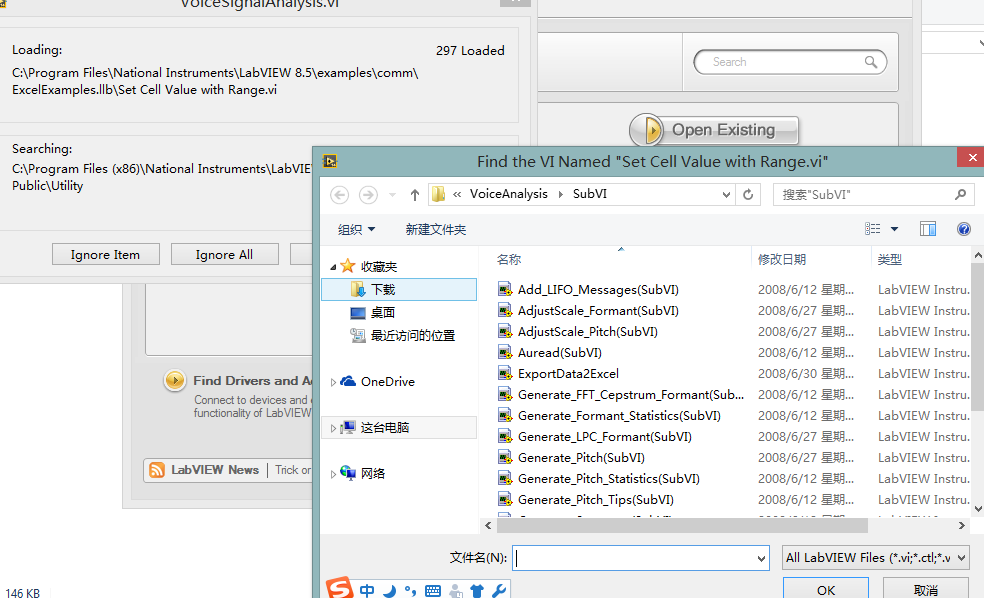 hello! how to solve this problem? i am using labview2014, and many vis for example can't load.

- Mark as Read
- Mark as New
- Bookmark
- Permalink
- Report to a Moderator
It would depend on which VI's you're referring to. Some VI's may need the Advanced Signal Processing Toolkit mentioned above. Other VI's like the Excel specific ones have changed with newer versions of LabVIEW.
You can still open the main VI without these missing ones to figure out which VI's are missing and what you need to run the program.
Applications Engineer
National Instruments
- Mark as Read
- Mark as New
- Bookmark
- Permalink
- Report to a Moderator
thanks


- Mark as Read
- Mark as New
- Bookmark
- Permalink
- Report to a Moderator
Many vi's are missing and the main vi cannot run without them. Where are they?


- Mark as Read
- Mark as New
- Bookmark
- Permalink
- Report to a Moderator
NI verified version include Excelexamples.llb that contains all the missing VIs.
Best Regards
NIIT AE


