- Subscribe to RSS Feed
- Mark Topic as New
- Mark Topic as Read
- Float this Topic for Current User
- Bookmark
- Subscribe
- Mute
- Printer Friendly Page
Can not get Hardware Watchdog to work on cFP2000

 selmore
01-03-2008 02:53 PM
- Mark as New
- Bookmark
- Subscribe
- Mute
- Subscribe to RSS Feed
- Permalink
- Report to a Moderator

 Graziano
01-04-2008 04:34 AM - edited 01-04-2008 04:34 AM
- Mark as New
- Bookmark
- Subscribe
- Mute
- Subscribe to RSS Feed
- Permalink
- Report to a Moderator
It seems to me that I've found why. It seems to be quite an odd behavior, but... you have to "whack" manually at least 2 times, or ocurrence won't be generated!
I'm cleaning up my code, then I'll post it.... I'll be back in a minute!
BTW, the problem is that watchdog VIs are not documented...... your code seems right, in fact, if you manually switch LED D some times, at the beginning, then it works!
PS.: which version of LV are you using?
graziano
Message Edited by Graziano on 01-04-2008 04:34 AM
Graziano
01-04-2008 04:45 AM - edited 01-04-2008 04:49 AM
- Mark as New
- Bookmark
- Subscribe
- Mute
- Subscribe to RSS Feed
- Permalink
- Report to a Moderator
Have a nice day!
graziano

Message Edited by Graziano on 01-04-2008 04:49 AM

01-04-2008 08:12 AM
- Mark as New
- Bookmark
- Subscribe
- Mute
- Subscribe to RSS Feed
- Permalink
- Report to a Moderator
Thanks for the help graziona!
I'm running LV 7.1.1 with Watchdog 2.1.5 and implemented you change without any errors, but it still won't work. One thing I noticed is that the Watchdog Status output from the Whack remains DISABLED no mater how many times I Whack it. Is there some secret to enabling the HW Watchdog other than the Config block?
Thanks,
Steve
Graziano
01-04-2008 08:38 AM
- Mark as New
- Bookmark
- Subscribe
- Mute
- Subscribe to RSS Feed
- Permalink
- Report to a Moderator
On my cFP-2020, your original VI doesn't work, and with my modifications it works, I don't know what it's related to.... I'll check the "disabled" stuff.....
I have LV 7.1, Real-Time 7.1 and WatchDog 2.1.3.
I'll be back in a while....
graziano
Graziano
01-04-2008 08:52 AM
- Mark as New
- Bookmark
- Subscribe
- Mute
- Subscribe to RSS Feed
- Permalink
- Report to a Moderator
I've tested application, and as "watchdog status" I get "running. Can you post back the complete updated version f your VI?
Once I made a silly VI demonstrating watchdog: it's here. It resets cFP-2020 when watchdog expires. If you want to try it... obviously you should make some daptions.
graziano
Graziano
01-04-2008 09:04 AM - edited 01-04-2008 09:06 AM
- Mark as New
- Bookmark
- Subscribe
- Mute
- Subscribe to RSS Feed
- Permalink
- Report to a Moderator
I've also found that the two "whack" are not needed, they can be substituted by "START" and "ENABLE", that you can find in advanced watchdog functions. They're embedded in Whack function, that's why putting 2 whacks it worked!
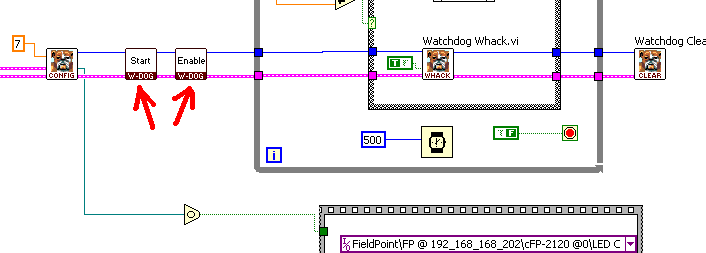
About your problem, I can't actually figure out what's going on... if it is a matter of driver, or a matter of device (I've tested on cFP-2120).
graziano
Message Edited by Graziano on 01-04-2008 09:06 AM

01-04-2008 12:49 PM
- Mark as New
- Bookmark
- Subscribe
- Mute
- Subscribe to RSS Feed
- Permalink
- Report to a Moderator
I finally managed to not only make it work, but to do what I want it to!! Your version initially didn't work for me because the RT and the programmer were out of sync, so to speak.
The latest VI is attached and allows for some additional functionality.
Thanks for all the assistance,
Steve
P.S.: I know I committed a mortal sin by using Local Variables, but it works!
01-07-2008 09:17 AM
- Mark as New
- Bookmark
- Subscribe
- Mute
- Subscribe to RSS Feed
- Permalink
- Report to a Moderator
Hi,
Thanks for posting your solutions! This helps other visitors to the forum. Just for reference, here are a couple of KnowledgeBase articles for reference:
Watchdog Timers - The New Industrial Feature Set
FieldPoint Watchdog Timer Questions
Good luck with your application!
Americas Services and Support Recruiting Manager
National Instruments
- Tags:
- cfp
- Watchdog_Timer
