- Document History
- Subscribe to RSS Feed
- Mark as New
- Mark as Read
- Bookmark
- Subscribe
- Printer Friendly Page
- Report to a Moderator
- Subscribe to RSS Feed
- Mark as New
- Mark as Read
- Bookmark
- Subscribe
- Printer Friendly Page
- Report to a Moderator
Arduino Example: Simple LED

Before opening this example, make sure to install the LabVIEW Interface for Arduino.
Description:
This example shows how to light up an LED using the LabVIEW Interface for Arduino.
Tutorial:
- Make sure you have installed the LabVIEW Interface for Arduino.
- Open the Simple LED Example VI (search for "Arduino" in the example finder once the toolkit is installed).
- On the front panel, select the Arduino digital pin connected to the LED.
- Build the circuit schematic shown on the block diagram.
- Connect your Arduino to your PC with a USB cable. Optionally you can specify the COM port associated with your Arduino to the VISA resource terminal of the Init.vi to decrease the time require for LabVIEW to connect to the Arduino.
- Click Run.


Peter Rifken - Field Engineer & Business Manager
Boston / North New England & Maine


- Mark as Read
- Mark as New
- Bookmark
- Permalink
- Report to a Moderator
Is there a way to download code to the microcontroller and leave it running without the usb conection. For example the led blinking every 5 seconds without labview connected to it.

- Mark as Read
- Mark as New
- Bookmark
- Permalink
- Report to a Moderator
Could you please save the Simple LED Example.vi for Labview 2009?
Thanks!

- Mark as Read
- Mark as New
- Bookmark
- Permalink
- Report to a Moderator
I've uploaded a version of the example saved in LabVIEW 2009. Let me know how that works out!
Peter Rifken - Field Engineer & Business Manager
Boston / North New England & Maine
- Mark as Read
- Mark as New
- Bookmark
- Permalink
- Report to a Moderator
thank you! i managed to open it, though i'm still configuring the arduino interface so i don't know if it works!

- Mark as Read
- Mark as New
- Bookmark
- Permalink
- Report to a Moderator
Great job Peter-R. This should be everyone's first example to build. The "hello world" example of LabView. One suggestion that might help someone would be to create the constants on the Initialize, for example which com port to use and which Arduino being used. That was the only troubles I had, but once I got those settings corrected it worked fine. Next I added a switch and expanded on this basic building block for the Arduino and LabView.

- Mark as Read
- Mark as New
- Bookmark
- Permalink
- Report to a Moderator
Thanks for this topic. It helped me a lot to interface Arduino with LabVIEW and test it. But, it took a while for the Arduino to execute LabVIEW front panel's instructions once I run the VI. Once the LED is ON, it obeys the commands given through the VIs. But, If I stop the VI and run it again, it takes a while for the LED to light up. Is there anything I am doing wrong?
- Mark as Read
- Mark as New
- Bookmark
- Permalink
- Report to a Moderator
Baudrate is not specified or defined in the Firmware available on the LIFA folders. Would that be a problem for not successfully communicating with the arduino? Kindly suggest.

- Mark as Read
- Mark as New
- Bookmark
- Permalink
- Report to a Moderator
Hi
I'm testing LabVIEW interface of arduino with nano ver3.0
Program I made was working and are on same basis like this. But even for simple task like led on/off the program taking about 5 sec.
As I'm usign nano borad. Is it same for all ?
Or I'm doing something wrong ?

- Mark as Read
- Mark as New
- Bookmark
- Permalink
- Report to a Moderator
Cool , it is working very well
i just modified the value with boleen and converted to to 0,1 value. it makes it cool
https://docs.google.com/open?id=0BwuFUcTYeBS9WXZfbndSMFh6dnc
Machanical Power Department
Helwan University, Egypt
- Mark as Read
- Mark as New
- Bookmark
- Permalink
- Report to a Moderator
Another example with a switch on the front panel controlling the LED. http://labviewtest.blogspot.com/
- Mark as Read
- Mark as New
- Bookmark
- Permalink
- Report to a Moderator
Great feedback!
Peter Rifken - Field Engineer & Business Manager
Boston / North New England & Maine

- Mark as Read
- Mark as New
- Bookmark
- Permalink
- Report to a Moderator
Is there any version that allows changing the intensity of the LED?
Thanks.

- Mark as Read
- Mark as New
- Bookmark
- Permalink
- Report to a Moderator
hello
i can't get tis thing running on my arduino duemilanove 
can you guys help me ?

- Mark as Read
- Mark as New
- Bookmark
- Permalink
- Report to a Moderator
No. Labview is controlling the LED so it must be connected to the Arduino, although it is possible to connect wirelessly e.g. bluetooth with a shield.
- Mark as Read
- Mark as New
- Bookmark
- Permalink
- Report to a Moderator
By creating a while loop that goes inside the INIT and CLOSE vi's, and deleting the current while loop including it's related stop button, it is possible to change pin and values whilst the VI is running. (Worked for me- sorry about picture -No Snipping Tool in Vista) 

- Mark as Read
- Mark as New
- Bookmark
- Permalink
- Report to a Moderator
Is there a particular reason why the default Arduino is always the Uno? I don't have one at the moment, and am reluctant to buy one, just because that's the one that's the default. The Mega is also indicated, but I don't need one, and if I did it would be more the ADK kind. The one that's shown with the Atmel 328 indicated, what is it?
And why doesn't the choice of board design stay stored between runs?

- Mark as Read
- Mark as New
- Bookmark
- Permalink
- Report to a Moderator
Dear Mr.Peter-R
I did step necessary prccess step by step. But I could not Simple LED, ( I'm pitty,,,,,,)
My arduino is not Uno but Duemilanove/Atmega328. Is not that work?
Could help me?
Tahnk for your help,,
H.L.Valley ( I live in Japan)
- Mark as Read
- Mark as New
- Bookmark
- Permalink
- Report to a Moderator
Not looking good for Duemilanove. I tried changing baud rates, etc but it comes up error 5002 incorrect firmware. Labview doesn't like it, the Arduino programme seemed to upload okay.
- Mark as Read
- Mark as New
- Bookmark
- Permalink
- Report to a Moderator
Aren't you the happy one. People will respond to positive comments, but you don't actually seem to have an Arduino board of any description so what exactly is the point you are trying to make!
- Mark as Read
- Mark as New
- Bookmark
- Permalink
- Report to a Moderator
Dear teucher
I thanks for your respons. And I did not show you my trouble point.
Yes, I received error 5002 form Labview.
Yesterday, I could not sleep in a dream of Arduino and Labview,,,,,,,,,,,
So, I got a Arduino UNO on the way home. 
I tried it. It is running now,,,,
I'm going to check and try to do by the Duemilanove again.
I thnks for your comments again.
H.L.Valley
- Mark as Read
- Mark as New
- Bookmark
- Permalink
- Report to a Moderator
All,
Glad to see the discussion and supporting community. I am now based in Boston working with our customers in the northeast and thus do not actively monitor this post. However, you should be aware that there is an Arduino Community (and support forum) here.
Have fun with your respective boards and a great day as well.
Peter Rifken - Field Engineer & Business Manager
Boston / North New England & Maine
- Mark as Read
- Mark as New
- Bookmark
- Permalink
- Report to a Moderator
Hi all,, I 'm running simple LED program on arduino uno.. Its giving error 5002. I have set the Baud rate, Com port, firmware installation. Looked into all the forum but no use. Here is the screen shot please help me 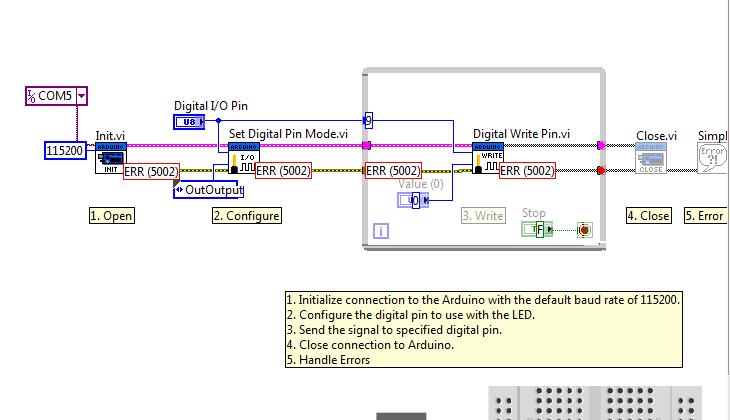
- Mark as Read
- Mark as New
- Bookmark
- Permalink
- Report to a Moderator
Have you checked baud rate on Labview VISA? I can only assume you are new to LIFA and this is your first program. There is a step by step installation and first program (copy and upload) elsewhere on the forums. Sorry I'm at work and can't really go into it much more at present time.

- Mark as Read
- Mark as New
- Bookmark
- Permalink
- Report to a Moderator
Hi everyone, does the example work for the arduino duemilanove or only for uno? Thanks.


- Mark as Read
- Mark as New
- Bookmark
- Permalink
- Report to a Moderator
How mariano1 said in Feb 21: "Is there a way to download code to the microcontroller and leave it running without the usb conection?"

- Mark as Read
- Mark as New
- Bookmark
- Permalink
- Report to a Moderator
nice to meet u all. i am a new user.
i am ok in using arduino uno with labview interface.
To interface with pc and to program, how can i get the driver for arduino nano?
Thank u all my friends.

- Mark as Read
- Mark as New
- Bookmark
- Permalink
- Report to a Moderator
What driver are you referring to and what operating system are you using?
hrh1818

- Mark as Read
- Mark as New
- Bookmark
- Permalink
- Report to a Moderator
How do you get to that window that shows you the diagram. It seems to me that it only shows on error, and it is a matter of luck that I get it.
Thanks
- Mark as Read
- Mark as New
- Bookmark
- Permalink
- Report to a Moderator
Is the answer really as simple as going to the drop down menu, select WINDOW and show block diagram or use tile if you want to have both on screen.

- Mark as Read
- Mark as New
- Bookmark
- Permalink
- Report to a Moderator
Hi, I'm a newbeginner of LIFA.
I have been testing following example led for a few days.
But I have been fighting error code 5002.
I don't know reason to happen.
Plase help me~~~~

- Mark as Read
- Mark as New
- Bookmark
- Permalink
- Report to a Moderator
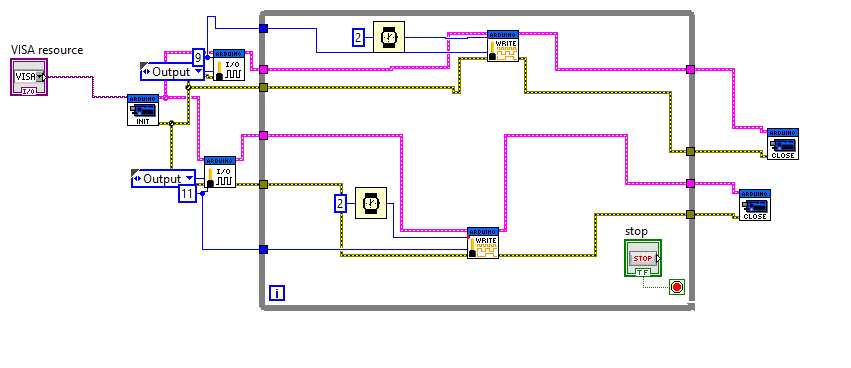
hello, i'm rai from indonesia, i have project make oximetry based labview. i have some problem with driving sensor spo2 by LIVA. i used sensor spo2 type nellcor. This is my program to driving sensor, can not driving sensor

- Mark as Read
- Mark as New
- Bookmark
- Permalink
- Report to a Moderator
hi,
I would to open and close a led for differents seconds.
For example: if I have an array like this T:[0,1,2,0,3,2,0,4,0,4,0,2] where the numbers in the array are the seconds that the led is open. How I can do it?

- Mark as Read
- Mark as New
- Bookmark
- Permalink
- Report to a Moderator
I try this program but i did not get output plz any boudy provide arduino code on this email 'divyangkuk10@gmail.com'

- Mark as Read
- Mark as New
- Bookmark
- Permalink
- Report to a Moderator
Buenas soy nuevo en el tema labview y eso, y tengo un proyecto donde me piden realizar la conversion de Binario a Decimal. Debo ingresar las combinaciones externamentes ya sea pulsadores que conecto a Arduino y este a Labview y en Labview encender un 2 display hechos con leds. Debe reconocer de 0 a 99. Gracias por la ayuda de antemano

- Mark as Read
- Mark as New
- Bookmark
- Permalink
- Report to a Moderator
Is there possible way to make this with multiple leds but just with linx or hovi, idk how its called


Is there a way to download code to the microcontroller and leave it running without the usb conection. For example the led blinking every 5 seconds without labview connected to it.