- Document History
- Subscribe to RSS Feed
- Mark as New
- Mark as Read
- Bookmark
- Subscribe
- Printer Friendly Page
- Report to a Moderator
- Subscribe to RSS Feed
- Mark as New
- Mark as Read
- Bookmark
- Subscribe
- Printer Friendly Page
- Report to a Moderator
Before opening this example, make sure to install the LabVIEW Interface for Arduino.
Description:
This example shows how to use a stepper motor on the Arduino using the LabVIEW Interface for Arduino.
Tutorial:
- Make sure you have installed the LabVIEW Interface for Arduino.
- Open the Arduino Stepper Motor Example VI (search for "Arduino" in the example finder once the toolkit is installed).
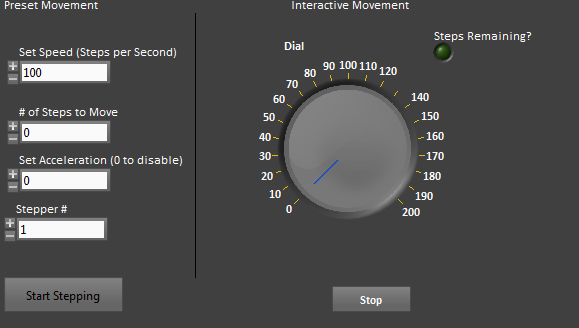
- On the front panel, select the stepper motor # you want to use. If using preset movement enter the speed, number of steps, and acceleration.
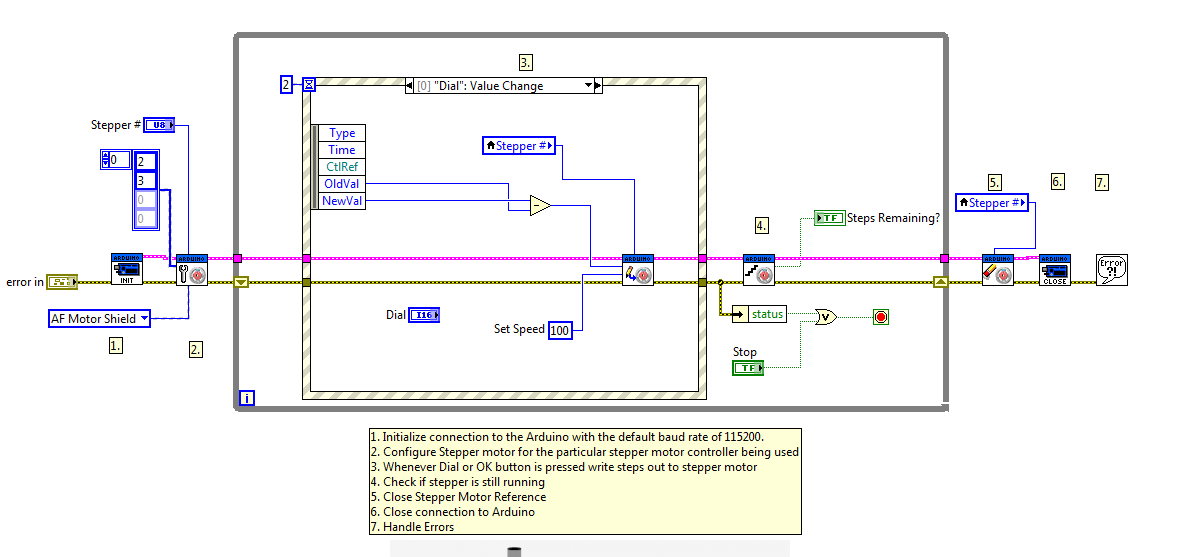
- Connect your steper motor driver to the Arduino. The block diagram shows a connection diagram for using an Easy Stepper motor driver.
- Click Run.
- The VI will run until you select Stop. You can adjust the dial for interactive movement and change the preset constants at run time.
Principal Software Engineer
NI


- Mark as Read
- Mark as New
- Bookmark
- Permalink
- Report to a Moderator
- Mark as Read
- Mark as New
- Bookmark
- Permalink
- Report to a Moderator
Hi shellykk, I posted an example but It wont me upload the vi here. If you go to manage versions at the top of this page and go to version 2 it should be there.
- Mark as Read
- Mark as New
- Bookmark
- Permalink
- Report to a Moderator
Thanx... I figured out a way.... Just reversd the inputs... Couldnt find ur vi.....

- Mark as Read
- Mark as New
- Bookmark
- Permalink
- Report to a Moderator
hi. i am getting error 1073676294 when i try and run the program. i have been looking around and i know this is not an error. what i dont know is how to fix it. did any one else have the same problem or whats going on. loosing my hair over this one.
thanks in advance......
- Mark as Read
- Mark as New
- Bookmark
- Permalink
- Report to a Moderator
if you've searched for the error you must have got the following solution. Try it & check if it works:
http://digital.ni.com/public.nsf/allkb/FDE6168683769D0886257975006D95B0
Besides check if the baud rate suits your processor & system.

- Mark as Read
- Mark as New
- Bookmark
- Permalink
- Report to a Moderator
Hi guys I'm new to arduino and labVIEW. Could you please tell if if can run the same example using a L6470 stepper driver instead of an easy driver. Also, do we have to upload any codes for the arduino before commanding the motor through the labVIEW front panel? I've got a stepper setup with a L6470 but the motor is not running  any advice? Thanks in advance !!

- Mark as Read
- Mark as New
- Bookmark
- Permalink
- Report to a Moderator
HI guys,
I am trying ti run an applied motion stepper with a Big Easy driver, arduino and labview. However when i connect the terminals as specified in the diagram, the circuit runs fine but i get a warning OK 1073676294 and the stepper doesnt run at all. I need to work this out ASAP, please reply at the earliest.
- Mark as Read
- Mark as New
- Bookmark
- Permalink
- Report to a Moderator
Hi,
I also had the same setup but it didnt work. Then I switched the step and direction pins so that the step pin is connected to arduino digital pin 2 and direction pin to arduino digital pin 3. It worked fine then. Try that.

- Mark as Read
- Mark as New
- Bookmark
- Permalink
- Report to a Moderator
i try to use this vi and it doesnt work
its running but nothing is moving,when i connect the step pin to pin 1(without changing the pin in the vi),the engine start moving even if i dont push the "start stapping" button.when i do push it the engine rotate faster untill the green light go off and then it keep rotating..someone know why?

- Mark as Read
- Mark as New
- Bookmark
- Permalink
- Report to a Moderator
how do you change the baud rate to 115200?

- Mark as Read
- Mark as New
- Bookmark
- Permalink
- Report to a Moderator
move your cursor on the arduino VI and then on the baudrate pin on its left, right click and create a constant, I presume it's already set to a default value of 115200.

- Mark as Read
- Mark as New
- Bookmark
- Permalink
- Report to a Moderator
When I set the speed to anything above 400 the motor will never stop (i.e. the "step remaining" output misses zero and starts to count down from 65000...) any idea? is the step remaining counter done at the Arduino or in Labview or both?


- Mark as Read
- Mark as New
- Bookmark
- Permalink
- Report to a Moderator
hi. i have a 5 wire stepper motor (5V-0.6A) . and i wrote a program in labview. i use two ULN2003 as interface. when i running the program, the motor work slowly. i don't know that my program is incorrect or my interface connection!!
please show me what program is correctly.
thanks
- Mark as Read
- Mark as New
- Bookmark
- Permalink
- Report to a Moderator
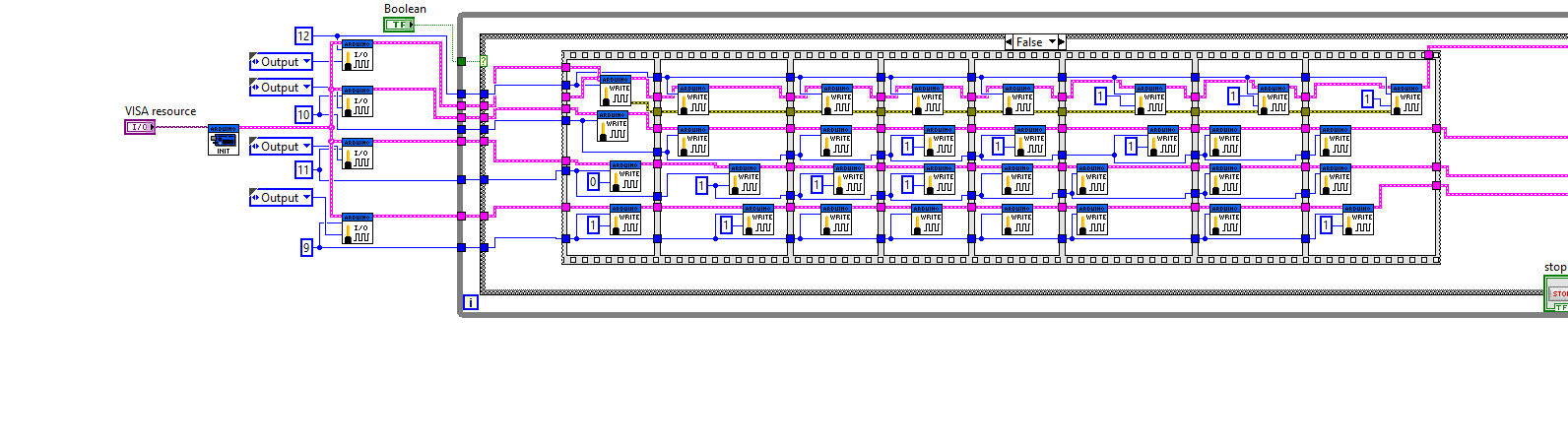
this is my program (for half step):


- Mark as Read
- Mark as New
- Bookmark
- Permalink
- Report to a Moderator
It appears you are using LIFA to generate pulses to drive a step motor. LIFA is to slow to drive a step motor. You should instead be using Aduino to generate the pulses and only use Laview to tell Aduino in which direction to move and how many steps to move. This is how the stepper VI that comes with LIFA works.
Here is an example for a 5 volt 4-phase 5 wire stepper motor and a UNL2003 driver bard that will show you how to write the code for Arduino.
hrh1818


- Mark as Read
- Mark as New
- Bookmark
- Permalink
- Report to a Moderator
Here is an example for a 5 volt 4-phase 5 wire stepper motor and a UNL2003 driver bard that will show you how to write the code for Arduino.
Hey hrh1818
Where is the example? The setup you describe is almost the same as mine and I can't figure out how to make it work. Could you please share your exampe with me?
Kind regards
Ruts

- Mark as Read
- Mark as New
- Bookmark
- Permalink
- Report to a Moderator
hello i am having the same issue with this VI.
i did my own driver which is L298 connected to some diodes .
Have you been able to do your LIFA code

- Mark as Read
- Mark as New
- Bookmark
- Permalink
- Report to a Moderator

- Mark as Read
- Mark as New
- Bookmark
- Permalink
- Report to a Moderator
Hello all,
I notice that the maximum number of counts in this program is limited to a 16 bit integer, i.e. (2^16/2)-1 (because of both directions). This is a problem for me as I have modified this program so that I can move the motor a set number of pulses, but my requirement is larger than this limit. I tried just changing the representation to a 32 bit integer in the VI and the LIFA subVIs, but this caused the motor not to turn at all.
Could someone please give me some help in trying to fix this?

- Mark as Read
- Mark as New
- Bookmark
- Permalink
- Report to a Moderator
LIFA was limiting and slow for me too. I ended up replacing LIFA with a very small sketch that recieves the number of steps and speed (as a string of bytes) on an UART port. At the labview side, I used VISA to access the COM port and concatenate a string containging the number of steps etc. (the string is made of bytes of data) I used VISA WRITE vi to transmite the string. to move the stepper I used AccelStep library for Arduino. It is more complicated to build but you would have control over everything.
- Mark as Read
- Mark as New
- Bookmark
- Permalink
- Report to a Moderator
This sounds interesting! Could you perhaps send the sketch that you used? It would be much appreciated!

- Mark as Read
- Mark as New
- Bookmark
- Permalink
- Report to a Moderator
Hi Arash
Could you enlighten on how to modify the code to control two stepper motors?
The help and documentation on this are quite hard to come by.
Thanks a lot.

- Mark as Read
- Mark as New
- Bookmark
- Permalink
- Report to a Moderator
Hi - I have a slightly adjusted version of the Arduino Uno (Orion - see MakeBlock) that uses 2 more analogue inputs, instead of the 6 that normally comes with it.
In the LIFA_Base code group (LabVIEWInterface.cpp to be exact) there is a call to "analogRead(x)", where 'x' is the pin#. I wish to extend beyond '5' so I can include A6 and A7 but i'm not having much luck.
Can anyone give me some direction on this? I'd like to look into the 'analogRead' function call more but I can seem to find it anywhere (i've searched all the h files included)...
thanks.
David.

- Mark as Read
- Mark as New
- Bookmark
- Permalink
- Report to a Moderator
can you share the arduino library? the one I have doesnt include the stepper motor, the ir transmit and the lcd. Thanks in advance 
- Mark as Read
- Mark as New
- Bookmark
- Permalink
- Report to a Moderator
Please explain in more detail what you mean by "share the Arduino library". LIFA includes the stepper motor example your comment applies to . You can examine the Arduino stepper code in LIFA. How dies what is avslible now differ from what you are asking.
hrh212
- Mark as Read
- Mark as New
- Bookmark
- Permalink
- Report to a Moderator
Miguel -
You don't need any extra labview drivers other than those that come with LabVIEW. The front interface (LabVIEW) just needs the VISA drivers.
What you need is the code on the Arduino itself, set up to drive a stepper motor. To understand this and find the code you need (and examples), you are best going to the arduino website (http://www.arduino.cc). You'll need to do this to ensure you are interfacing with your particular stepper motor and pin connection properly. You will also learn how to upload the firmware to the arduino. Once you have this up and working you don't need to touch the code any further. The rest is in LabVIEW.
Once you have the ports and code established on the arduino, you simply send commands from your LabVIEW code to run particular ports/pins - which you can see from the example code on this page.
I pretty much used the example here. I hacked it to what I needed but it provided a pretty good foundation for what you'll need.
EDIT: of course, you'll need to install the LabVIEW interface for Arduino; link and instructions found at top of the example.
- Mark as Read
- Mark as New
- Bookmark
- Permalink
- Report to a Moderator
hrh212, David
thank you both for your response. I didnt notice I had an old version of the Arduino interface for LabVIEW, I now have it updated and its working fine

- Mark as Read
- Mark as New
- Bookmark
- Permalink
- Report to a Moderator
How can I make mutiple stepper motor move at the same time?
- Mark as Read
- Mark as New
- Bookmark
- Permalink
- Report to a Moderator
Sending a command to the stepper motor (Arduino) is very fast. This means you can send a RIGHT and then a FWD command and it will look like both stepper motors are moving at the same time.

- Mark as Read
- Mark as New
- Bookmark
- Permalink
- Report to a Moderator
hello everyone
if anybody knwo about how i change direction of stepper motor in this example , please tell me. i need it really
thanks

- Mark as Read
- Mark as New
- Bookmark
- Permalink
- Report to a Moderator
thanks for you help
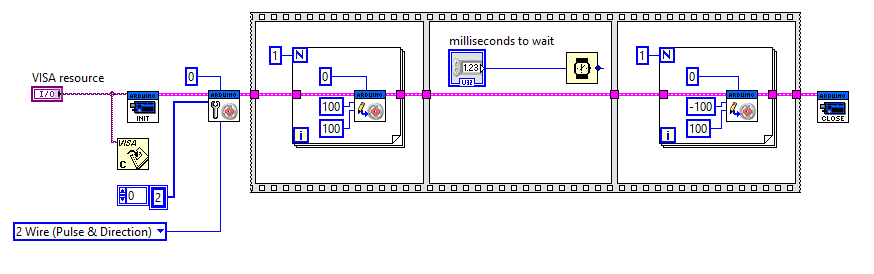
i already down that like image i send bellow. the problem is when i put negative value for first step and posetive value for other step both of them going in one direction.
can you help me with that?
- Mark as Read
- Mark as New
- Bookmark
- Permalink
- Report to a Moderator
amkamyab -
all you're doing here is adding a negative sign to the # of steps to move variable. This does not change the direction.
it is the input stepper # that you need to change.
I suggest you study the code on your Arduino (firmware) and determine which stepper motor has the stepper # value associated with it.
you will also need to understand that the direction of the stepper motor is given a separate stepper # value (if you are using the base LabVIEW Arduino code). The quick test here would be to change the value from '0' to '1'.
- Mark as Read
- Mark as New
- Bookmark
- Permalink
- Report to a Moderator
HI
There is few error in you program.
1) Remove unused "Close Visa" . "Close Arduino" at the end is enough.
2) "Stepper Move "Vi is used for send value of move one time before moving.
3) After, you need wait the end of moving,before send another moving command.
4)To know if the move is finish , you can use Stepper toGo Vi. Put it in while structure and watch step remaining value.
5) if you want prematurely, use "Stepper Move "Vi with 0 in "To Move Value. Place it in case structure place in previous while.
6) When all steps are finish, Duplicate 2)(with negative value on "step toMove"input) and 3)4)5) to go on the opposite direction .
7)and finish with "Close arduino Vi.
Eric
- Mark as Read
- Mark as New
- Bookmark
- Permalink
- Report to a Moderator
thank you for your help.
it work now correctly.

- Mark as Read
- Mark as New
- Bookmark
- Permalink
- Report to a Moderator
Hi everyone,
I had a question regarding using Labview in combination of Arduino + Reprap 1.4 + Stepper motors. In fact I am using Labview to control my stepper motors which are NEMA 17. I got the Labview interface for Arduino installed, but I cannot even run the Arduino example for stepper motors. I think the problem is setting the correct pin numbers for the stepper motor. I cannot find the proper matching for the pin numbers as I am using the Reprap 1.4. Has anyone any suggestion or idea how to resolve this problem?
Best,
Moien

- Mark as Read
- Mark as New
- Bookmark
- Permalink
- Report to a Moderator
you put negative numbers (I found out the hard way)

- Mark as Read
- Mark as New
- Bookmark
- Permalink
- Report to a Moderator
I tried this to get opposite direction for stepper motor with little changes in program. I want to add limit switches to stop the motor and it should start in opposite direction and should be able to move in some steps till that switch gets inactive. How to do this? I am attaching vi here.https://app.box.com/s/0ecasief8yctg67k2q7czxmc6zl6azvu
- Mark as Read
- Mark as New
- Bookmark
- Permalink
- Report to a Moderator
I'm not entirely sure what's going on in the last three (3) comments...I see a bunch of odd characters from FutureTECH and possible advertisement from erickalfonso (Outlook...really?)
FutureTECH, if you're serious about looking for assistance, I suggest you post your vi in the forum here, or start your own thread to do so.
- Mark as Read
- Mark as New
- Bookmark
- Permalink
- Report to a Moderator
I have already posted my vi here in the link.. I don't know how to post it directly in forum so I uploaded in box.com account. Which is available for download and run on your machine. (The blue link where you have to click and download it. 1.5mb file is there.) I seriously need an assistance that is the reason I posted it here. I don't know who posted the advertisement as an answer to my question.
- Mark as Read
- Mark as New
- Bookmark
- Permalink
- Report to a Moderator
this may not be the best place to seek further discussion over code (vi), as it really isn't supported with the option to upload files. I suggest you go to the forums and have a little search there (forums.ni.com). If you can't find a post there that can assist, create one and post the link here (or send me a personal message). You can attach files with your posts there. That way you'll get a better hit rate from those who are able to assist you in resolving your problem. Good luck!

- Mark as Read
- Mark as New
- Bookmark
- Permalink
- Report to a Moderator
hi there..
I have the same problem, i can´t get the motor to turn to the opposite way, can you upload the screenshoot of the vi that is all done and worked, please.

- Mark as Read
- Mark as New
- Bookmark
- Permalink
- Report to a Moderator
How many wires your motor have?-B
From: DrpDsgn <web.community@ni.com>
To: barddya <barddya@yahoo.com>
Sent: Monday, August 1, 2016 9:32 PM
Subject: Re: - Arduino Example: Stepper Motor Example
|
|
NI Community |
|
Arduino Example: Stepper Motor Example new comment by DrpDsgn View all comments on this documenthi there.. I have the same problem, i can´t get the motor to turn to the opposite way, can you upload the screenshoot of the vi that is all done and worked, please.Reply to this email to respond to DrpDsgn's comment. |
- Mark as Read
- Mark as New
- Bookmark
- Permalink
- Report to a Moderator
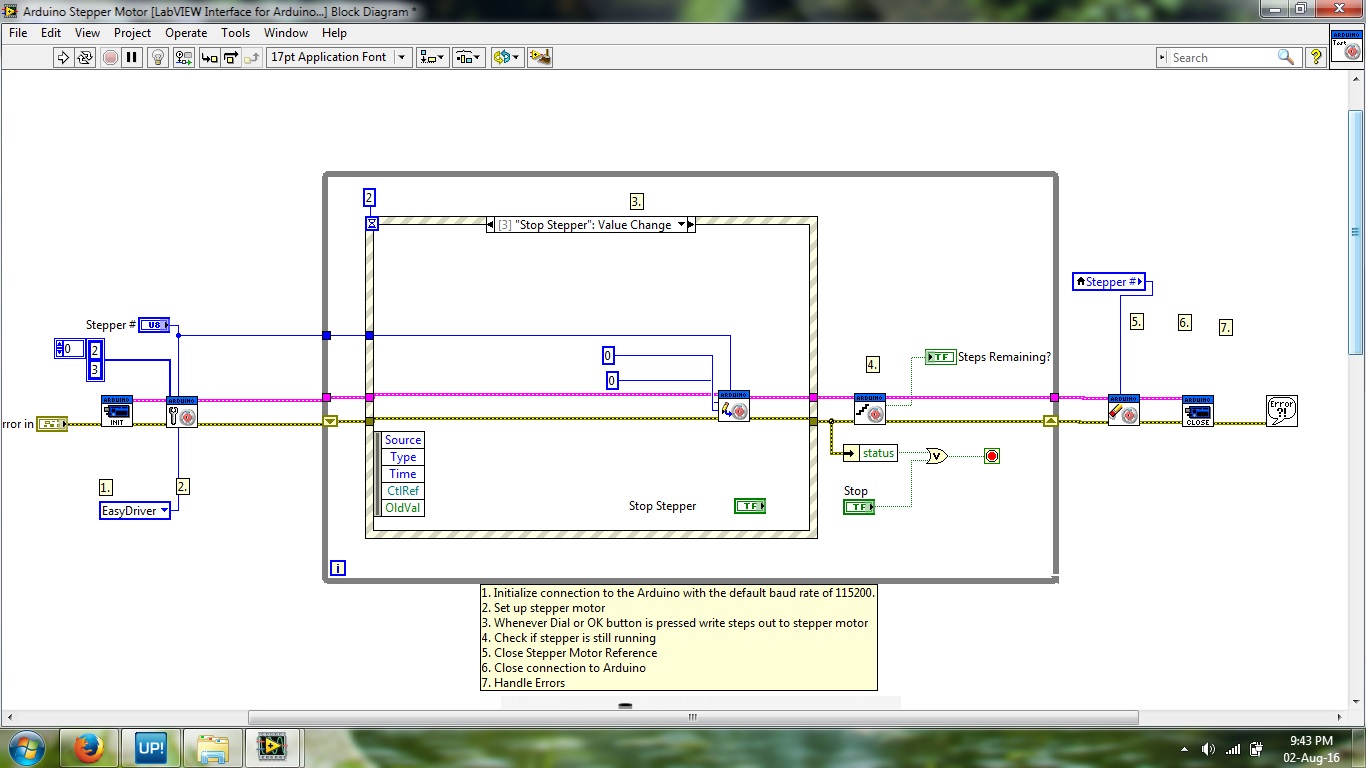
This is for stopping stepper motor...
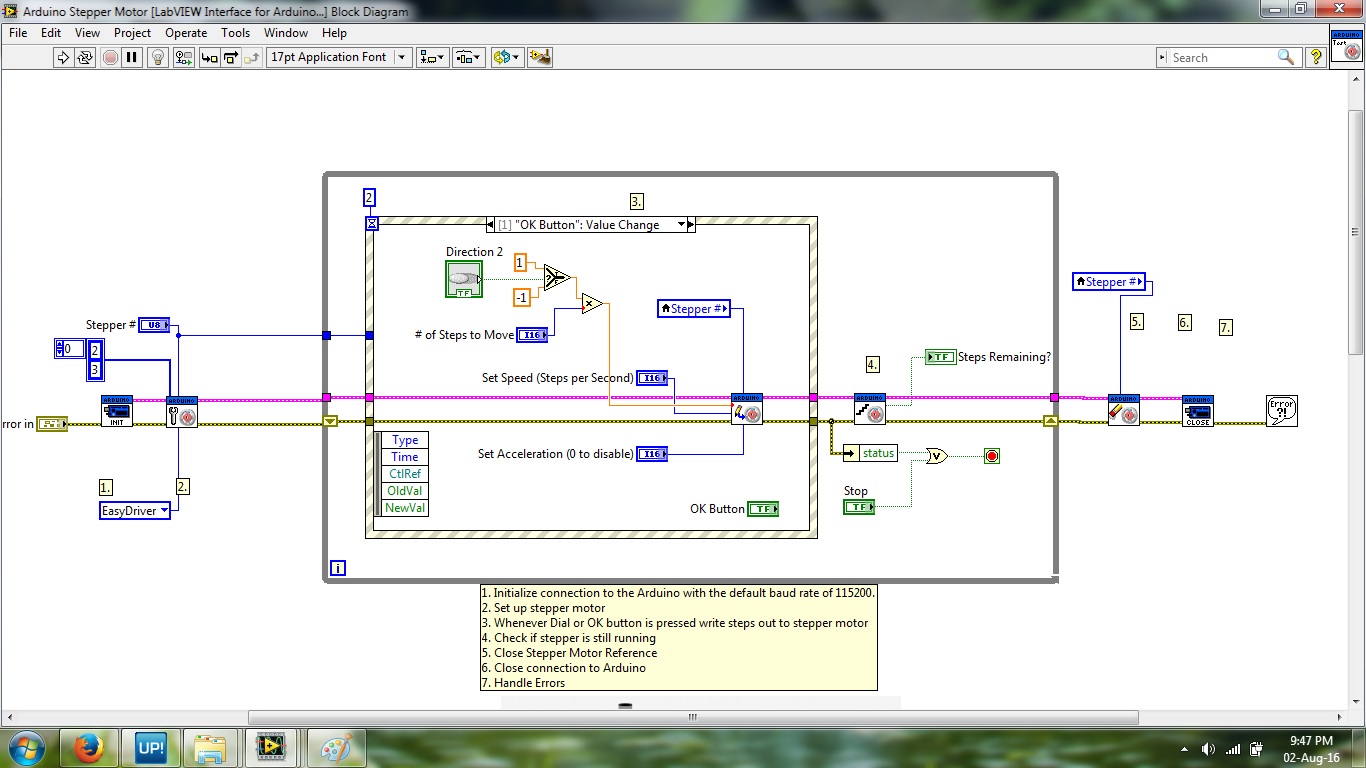 This is for changing the direction.
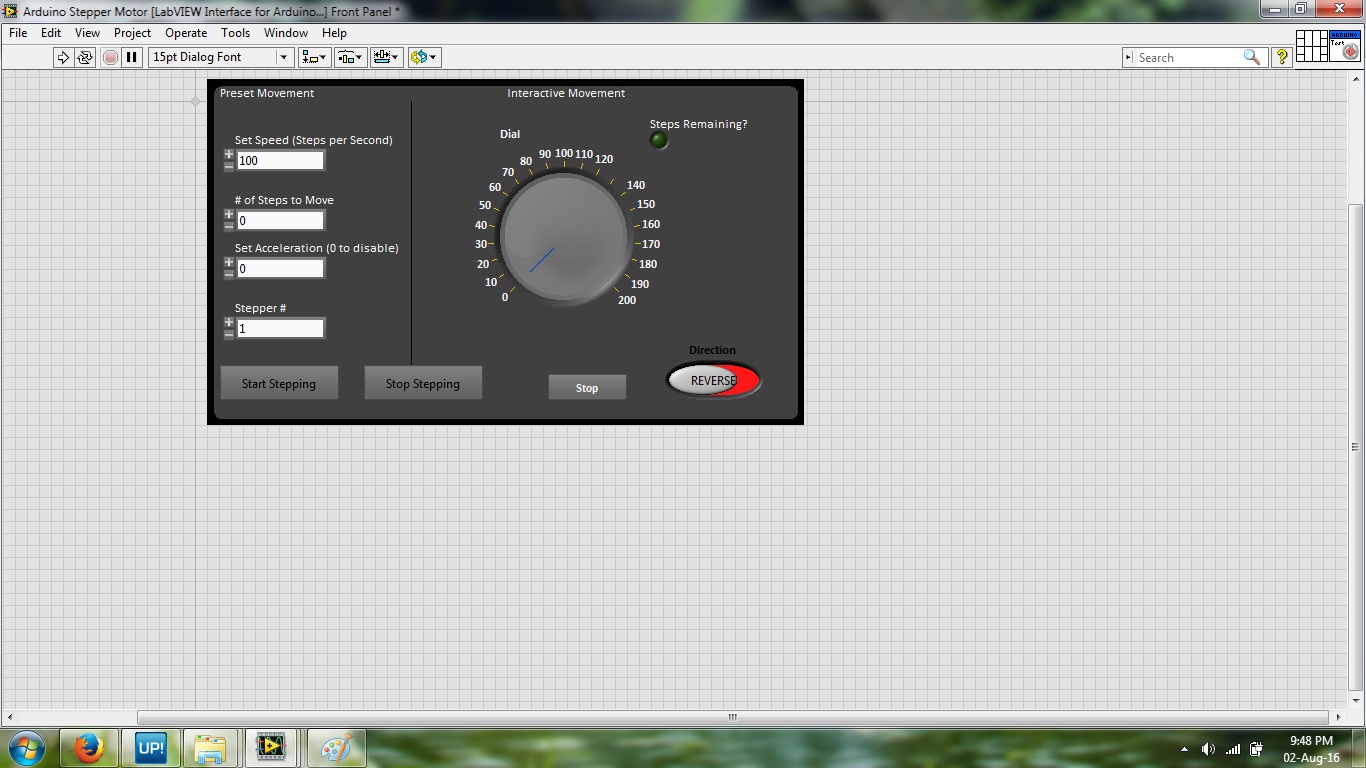 This is front panel...
This is link to updated vi
- Mark as Read
- Mark as New
- Bookmark
- Permalink
- Report to a Moderator
I've noticed a couple of things in your screenshots. I don't know the structure of your firmware (on the Arduino) so I'm going to have to make a couple of assumptions on how you're calling and initialising your stepper motor.
For me, I use a 4-wire stepper motor driver (I use 2 stepper motors). To initialise, I need to use the init subvi in the same manner as you, but for each direction that I use (one motor handles FWD and REV; the other, LEFT and RIGHT - it's a plotter).
In your code you are initialising only one stepper motor, being the forward direction. But in all this (and what people are saying above), I don't use -ve numbers to attempt a reverse direction. I simply initialise a motor with the ports (wires) swapped. You can try something similar but again, it'll depend on your firmware.
- Mark as Read
- Mark as New
- Bookmark
- Permalink
- Report to a Moderator
I am using A4988 motor driver and 4 wire bipolar stepper motor. so the stepper I select from the vi is "2wire pulse and direction". Where pin 2 and 3 from arduino are connected to step and DIR input of driver.
- Mark as Read
- Mark as New
- Bookmark
- Permalink
- Report to a Moderator
ok. I noticed in your screenshot that you select the 'easydriver'. Is this correct?
Have you tried swapping the port allocation on the init; switch '2' and '3' in the array ?
- Mark as Read
- Mark as New
- Bookmark
- Permalink
- Report to a Moderator
I select 2 wire step and direction. Easy driver is selected in the vi by default. and yes I tried with swapping, it didn't work for me.

