- Subscribe to RSS Feed
- Mark Topic as New
- Mark Topic as Read
- Float this Topic for Current User
- Bookmark
- Subscribe
- Mute
- Printer Friendly Page
Is LabView really having trouble finding enough memory?
Solved!
 joshmont
05-31-2011
02:36 PM
- last edited on
05-19-2025
04:41 PM
by
 Content Cleaner
- Mark as New
- Bookmark
- Subscribe
- Mute
- Subscribe to RSS Feed
- Permalink
- Report to a Moderator
I'm using a 32 MB/ch USB-5133 digitizer and making an effort to acquire as long of a time record as possible (~32E6 data points). However, the device can currently only reach its maximum capability while acquiring from a single channel. When making a simultaneous acquisition, I get the dreaded "Not enough memory to complete this operation" message somewhere around 20E6 points per channel.
I've already bumped the VM paging memory up to ~10 GB, and followed the instructions listed at ( http://zone.ni.com/reference/en-XX/help/371361F-01/lvhowto/enable_lrg_ad_aware/ ) to modify the boot.ini file.
Is it really the case that LV cannot find two 32 MB blocks of memory? Or am I missing some other options that would allow this device to be used to its full capability?
Attached:
-Error message (jpeg)
-2 channel daq (.vi)
System info:
Windows XP Pro SP3
3 GB RAM (4 GB installed...)
Thanks,
-Josh
Solved! Go to Solution.

 Matthew_Kelton
05-31-2011 02:56 PM
- Mark as New
- Bookmark
- Subscribe
- Mute
- Subscribe to RSS Feed
- Permalink
- Report to a Moderator
Scott,
I can't open the VI on my current machine, but I am assumign you are getting back an array of DBLs.
Assuming my math is correct,
1 DBL = 64 bits
32e6 samples = 2GB worth of data
so you need 2GB for every channel you are trying to collect. And that is assuming there is no copying of data in the driver or your code. Since I notice plots on your VI, if you attempt to plot this data (plotting 32 megasamples is kind of ridiculous to begin with), you'r eprobably using a lot more than the 4GB of memory to just store the measurement.

 altenbach

05-31-2011 03:04 PM
- Mark as New
- Bookmark
- Subscribe
- Mute
- Subscribe to RSS Feed
- Permalink
- Report to a Moderator
@joshmont wrote:
System info:
Windows XP Pro SP3
3 GB RAM (4 GB installed...)
I assume that is 32bit WIndows XP. Cranking VM to 10GB will have no effect, all you can use is 3GB.

05-31-2011 03:07 PM
- Mark as New
- Bookmark
- Subscribe
- Mute
- Subscribe to RSS Feed
- Permalink
- Report to a Moderator
Ah, thank you for reminding me how to do math.  This probably the case.

 JÞB
JÞB
05-31-2011
03:28 PM
- last edited on
05-19-2025
04:42 PM
by
Content Cleaner
- Mark as New
- Bookmark
- Subscribe
- Mute
- Subscribe to RSS Feed
- Permalink
- Report to a Moderator
In a nutshell- Yes LabVIEW can't find that much memory- your code is tearing HUGE chunks that are wasted on the FP and bits that don't matter.
OK, you do not want to use the niScope Multi Read WDT.vi since it assigns the readings as arrays on DBLs- way more memory than you need since the digitizer is an 8 bit digitizer anyhow.
Use the ni Scope Read (poly) vi on the Ni Scope acquisition pallate and select the 2D U8 instance to immediatly reduce your memory needs by a factor of 8. Second, delete the waveform indicator to remove another unneeded copy of the data. now youve got 1/16 of the memory filled with no loss of information. And, as mentioned. you don't need to graph every point- the graph (or any indicator) requires a copy for display that is seperate from the data the BD operates with. so we could get close to a 32x improvemnt without much work.
Then take a look at this KB article on managing large data sets in LabVIEW- its a must read.
"Should be" isn't "Is" -Jay
- Tags:
- Large_Data
05-31-2011 04:01 PM
- Mark as New
- Bookmark
- Subscribe
- Mute
- Subscribe to RSS Feed
- Permalink
- Report to a Moderator
... Use the ni Scope Read (poly) vi on the Ni Scope acquisition pallate and select the 2D U8 instance ...
I'm not sure what this means. When I select the ni Scope Read (poly) vi, I have "Single" & "Multi" Waveform options and then "Waveform" or "Cluster" options in each of those. I need both channels, so I'm using the "Multi" + "Waveform". Can you try explaining this selection again?
JÞB
05-31-2011 10:07 PM
- Mark as New
- Bookmark
- Subscribe
- Mute
- Subscribe to RSS Feed
- Permalink
- Report to a Moderator
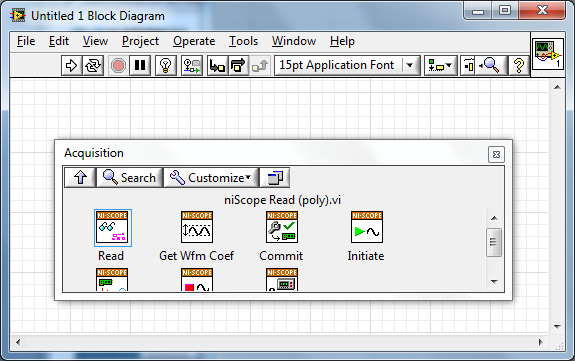
Ni Scope> acquisition >pallate
it is a sub palatte of the niScope functions
those (Advanced ) functions are there for a reason>>> Like, to provide users with advanced functionanity
"Should be" isn't "Is" -Jay
06-01-2011 10:46 AM
- Mark as New
- Bookmark
- Subscribe
- Mute
- Subscribe to RSS Feed
- Permalink
- Report to a Moderator
@Jeff Bohrer wrote:
Ni Scope> acquisition >pallate
Yes, as you can see from my previous post, I am already using the niScope Read (poly) vi. My question was regarding your comment about selecting the "2D U8 instance". I don't know how your terminology maps onto the actual options that I've shown in the image and my text above.
JÞB
06-01-2011 11:36 AM
- Mark as New
- Bookmark
- Subscribe
- Mute
- Subscribe to RSS Feed
- Permalink
- Report to a Moderator
Sorry about that I managed to confuse myself
Fetch (poly)
here's a snippet


"Should be" isn't "Is" -Jay
06-01-2011 01:15 PM
- Mark as New
- Bookmark
- Subscribe
- Mute
- Subscribe to RSS Feed
- Permalink
- Report to a Moderator
Thanks, I'll try that version and report back!
