- Subscribe to RSS Feed
- Mark Topic as New
- Mark Topic as Read
- Float this Topic for Current User
- Bookmark
- Subscribe
- Mute
- Printer Friendly Page
LabVIEW Advanced session resources

 Intaris

01-09-2026 05:58 AM
- Mark as New
- Bookmark
- Subscribe
- Mute
- Subscribe to RSS Feed
- Permalink
- Report to a Moderator
I remember there being an old NI Labs software for programmatically interrogating bitfile interfaces for Controls and FIFOs. We're haivng all kinds of problems with apparent lack of propagation or updating of Bitfile reference data and wanted to try this out.
https://forums.ni.com/t5/NI-Labs-Toolkits/LabVIEW-FPGA-Advanced-Session-Resources/ta-p/3500447
Unfortunately, the toolkit only has a package up to LV 2019. And a couple of older VIs which were in the rvi folder used to allow reading out the control and FIFO names from the bitfile located on disk, but these seem to no longer exist in LV 2025.
<\vi.lib>\rvi\Bitfile\Public\nirviGetControlsFromBitfile.vi
<LabVIEW>\resource\RVI\compilationResultUtilities\niLvFpgaGetDmaChannelInfoFromXML.vi
Is there a replacement, an alternative method? The issues we are seeing are starting to really prevent us from being productive.

 ZYOng
ZYOng
01-11-2026 07:56 PM
- Mark as New
- Bookmark
- Subscribe
- Mute
- Subscribe to RSS Feed
- Permalink
- Report to a Moderator
LabVIEW FPGA Advanced Session Resources is included with the R Series device driver versions 21.0 and later.
Those VI are now at
- C:\Program Files\NI\LVAddons\nilvfpgahostcomm\2\vi.lib\rvi\Bitfile\Public\niFpgaBitfileGet_ViInfo.vi
- C:\Program Files\NI\LVAddons\nilvfpgahostcomm\2\resource\RVI\compilationResultUtilities\niLvFpgaGetDmaChannelInfoFromXML.vi
Applications Engineer | TME Systems
https://tmesystems.net/
-------------------------------------------------------
https://github.com/ZhiYang-Ong
01-12-2026 03:39 AM
- Mark as New
- Bookmark
- Subscribe
- Mute
- Subscribe to RSS Feed
- Permalink
- Report to a Moderator
Perfect, thanks.
I didn't even think of searching in the Program Files\NI subfolder.......
01-13-2026 12:34 PM
- Mark as New
- Bookmark
- Subscribe
- Mute
- Subscribe to RSS Feed
- Permalink
- Report to a Moderator
So.... to continue on this, I have found the VIs and can parse the info in my bitfile, but the part where I can cast then to usable FPGA references I don't see. I think this is the "Advanced Session Resources" mentioned above. For the life of me I cannot find a version of this to install......
ZYOng
01-13-2026 11:31 PM
- Mark as New
- Bookmark
- Subscribe
- Mute
- Subscribe to RSS Feed
- Permalink
- Report to a Moderator
The VIs are available under FPGA Interface palette.
Applications Engineer | TME Systems
https://tmesystems.net/
-------------------------------------------------------
https://github.com/ZhiYang-Ong
01-15-2026 02:35 AM - edited 01-15-2026 02:59 AM
- Mark as New
- Bookmark
- Subscribe
- Mute
- Subscribe to RSS Feed
- Permalink
- Report to a Moderator
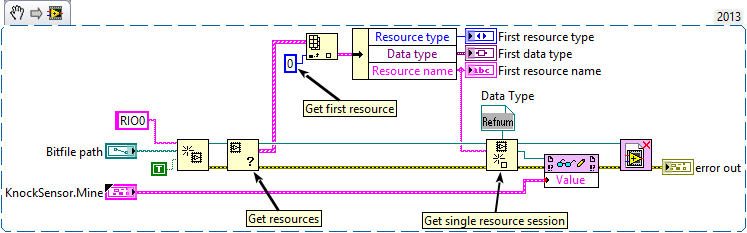
This is the code I'm referring to, it takes the information about the interface which is returned by the VIs mentioned above and transforms it into an FPGA reference which can actually do something. I do not have these nodes.*
*Or at least that was the case, I've since installed the 2018 version of the toolkit, but have yet to be able to restart LabVIEW, busy debugging FPGA code

 dan_u
dan_u
01-15-2026 05:35 AM
- Mark as New
- Bookmark
- Subscribe
- Mute
- Subscribe to RSS Feed
- Permalink
- Report to a Moderator
If you install the Advanced Session Resources this installs an example, which contains these VIs.
I attach the example here (might be missing some ctl, but the VIs should be there).
