- Subscribe to RSS Feed
- Mark Topic as New
- Mark Topic as Read
- Float this Topic for Current User
- Bookmark
- Subscribe
- Mute
- Printer Friendly Page
Create fast intenstiy histogram without Vision toolkit
Solved!
 Terry_S
11-28-2011 05:16 PM
- Mark as New
- Bookmark
- Subscribe
- Mute
- Subscribe to RSS Feed
- Permalink
- Report to a Moderator
I am trying to create an intensity histogram from an 8bit gray scale image that is being acquired from a USB camera. Using the drivers that camera that came with the camera I am able to get a 2D array of image data (1021 x 764). What I am doing is concatenate all the columns in the array to create a 1d array. I then use the general histogram function that is set to a max of 256, min of 0 and 100 bins. This approach takes approx. 5 secs. to complete. Attached is my approach.
Is there a better approach that would process much faster?
If I use the Vision functions to convert the image data to an IMAQ image and then using the IMAQ histograph function, it processes almost immediately. However I do not wish to use the Vision functions because I do not wish to pay for a Vision runtime license for each installation of my application.
Thanks
Terry.
Solved! Go to Solution.

 RavensFan

11-28-2011 06:07 PM
- Mark as New
- Bookmark
- Subscribe
- Mute
- Subscribe to RSS Feed
- Permalink
- Report to a Moderator
It looks like you are trying to do the same thing as Reshape Array. If you used that function, how fast does it run?

 GregSands
11-29-2011 02:01 PM - edited 11-29-2011 02:08 PM
- Mark as New
- Bookmark
- Subscribe
- Mute
- Subscribe to RSS Feed
- Permalink
- Report to a Moderator
This is the simplest way to obtain a histogram. Is it fast enough?
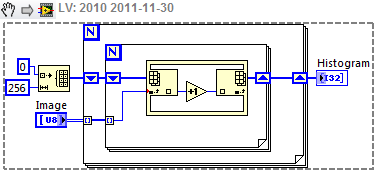
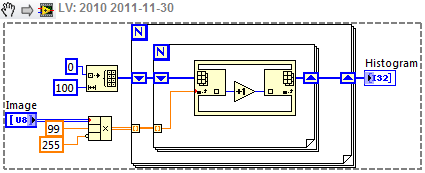
That will give a 256-bin histogram, but I iust noticed that you want 100 bins for some reason. The easiest way to do that is to scale your image from 0-255 to 0-99 (multiply by 99/255) and do the same thing, something like this:
- Tags:
- Image Processing
11-29-2011 04:43 PM
- Mark as New
- Bookmark
- Subscribe
- Mute
- Subscribe to RSS Feed
- Permalink
- Report to a Moderator
Thanks for the suggestion GregS. However the array function that you have in the inner for loop, where did you find this? This is something I have not discovered yet in labview
GregSands
11-29-2011
06:14 PM
- last edited on
04-30-2026
03:39 PM
by
 Content Cleaner
- Mark as New
- Bookmark
- Subscribe
- Mute
- Subscribe to RSS Feed
- Permalink
- Report to a Moderator
That's the In Place Element Structure, which ensures that the array is not copied when it is used. You can find it in the Structures palette since LabVIEW 2009 I think. Or you can effectively replace it with the pair of functions Array Index and Array Replace - the IPES is just a little cleaner!
