- Subscribe to RSS Feed
- Mark Topic as New
- Mark Topic as Read
- Float this Topic for Current User
- Bookmark
- Subscribe
- Mute
- Printer Friendly Page
Sever and dangerouse Issue usign Feedback node (68872 4EBC79AG or similar) still exist in LabVIEW 8.5.1

 D4N!3L3
07-22-2008 02:53 AM
- Mark as New
- Bookmark
- Subscribe
- Mute
- Subscribe to RSS Feed
- Permalink
- Report to a Moderator
Happy coding to all!
07-22-2008 03:01 AM
- Mark as New
- Bookmark
- Subscribe
- Mute
- Subscribe to RSS Feed
- Permalink
- Report to a Moderator

 Ray.R
Ray.R

07-22-2008 06:35 AM - edited 07-22-2008 06:35 AM
- Mark as New
- Bookmark
- Subscribe
- Mute
- Subscribe to RSS Feed
- Permalink
- Report to a Moderator
I don't see the problem you described.
I can save the file and open it up and I don't see any errors or crashing.
R
Message Edited by JoeLabView on 07-22-2008 07:35 AM

07-22-2008 10:04 AM
- Mark as New
- Bookmark
- Subscribe
- Mute
- Subscribe to RSS Feed
- Permalink
- Report to a Moderator
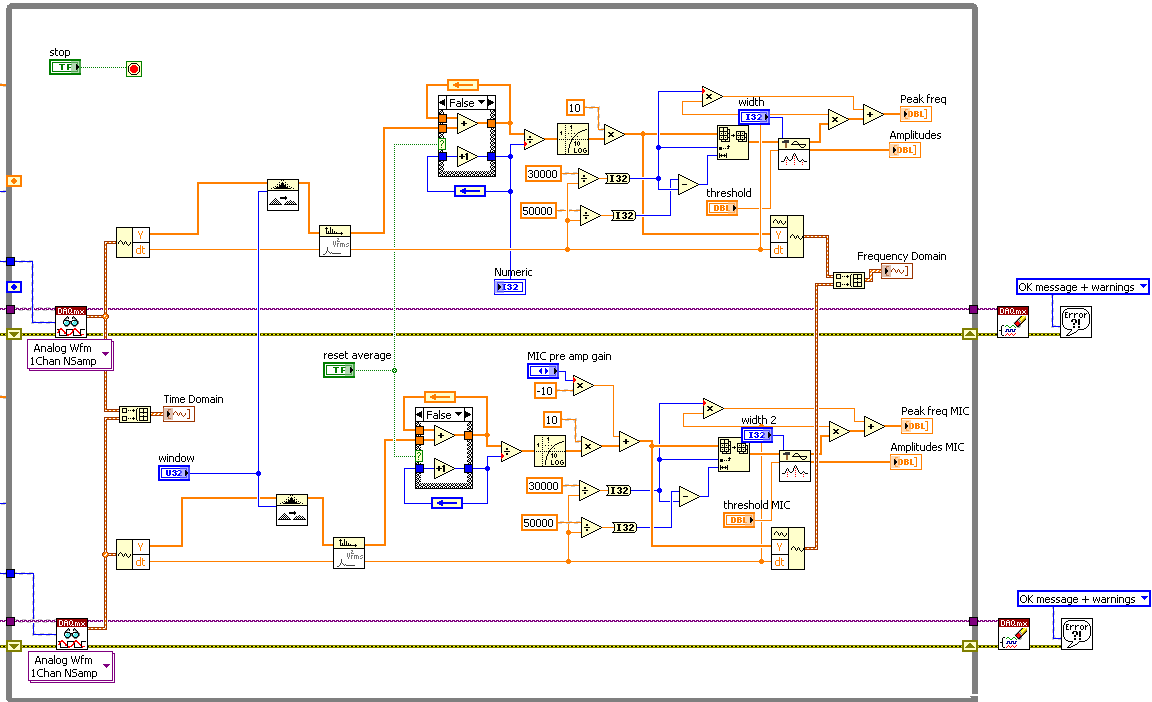
Of course you can open and save the vi but take a look at the position of the Initialization terminal of the feedback node (also in your snapshot one can see that something is wrong on the left side of the while loop)! Try to move them or try to move the various initialization constants.... strange things will happen, the worst is a LV crash!

Ray.R
07-22-2008 10:16 AM
- Mark as New
- Bookmark
- Subscribe
- Mute
- Subscribe to RSS Feed
- Permalink
- Report to a Moderator
Good observation..
lemme try..
Ray.R
07-22-2008 10:20 AM - edited 07-22-2008 10:21 AM
- Mark as New
- Bookmark
- Subscribe
- Mute
- Subscribe to RSS Feed
- Permalink
- Report to a Moderator

Message Edited by JoeLabView on 07-22-2008 11:21 AM
 Ray.R
Ray.R
07-22-2008 10:29 AM - edited 07-22-2008 10:30 AM
- Mark as New
- Bookmark
- Subscribe
- Mute
- Subscribe to RSS Feed
- Permalink
- Report to a Moderator

Message Edited by JoeLabView on 07-22-2008 11:30 AM
 Ray.R
Ray.R
07-22-2008 10:31 AM
- Mark as New
- Bookmark
- Subscribe
- Mute
- Subscribe to RSS Feed
- Permalink
- Report to a Moderator
Ray.R
07-22-2008 10:37 AM - edited 07-22-2008 10:37 AM
- Mark as New
- Bookmark
- Subscribe
- Mute
- Subscribe to RSS Feed
- Permalink
- Report to a Moderator
Tried it again in another new blank VI..

Message Edited by JoeLabView on 07-22-2008 11:37 AM

07-22-2008 11:14 AM
- Mark as New
- Bookmark
- Subscribe
- Mute
- Subscribe to RSS Feed
- Permalink
- Report to a Moderator
Thank you for your attention!
I've opened the fixed vi and all seems to be ok, but in few mouse click all messed up again causing strange floating wire and a LV crash.
If you are brave please try the following procedure (save and close all of your work..!):
- Open your fixed vi.
- CTRL-E to display the block diagram.
- Rigth click on the upper (DBL) feedback node and change it to "Globally Initialize".
- Right click again on the same feedback node and select "Move Initializer One Loop Out".
- Select the feedback node, the "+", the "+1" and the other (blue, INT32) feedback node.
- Then perform the "Horizontal Centers" alignement.
- (in my case) voila! Move one of the 2 feedback node and see what happen....
- Now try to close and save the vi.
I run LV on a NI PXIe-8106 so I think that this kind of hw is fully compatible with NI software... 🙂
I suspect that in this case the problem is not at a graphic level but reflect a corruption of internal data LV data.


