LabVIEW Idea Exchange

Community Browser
cancel
Showing results for 
Search instead for 
Did you mean: 
Post an idea

iPad picture2.jpg


This idea is similar to two other ideas:

1) http://forums.ni.com/t5/LabVIEW-Idea-Exchange/Support-for-HTML5-and-SVG-in-Web-Publishing-Tool/idi-p/1437488

2) http://forums.ni.com/t5/LabVIEW-Idea-Exchange/Remote-Access-to-LabVIEW-using-HTML5/idi-p/1944781 ,


However, this idea has the following unique aspects/extensions:


1) In the past, it appears that the decision needed to be made between a Native App (like Data Dashboard) or a Web App. However, I believe both should be developed by NI. See http://www.ericbrynsvold.com/2011/11/native-vs-web-app/ and http://www.webmonkey.com/2010/08/how-do-native-apps-and-web-apps-compare for more details and an examination of the pros and cons. Facebook has both a native app and a mobile app and the user interface looks the same! So, the important thing is, it’s not one or the other, with both having their place.


2) Don’t develop the LabVIEW web app fully and then release it. Follow the path taken by the Data Dashboard for LabVIEW and release bits at time. This way we get something to use relatively quickly. Just simple numeric controls and indicators and Boolean controls and indicators would do to start with.


3) Put as much development effort into the web app as is currently going into the native app (Data Dashboard for LabVIEW).


4) The web browser user interface should reflect the contents of a VI. Also, multiple VIs / sub-VIs can be addressed. This last part is important since different devices may need different interfaces. For instance, for my upcoming home automation project, the user interface for the bedroom would be different to that for the home theatre.


Although Native Apps like Data Dashboard give a rich user experience, the effort required to handle multiple platforms can become onerous, as detailed in https://forums.ni.com/t5/Smartphones-Tablets-and-Mobile/Troubleshooting-and-Support-Data-Dashboard-for-LabVIEW/ta-p/3515264#comment-23928 . The Web App does not have to have the performance of the Native App. What is lost in performance (and I think this is not a big issue) it gains in universality.


I believe the need for both LabVIEW remote access using native and web apps, the concept of releasing early and releasing often and putting the same level of effort as the native app are the essence of this idea.


It important that the web app be able to use a standard web browser without any plug in. This way any mobile device can be targeted.


Wouldn’t it be great to use any web browser to provide a great remote user interface for LabVIEW?

Inspired by a breakpoint discussion I looked at some Menu Selections that I do not use.


View>>Getting started Window... is one of them.   Don't get me wrong! I like the GSW it has many useful features like all my pinned items, online links, the RSS feed.... Basically all the features that justified the new GSW in the first place BUT, it opens "Modal" and closes after the first actionSmiley Sad  If I want to do a few things I need to reopen the GSW and of course I can't do anything else while the GSW is openSmiley Sad


BUT! I thought to myself, "Jeff," I said to myself "wouldn't it be just peachy keen if the GSW opened Floating (Hide while LabVIEW is not active) when launched from the Menu?"  After all FP.Behavior is run-time settable.


After much patting myself on the back for such a brilliant thought I figured I had better share that super-dooper idea with the community!

Currenly we have the option to set default control style (System, Modern, Classic). But it would be great to be able to specify a control as the default for a particular data type.


Use Case: whenever you convert a boolean constant to boolean control, you get a boolean radio button when your default controls are the System controls. Unless you have at least two options to choose from, a readio button is kind of pointless. So, call it a preference, but I always end up changing it to a check box, copying the label/caption to the boolean text (so you can click on the text to change the value, I guess people have learnt to expect it), and then hiding the label.

Wouldn't it be great to specify these parameters in preferences and always get a checkbox with the boolean text visible (and label hidden?), and boolean text being the same as the label? OK, may be I'm asking for too much, but at least getting a checkbox would be a good start.


An extension of the idea could allow us to specify may be a custom control as the default control for a data type. This already works when creating constants or controls are the wire whose data type is a typedef.

Hello,


For the moment, when you want to create a Packed Library you have first to create a LVLIB. Smiley Sad

The PackedLibrary build specification is based on a LVLIB ...


PackedLibrary.png


It would be nice to be abble to create a Packed Library the same way as a Shared Library (DLL). Smiley Happy


  • Be abble to choose every VI to publish : The exported VIs are automaticcaly 'public'
  • All other depending VIs or 'always included' VIs would be private ! 

Shared Library.png


Thanks a lot.


Manu.

It would be a timesaver to have a Search 1D Array In Reverse! Obviously we can code this ourselves, but a LabVIEW function would make it handier (and hopefully faster).

Hello all,


I'd like to suggest some improvements to the run-time menu editor dialog:  (This is found under Edit->Run-Time Menu...)


1.     Allow the window to be resizable.  (Scroll bars are no fun)


2.     When using source control (Perforce in my case), prompt the user to check out the .rtm file upon the first edit. (Same behavior as when editing VIs)  At present, if I forget to check out the menu file I get a very ugly dialog followed by an "Emergency Backup Destination" prompt.  [insert muttering of naughty words]


PermissionError.png


I'm then faced with two choices: Either I can save an "emergency backup," as the prompt refers to it, or lose all of my changes and edit my menu all over again.


3.     The manner in which the tree manipulation works seems kind of wonky to me.  I've been using it for a long time, but I'm getting to the point where I stop and ask, "Why does it do that?"  For instance:


Let's say I select the root node of my "Edit" menu which has several items under it, and I've got that menu open.  If I press the yellow, down arrow, the whole Edit menu relocates itself under my File menu.  The file menu is above the Edit menu!  Why does pressing "down" move the menu up?  Intuitively, I'd expect the entire Edit menu to move as a unit and appear after my View menu, exactly as it would if the whole "Edit" subtree was closed.  (This is hard to explain and I understand if my explanation is likely confusing.)


4.     When dragging and dropping tree nodes, there's no visual cue as to where the item will land.  You start dragging the node, mouse over the general area and cross your fingers.  Alternatively, you can eschew dragging and dropping altogether and opt for the yellow arrows of wonkiness.  Okay, in fairness the arrows are usually alright.


5.     I would really like to see Edit->Undo and Edit-Redo on this editor dialog.  Having to revert entirely and reopen the file can be frustrating.  Mistakes happen often, especially when dragging and dropping.


6.     This is less important to me than the other suggestions, but... is there any reason why the menu files couldn't be encoded in XML?  Right now they're not very text editor friendly.


Of course, as I offer these suggestions I intend no disrespect toward whomever developed the dialog - I'm simply perceiving room for improvement.


Thanks very much,


Jim

Since I'm working with LV-DLLs there is a very very annoying Bug. I just made my first tries in LV 2012 (up to now I'm using LV 2009) and I recognized that the bug is still there but an information/warning dialog opens now when it takes effect. With other words: The bug became a feature ;-( So it's time to make a suggestion for changing in the LV behaviour.


Here are the steps you have to take to reproduce the problem:

1) create a new, empty LV project


2) first create a cluster, store it as type def and add the type def to the project

typedef.jpg 


3) create a new VI (called test) that uses this cluster as output (input will work, too). Add the VI to the project, too.

 2.jpg


4. Create a DLL-Spec with this VI as exported function (sorry, I’m using a German LV):

 3.jpg


5. Usually the default prototype is not the best. So we re-configure it like this.

4.jpg

Click to ok and store the project and all files.


6. Ok, last step: Building the DLL 🙂
 – Ups, we forgot to change the element “n” inside of the typedef-cluster to U16 (it’s still set to double).
But no problem – changing the typedef will correct the bug everywhere where the ctl is used.
Open the typedef, change and store it. Now re-build the bug-free DLL - finished! .. or not? No, you're not. Because you changed the type def LabView has reset the hard configured prototype to default *grmpfl* Smiley Mad


Now you might say: “Hey, where is the problem, just re-configure it.”

Currently I have a single project which uses up to 25 DLLs created in LV. All are using the same data cluster typedef. Each DLL has approximately 10 exported VIs. This makes 250 prototypes I have to re-configure if there is just one little change within my cluster!!!

LV resets the prototype even if a VI-IO changes from “required” to “recommended” – a change that does not have any effect to the behaviour of the exported VI.


So NI, please change this “feature” to a real feature as soon as possible!


Meanwhile I have to go on using variant elements to send data to my DLLs and back.


Appended you'll find a very similar example. Don't forget to save the VI after you've changed the type def.


ipad_hor_lights[1].png

One of my planned projects is to write home automation software for my new house. I already have three iPads installed in the wall (kitchen, theatre and upstairs), all my awning windows are motorised, I have a solar powered hydronic in-slab heating system that needs the right type of control, earth tubes, a whole-house fan, solar chimneys, many other passive climate control features and plenty of data cabling throughout the house. User interface access would also be via iPhone, which I carry in my pocket at all times, and mobile iPads.


The intention is to automate the house for climate control, lighting, theatre control, security, monitoring electricity usage, monitoring phone costs, controlling the hot water system, seeing who’s at the front door and letting them in (even if I'm not home), setting up a in-house phone/intercom system, limiting phone use, changing TV channels, looking at weather forecasts for activating systems in anticipation of tomorrow’s weather, remotely viewing the inside of the house, and plenty more. You could call it a life-long project!


I’d like to use LabVIEW for programming since it’s the most fun language I know. The only problem is that when it comes to easily programming a great user interface, I can’t find the way.


1) Data Dashboard for LabVIEW is too limiting with only 6 indicators and no controls (and needs work at the iPad end?)

2) Web UI builder is way too expensive (I need a free solution) and cumbersome


What’s also important is that different rooms can have different user interfaces. Perhaps each can reflect the front panel of a sub-VI.


There are plenty of examples on the web of great looking Home Automation iPad user interfaces. Apart form the example shown above, http://a2.mzstatic.com/us/r1000/089/Purple/v4/d9/23/ec/d923ec9c-0a31-6a62-cb7c-e74a4f8feecc/mzl.uayvvtoo.480x480-75.jpg looks good. Such great user interfaces and there is no way (or I don’t know how) to make them happen using LabVIEW.


This may not need to be a product development, per se, but may actually just turn out to be a step by step set of instructions on how to achieve the outcome using existing tools and an example application. Given what I imagine as a wide appeal for such a LabVIEW user interface, I think it’s worth the effort and could be used for many other application such as process control.


The basic criteria are:

1)    Must work with iPhone, iPad (and Android devices)

2)    All programming at the desktop (I don’t want to stand in front of multiple iPads setting them up/updating)

3)    User interfaces must look as good as the examples on the web (and sampled here)

4)    No additional cost


Wouldn’t it be great to have a LabVIEW based Home Automation user interface that is versatile, easy to use and free?

Even to this day, I still use the Simple Error Handler, for times when I'm writing throwaway code, normally when I'm stress testing a new API.


When that dialog is thrown, you should have the option to bring up the block diagram of the VI where it occurred.  Kind of the way breakpoints are done.  Just another button on the dialog that says "Take me there."


This is not a high impact improvement, but it also has no chance of hurting anything, and I think an intern could do this.  I guess I could just do it myself, but it should be baked into LV.


~~~~

Post edit:  holy cow!  Your spell checker is from 1996.  Terrible!  You guys have the best technology, I'm shocked by how retarded it is when you hit the 'Spell Check' button.  What does that message even mean?  I'll translate:  Do you not want me to not undo something that may not have happened?

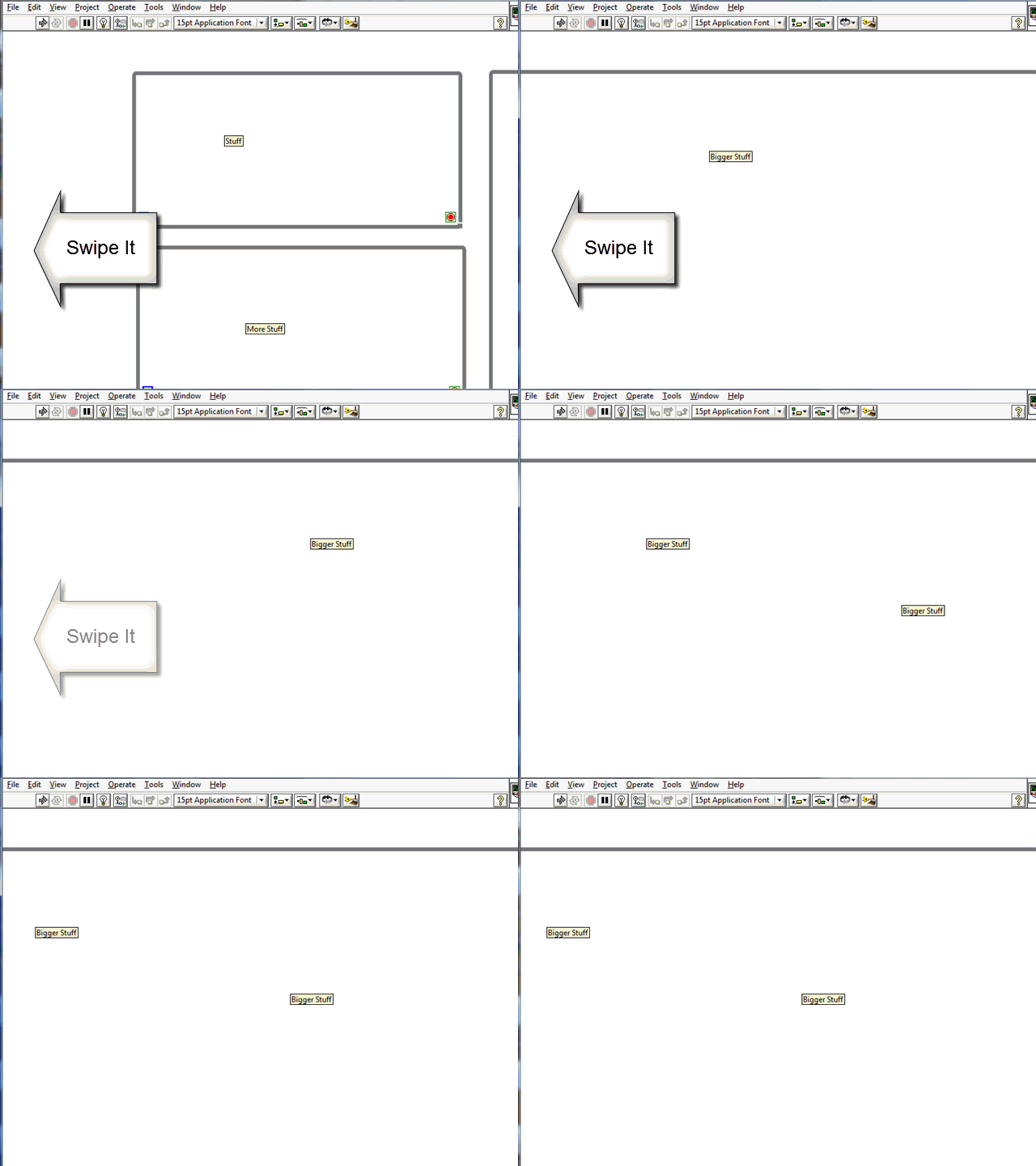
Panning around the VI using the scrollbar is way too slow. Using the scroll wheel only goes vertical. The Pan tool is nice but I never switch over to it when I should. LabVIEW should support the swipe gesture on the Front Panel and Block Diagram. Swiping is a gesture done by clicking and "throwing" the canvas one way or another (kinda like minority report). The canvas keeps the virtual momentum of the swipe and continue to pan the screen until the user clicks or the screen slows to a stop. This interface is one of the main tennants in iphone navigation for panning through tables, around web pages, and really anything that is larger than the view.


Swipe.gif

Since LabVIEW coding must be a left to right allignment to look clean/understanding and maintian the dataflow, It would be better if we have the default scroll to be activated from left to right (horizontal).


In current versions, we have to roll over the mouse to horizontal scrollbar to scroll left/right. but by default, scrolling anywhere scrolls it vertically. 


Perhaps we can have an option to enable the scroll to vertical or horizontal? 


I am sure that someone has suggested this before, and yes I know the workaround for floating point numbers, but being able to do regular expressions, comparasons and maybe simple bits of code (C/Matlab) would be nice.  


FP case structure.png

Hi all

I am still missing some kind of SubVI structure. The third representation - SubVI displayed as icon, expanded icon or its own block diagram in new structure. A modification in one structure of one vi reflects immediately in all others. This could increase code readability in some cases.


lv1.pnglv2.png


Local variable for case structure


I do my best to use state machines and consumer-producer structures using queues that go into case structures for programming my applications. One of the problems I have is it is necessary to make a separate control for the various inputs that go the case structure. This situation is relatively friendly to making new cases (just edit the type def of the control and then got to the case structure and "add case for every value"). However, his takes two steps, is complicated, and is not intuitive - i.e. when I try to teach this to anyone else, it takes some time for them to appreciate how powerful it is.


Worse, however, is that it is very unfriendly when I want to remove cases and change the flow of the program, because I have to remove the same cases in a long list of both the control and the case structure.


I suggest a new way to do this - allow the case structure to "create a constant" in the wiring diagram that is linked to the case structure, so whenever the case structure is modified, any constants that were created from it are also updated. This would make creating state machines and consumer-producer programs much much simpler. Since the only cases that need to exist are those that are in the case structure, then it is a one-touch modification to add/subtract cases.


Please do this quickly, I am getting very tired of having to constantly open the "type def". It is way too much work and really slows down development!

Currently, whenever you filter data it is initialized with all zeroes.  If your data is fairly constant, there is a large section where the filtered value slowly goes from zero to the steady state value.  This is annoying when doing a quick look at the filtered data, because you have to rescale a graph to ignore the ramping portion of the filtered data.


My suggestion is to provide an option for either providing a starting value for the filter or automatically using the first value of the data being filtered.  For fairly constant data, this would eliminate the large ramp from zero.  For varying data, it would start better as well.  It seems the initial value is fairly arbitrary, so it shouldn't violate any mathematical rules.  It would be the equivalent of subtracting the first value from all the data, filtering, then adding the first value back to the filtered data.


Bruce

I often find myself switching back and forth between two VIs or two cases within a given VI to copy parts of the diagram (or check what another part of the diagram does, or for whatever other reason). In the latter case, it just dawned onto me that this is why "Word" has the Split Window and New Window functions. For those who have never used Word, this allows seeing another part of the document while working on it, either within the same window (split) or in a separate one (new) (I mostly use "New Window" as I have sufficient screen space and it is more convenient to organize).

My suggestion is to introduce a "New diagram window" feature, which allows working on the SAME VI diagram in as many windows as needed (I suppose two will be the usual number).

Hi,


there is an idea about making labview.ini and other user configs to the corresponding user folder .


I propose to go a step further and make the LabVIEW environment project based, which means that you can define a labview.ini file, VI templates (including standard VI, if you create a new VI), palettes, QuickDrop stuff, etc. inside a project.


E.g. templates are saved in a custom location and linked inside the project. If you do this and start the "New..." dialog, than all your templates inside the project are listed first (below project).


If you do not use this feature in your project, the default files are used (default meaning the way LabVIEW works now).


Regards,

Marc

Link the control, indicator or constant to the type def when creating it from the contextual menu of the value property node.

I like using Gauges/Meters/Thermometers as indicators because you can get a feel for values with a quick glance. 


However, after a quick glance you may want a more accurate value.  The Gauges/Meters/Thermometers have a "digital display" that will display the value but you cannot change the number format. 


It kind of distracting when all the numbers on the FP are displayed in SI notation except for the gauge's digital displays which are in scientific notation, or a thermometer's digital display is showing 6 digits, especially when the value is varies about a whole number and the number of digits displayed varies as trailing digits are hidden.


My workaround is to add a numeric display for each gauge but it seems redundant when the solution is almost right there.


Gauge.png

I would like a feature similar to Control-Click-Drag which creates room within a diagram.  However, this version (Alt-Click-Drag) would create a rectangle of empty space bounded by the endpoints fo the drag, but only move those objects which within the new area.  Those objects would expand outward and push any objects which they bump into while expanding.  Objects which are distant would not be pushed.