LabVIEW Idea Exchange

Community Browser
Top Authors
cancel
Showing results for 
Search instead for 
Did you mean: 
Post an idea

I am extending on an old idea, but the implementation is different than the OP so I made this a new idea:

https://forums.ni.com/t5/LabVIEW-Idea-Exchange/Decimation-feature-built-into-the-graph-indicators/idi-p/1109956


What I would want would be an XY graph with automatic disk buffering and on screen decimation.  Imagine this, I drop a super duper large data sets XY graph.  Then I start sending data in chunks of XY pairs to the graph (updating the graph at 10 hz while acquisition is running at +5000Hz).  We are acquiring lots of high rate data.  The user wants to see XX seconds on screen, probably 60 seconds, 120 seconds, or maybe 10 or 30 minutes, whatever.  That standard plot width in time is defined as a property of the plot.  So now data flows in and is buffered to a temp TDMS file on disk with only the last XX seconds of data showing on the graph.  The user can specify a file location for the plot buffers in the plot properties (read only at runtime). 


We decimate the incoming data as follows:

  • Calculate the maximum possible pixel width of the graph for the largest single attached monitor
  • Divide the standard display width in time by the max pixel width to calculate the decimation interval
  • Buffer incoming data in RAM and calculate the min and max value over the time interval that corresponds to one pixel width.  Write both the full rate data to the temp TDMS and the time stamped min and max values at the decimation interval
  • Plot a vertical line filling from the min to max value at each decimation interval
  • Incoming data will always be decimated at the standard rate with decimated data and full rate data saved to file
  • In most use, the user will only watch data streaming to the XY graph without interaction.  In some cases, they may grab an X scroll bar and scroll back in time.  In that case the graph displays the previously decimated values so that disk read and processing in minimized for the scroll back request.
  • If the user pauses the graph update, they can zoom in on X.  In that case, graph would rapidly re-zoom on the decimated envelope of data.  In the background, the raw data will be read from the TDMS and re-decimated for the current graph x range and pixel width and the now less decimated data will be enveloped on screen to replace the prior decimated envelope.  The user can carry on zooming in in this manner until there is at least one vertical line of pixels for every data point at which point the user sees individual points and not an envelope between the min and max values.
  • Temp TDMS files are cleared when the graph is closed. 
  • The developer can opt to clear out the specified temp location on each launch in case a file was left on disk due to a crash.

This arrangement would allow unlimited zooming and graphing of large datasets without writing excessive data to the UI indicator or trying to hold excessive data in RAM.  It would allow a user to scroll back over days of data easily and safely.  The user would also have access to view the high rate data should they need to. 


This idea provides the same functionality as the Call library function node, but in this case using a formula node scrit .

Watch the image:

formula_script_node.jpg

It would be nice if XControls could maintain arbitrary state information akin to display state but was volatile and so not preserved when the XControl was saved and (importantly) did not set the VI modified flag when it was changed.


An XControl's display state is the natural place to store all state information about the XControl that you might want to access via property or method nodes as well as via user activity on the facade.  However, anytime the State Changed ? flag is set in the facade, then container vi is marked as having unsaved changes. This is obviously sensible if the state change is meant to persist - e.g.. control resize, but not if the state change is volatile and can bee discarded after each run.


There are various alternative methods that can currently be employed, but they are not satisfactory:

1) Additional shift registers on the facade - are not available within property or methods

2) Storing volatile state data in LV2 style globals - unfortunately the same global is shared between instances of the XControl. This is still the best solution as the Container refnum can be used to generate a per-instance unique identifier to enable the global to manage the state data for all instances of the XControl.

3) Storing volatile state data in a 1 element queue. There are two problems - firstly some daemon process needs to be able to keep the queue reference alive but this adds complexity in making sure the dameon process shuts down cleanly. Secondly, there is still a problem of ensuring separate data storage between instances of the XControl.

4) Storing volatile state with the data. This works where the data type supports attributes I.e.. variants and waveforms but not for the general case.

5) Storing volatile data in a tag of the container refnum. This requires scripting and private methods and only works in the development environment.


A better solution would be an additional ability type def that is provided for volatile state, presented as a control/indicator pair for properties and methods and prepare to save, wired through on a shift register for the facade and presented as an indicator to init and as a control to uninit.

LabVIEW continues to evolve into a more optimized programming language through many under-the-hood compile optimizations, and LabVIEW 2010 brings the compilation improvements to a new level. However, these optimizations currently happen every time the user saves a VI or perfoms an undo. In the past, this would only take <1 second, but with LabVIEW 2010 there are several scenarios where each save of the same VI now takes 7 seconds, with reports of other VIs taking 15, 30 seconds or more.


SUGGESTION: Postpone compile optimizations until the user presses RUN, performs a build, or similar operation.


RATIONALE: Compiler optimzations are not necessary during edit time where a programmer is just saving their wiring progress, and anyway multiple edits can change the prior optimizations. The optimization of code is only necessary when the user is ready to run the VI in some fashion (in LabVIEW, in a build, etc.). At that time, the user is certainly happy to wait for the improved run-time performance.


An Event Structure Current Frame Indicator would allow easy troubleshooting and/or feedback, especially useful when frames are accessed by dynamic events.


22885i30385A9CE7D88CEA

This idea is for improving the connector pane to default to required inputs for terminals that use reference type data.  So if I have a new blank subVI and I wire a VI reference to an input, this should be set to Required by default.  I'd also suggest this be the same for a Create SubVI from selection.  Obviously you could change it from required, because the developer may have some code in the VI to detect an invalid reference and do something specific.  But in most cases if I do something like wire a Queue reference to an input, that input should be required.


One could make the argument that this idea could be done today, by making all inputs default to required, which I think goes too far.  Many times I have code that detects unwired inputs (by looking at the default value for the control) and it shouldn't make an input required if it isn't really required.  What I mean is in my work flow the majority of inputs should be recommended, but the majority of references (Queues, DVRs, Control References, VI References) should be required.  There are a few data types like Classes that could be reference based or not, and I could see an argument for this being required, or recommended, and for these I don't really care how they behave.  But for inputs that are clearly reference based I think it would help from making code that the developer mistakenly leaves recommended.


This could be an INI key in LabVIEW for those that don't want it, or for those that choose to make all inputs required.

The In Place Array Index/Replace Elements function not only can save memory by avoiding copying arrays, it can also create "neater" and more transparent Block Diagrams.  For example, here are two ways to triple the third element in an Array of 3 elements:


Array Index-Replace 1D.png

I needed to do the same thing, but for a 2D array (three channels of A/D data, I wanted to triple the third channel).  The Help for the In Place Array Index/Replace Subset function suggests this is possible, using language like "element or element(s) of an array", noting the similarity between this In Place Structure and the two Array Functions that form the Input and Output nodes, and in earlier versions of LabVIEW (specifically LabVIEW 2012), explicit reference to rows, columns, and pages as replacement items.  Here's what happens:

Array Index-Replace 2D.png

The Index Array left node forces you to specify both row and column, meaning you cannot operate on a single row (or single column), "breaking" the functionality with the separate Index Array/Replace Subset functions.  This also, I believe, will force an Array Copy operation, something I'm (also) trying to avoid.


At its most benign, there is a Documentation "Bug" that should warn users that this In Place function is only designed for single array elements (which, in my opinion, severely limits its usefulness).  I would like to suggest that this function be "fixed" to (a) for multi-dimension Arrays, allow, as with Index Array and Replace Subset, flexible choice of one or more Indices to be specified, with the unspecified Indices implying "All of the Elements", i.e. an entire Row, Column, Page, etc, and (b) maintain the "In Place" functionality by having this function generate the necessary code (behind the scenes) to access the specified elements and do whatever operation is required inside the Structure.


I appreciate that requirement (b) might be difficult.  For instance, operating on a row in a 2D array should be easy, as the (row) elements should be continguous, making getting and putting them simple.  However, if a column is specified, getting successive elements and putting them back becomes more complex.  To the User, it all "looks simple" -- you get a 1D wire out, operate on it (say, multiply it by 3), and stick it back "in place", but the LabVIEW compiler has to "get" elements from non-continuous locations and put them back where it got them, but that's what Compilers are for!


Bob Schor

NI Community,

I have developed some applications where it was desirable to have a Wait, but 1 millisecond is just too long.


I came up with a method using the High Resoution Releative Seconds.vi, to create a delay in the microsecond range (it's attached).  This works for the particular application I need it for, because I am waiting on an external buffer to be ready to accept new data (its rate it can process is 60 nanoseconds).  Waiting for an entire millisecond in this case is just too long.


The downside to this method is it is tied to your processor speed and current workload.  It would be great if NI supported a 'Wait Until Next us Multiple.vi  (it doesn't Sleep).

Attached is my work-around.  I'd love to see other ideas on this topic. 

Thank you, 

Dan

The Unit Test Framwork provides some useful statistics on code coverage and project coverage of tests but these mean that it is much slower than other frameworks.

In particular the project coverage causes a very long results load time (>5mins AFTER test completion) on a RT target as it appears to load (and possibly compile) the VIs for the target.


It would be great to have an option to disable these high levels of reporting for day to day tests to speed up development.

I think it would save a bit of space, and time, if we could use a negative array index value in order to quickly get the last element of an array.  This would also work for 2nd to last item, 3rd to last, etc.

Python Array Index Example

When I started working with Python I thought it was rather useful and intuitive to be able to quickly reference the last item in an array in that way.  Like so:


>>> a= [1, 2, 3]
>>> print a[-3]
1
>>> print a[-2]
2
>>> print a[-1]
3

When first launching the Quick Drop tool it can take a while. This isn't a problem in itself, but the fact that you can cancel the loading or continue working in the background is. This is especially annoying if you launch it by mistake.


Not a major thing, just something that could be improved.


Quick Drop idea.PNG

Maybe this has been brought up along with all the other ideas/wishes dealing with graphs, but there is a couple of things with the intensity graph – z scale, that could be improved:


 1. Fit Z-scale with the top and bottom of the graph when resizing.

zscale fit.png


2. Z-scale should be in front of the graph frame

Z-scale in front.png better.png

                                       Now   Smiley Mad                                                                     Better   Smiley Very Happy                                                     

Situation:

  I have to support several production lines which are using different LabView versions (currently LV 8.5.1 and LV 2009). On my office PC I would like to use always the latest LabView.

  If I open a project which was created in LV 2009 in a newer version of LabView, LV will try to convert all files to the new version. If I transfer it back to a PC which uses LV 2009 I can not open it.


Suggestion:

  I'd like to suggest a new project parameter that changes to storage format of all the files contained in the certain project (excluding those coming out of the LV program folder and maybe from some other excluded folders).


This is more of an object orientation thing rather than actor thing but would have huge implications for actor core VI, or Receive Message VI. Please add pattern matching into OO LV. It could look like a case structure adapting to a class hierarchy on case selector and doing the type casting to the specific class inside the case structure. You could have dynamic, class based behavior without creating dynamic dispatch VIs, and you would still keep everything type safe. https://docs.scala-lang.org/tour/pattern-matching.html

Please include into AF:
Certain templates, standard actors, HALs, MALs should be part of the framework e.g. TDMS Logger Actor, DAQmx Actor. Right now the framework feels naked when you start with it, and substantial effort is required to prepare it for real application development. The fact that standard solutions would not be perfect for everyone should not prevent us from providing them, because still 80% of programmers will benefit.

The For Loop is one of the most widely used tools in Labview.  However, it has a drawback.  The step size and starting point is fixed and cannot be changed.  Most of the times this is OK.  But there comes a time when being able to change the starting index and/or the step size would become very useful.  Consider the following scenario:


You have a test results file as such:

Test1   UUT1   3.4

Test2   UUT1   4.5

Test3   UUT1   5.4

Test1   UUT2   3.0

Test2   UUT2   4.1

Test3   UUT2   5.2

Lets say you wish to extract all the info for Test2 only.


With a conventional For Loop, you would have to create special code to form the index.  You could do it with a While Loop:


21880i44C0BE7C265E7F7F  21884i11AA5440B1FB2F3A


Or you could have an option to specify the start, stop, and step parameters:


21886i75DF07FB2B0F1B67


This could be made possible as a right click option.  The default would be for the For loop to appear and function as it is now.  But if you right click on the border, you would get an option to display and use the extra terminals, as shown below.  This is similar to what is being done with the Conditional terminal.


21888iA08C0E5DE4D1CEFA


With this option, the three values would be supplied.  The i terminal value would follow the parameters.  With a start value of 1 and a step size of 2 and a stop value of 10, the i for each iteration would be 1,3,5,7,9.

This would also apply to auto indexing when this option is chosen.  In the above test result example. the code could be made even simpler by enabling indexing:


21890i2F764D51ADB4B1DF


If the start were set to 1, step to 3, and stop to 5 (or the length of the array - 1), the output would be rows 1 and 4.  No extra code needed.


I think this idea has great merits.  It allows use for special cases, and it allows the normal For Loop to be continued as it is today, making it backward compatible.


It is very common to build an array or string in a loop using the Build Array or Concatenate String primitives. Unfortunately, while easy, this also incurs a large performance degradation (see this post for some examples) and this is not communicated to the creator in any meaningful way, other than slow code. I propose changing the primitive appearance in some obvious way to show that a performance degradation is happening. This would only happen if the primitive was in a loop, since these functions are a normal part of LabVIEW programming.  Some possible methods of showing issues:


  1. Change the border of the icon from a black line to an alternating red and yellow line (for an over-the-top effect, make it "crawling ants")
    BuildArray-RedYellowBorder.png
  2. Change the background of the icon from light yellow to dark red, while changing the glyphs to white, so you could read them
    BuildArray-DarkRedBackground.png
  3. Double the width of the border and make it red instead of black
    BuildArray-WideRedBorder.png

Accompanying any of these would be a mouse-over or pop-up to explain why the colors changed. The change would also be explained in the context and primary help. I would definitely want a switch, probably in Tools->Options and the labview.ini file to turn the behavior off for advanced users. New users would see the change and should be able to find out why it is occurring fairly quickly. The help files for the nodes should give alternatives for using them in a loop, such as the post above or replacing a Build Array with a conditional index.


The majority of the problem comes from Build Array, Delete from Array, Insert Into Array, and Concatenate Strings, so an initial pass at this problem could target them only. The Build Array and Concatenate Strings issues could be largely removed by using compiler optimizations similar to the ones currently being used for the conditional index, although algorithm changes by the developer can lead to higher performance than the generic case (see link above). The Delete from Array and Insert Into Array issues are usually solved by algorithm changes on the part of the developer, so an indication of an issue would be useful.


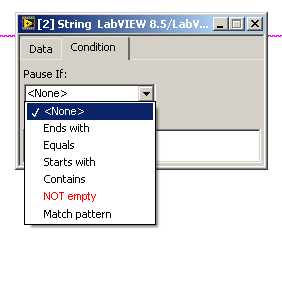
Add a new selection, so that the application pauses if "something" is on the wire...please see the attached image!


Similar to that, a conditional "DBL" probe could be enhanced by adding a "NaN" option...one could realize that by inserting "Equal to ... NaN", but it would be easier to just select this "value" with a checkbox, and two conditions could be monitored at the same time ("=NaN" and "=xxx")


extendedconditionalstringprobe.PNG

I hope this is the correct venue for ideas about the desktop execution trace toolkit.  It is a LabVIEW-related tool.


In the course of investigating several LabVIEW crashes, one of NIs AEs suggested the DETT.  This seemed like a really good idea because it runs as a separate application and therefore doesn't lose data on the crash.  Better yet, the last thing in the trace would be likely to be related to the crash.  So I started my eval period of the DETT.  I am debugging a LV 8.6.1 program but since I have installed LV 2009, the 2009 version of DETT came up when I started tracing.  It seemed to work, however.


Sadly, the DETT sucked.  After about a minute of tracing, it got buffer overflow and popped up this dialog:

trace tool mem full.PNG

When I dismissed this, I got the usual popup about "Not enough memory to complete this operation."  Following this, the DETT was basically frozen.  I couldn't view the trace, specify filters, nothing.  I had to restart the application.  I tried a few hacks like disabling screen update while running, but nothing changed.  The DETT app was using about 466 MB at the time, and adequate system memory was available.


Possibly this is a stripped-down eval version.  If so, it is a mistake to make an eval  version work so badly that one is pursuaded not to buy the full version, which is the way I feel now.


I have some suggestions about how to improve the tool.  If these are implemented, I would recommend that we buy the full version.


  1. Stop barfing when the buffer overflows.
  2. A wraparound (circular) buffer should be an option.  Often one is interested in the latest events, not the first ones. 
  3. There should be a way to specify an event as a trigger to start and/or stop tracing, like in a logic analyzer.  Triggers could be an event match, VI match, user event, etc.
  4. The tools for analyzing events in the buffer (when it doesn't overflow) are useless. A search on a VI that is obviously present fails to find any event for that VI.  Searching should be able to be done based on something like the trigger mentioned above.
  5. The display filter is a good start but needs to be smarter.  It should be possible to filter out specific patterns, not just whole classes of events.
  6. The export to text is broken.  It loses the name of the VI that has a refnum leak.
  7. Refnum leak events are useless.  They don't give even as much as a probe would show, like what the refnum is to, the type, etc.
  8. The tool should be able to show concurrent thread/VI activity side-by-side, not serially, so one can see what is happening in parallell operations.

Do this stuff and you will have a useful tool.


John Doyle

When I have large projects with lots of classes, Labview's edit time environment slows down to a painful crawl.  Almost every meaningful action triggers a recompile that gives me a busy cursor for 3-10 seconds.  My productivity falls off a cliff and I avoid making important changes in favor of the cheap hack.  (The dev environment has high viscosity.)


I often wish there were a way to turn off the compiler while I make a set of changes.  I'm not interested in the errors at every single intermediate state of the code while I'm making the changes.  I *know* the code will be broken after I delete some nodes or wires.  Let me turn the compiler off, make my changes, and then turn it back on for error checking.


I'm sure there are lots of different solutions to address this problem.  My preference would be to make compiling faster so it is unnoticable.  I doubt NI will ship me a new computer with the next release.  My second choice would be to stop loading all of the class' member vis when any single vi is loaded.  I vaguely remember a discussion about that some time ago and it wasn't practical to do that.  That leaves me my third choice--more control over what automatically compiles when I make edits.


It could be something as simple as Ctrl-Shift clicking the run arrow to toggle auto-compiling at the vi level.  Or it could be a right click option in the project window that controls auto-compiling for an entire library or virtual folder.  Either would be okay; both would be nice.  


(For that matter, it would probably be a lot cheaper if NI just shipped me a new computer...)