LabVIEW Idea Exchange

Community Browser
Top Authors
cancel
Showing results for 
Search instead for 
Did you mean: 
Post an idea

In 2014 the Clear errors VI now accepts a single error which can be cleared.  This is nice but when I heard NI was implementing their own filter errors, I assumed they would do it in a similar way to the OpenG Filter Errors VI, which accepts a scalar, or an array of error codes to filter.


In addition to this I think it would be helpful if this Clear Errors also accepts the error data type for errors to filter, or an array of errors to filter.  That way the Error Ring can be used to help readability of the block diagram showing the error that is being cleared.


Improve Clear Errors Filter.png

Many or most VIs that ship with LabVIEW have their protection set to Unlocked (no password). The screenshot below shows a selection of such VIs.

1.png


It would be much better if the protection of vi.lib VIs was set to "Locked (no password)", to prevent accidental modification.

2.png


It seems very risky for built-in VIs to be open to modification, especially to accidental modification.


Scenario 1: Developer A is developing an application on their machine which contains modified vi.lib VIs which were accidentally modified as part of work on previous projects. They build an application which passes validation and starts to be used in production. All of the developer's source code is committed to a source code repository. Developer A leaves the company. Six months later Developer B is asked to pull the code from the repository and add a minor improvement. The application behaves very differently when Developer B builds it on their machine. A long and complicated troubleshooting session later, Developer B concludes that the different behaviour was likely caused by modified vi.lib VIs on Developer A's machine. Developer B cannot be sure, because Developer A's machine was wiped when they left, so there is no way to unequivocally prove the conclusion.


Scenario 2: A team of developers builds a test system for a defence application. The code is completed, and the test system is put through a thorough  commissioning and validation process that involves testing dozens of known good units and known bad units. The validation process takes three weeks to complete. Management plans to not have to run the whole validation process for future minor changes. Instead they will ask the development team to perform code reviews and record notes for each minor change. Revalidation is not necessary if the code reviewers agree that the changes are non-functional, for example, the wording was changed in a dialogue message, or a logo was added to the UI. This sounds like a great plan, but is technically unsafe. Strictly speaking the whole revalidation process would have to be rerun, even for minor changes, due to the fact that not all of the source code is visible in the repository (there is uncontrolled source code in vi.lib that could have been modified in between builds).

Essentially I don't think it's safe for an app to contain source code that is not visible or tracked in a repository.

I can't think of a simple, quick solution to the concerns above, but having all vi.lib VIs set to "Locked (no password)" could be a quick first step towards reducing the likelihood of this issue. Developers would at least have to consciously edit vi.lib VIs, rather than doing it accidentally which can happen now. Of course, a malicious actor could still wreak havoc by editing a few inconspicuous vi.lib VIs.

The risk would be reduced further if the vi.lib VIs were password-protected. This would come at the expense of not being able to view the source code of native VIs, something which I find useful. Therefore, I personally would prefer "Locked (no password)" to password-protected, but I might prefer password-protected to unlocked.

Similar concerns apply to non-NI third-party libraries that install in vi.lib, user.lib or instr.lib, for example the extremely useful OpenG libraries. These too are examples of uncontrolled source code. For this reason some developers I worked with preferred to copy the OpenG and other libraries into the project repository (this involves a tedious job of opening each library VI and relinking it to the other library VIs in their new location).


This idea is similar but potentially easier to implement than the following idea: Make the VI's from the "vi.lib" Read-only - NI Community


Thanks

I find myself with my fingers on the shift and arrow keys a significant amount of time while trying to make my code more readable. Invariable I switch between the arrow keys and the mouse in the process of straitening and aligning. Why not use the arrow keys for both alignment and object movement?


I'll let the following illustrations explain what I mean. I'm only showing a limited subset of the possible combinations, most of the time you can go in all 4 directions.


Basic


Note that during a "combo" (the control key isn't released) the original order of the objects will need to be remembered, so that when they are all aligned into a corner, subsequent combinations will maintain the order.


Building on that, more advanced functions are below:


advanced.gif


For the diagonal, once they are aligned to a corner, the diagonal can go in any of the 4 directions.


As you can see, this will emmensely increase productivity and general neatness of code. And perhaps more importantly, it will bring us even closer to our ultimate goal: making LabVIEW programming even more like playing a video game.

I should be able to modify a class with no private data to be an interface and vice versa. This post indicates it's not readily possible currently. But, the documentation for interfaces is sprinkled with statements that they should be for the most part interchangeable with classes.

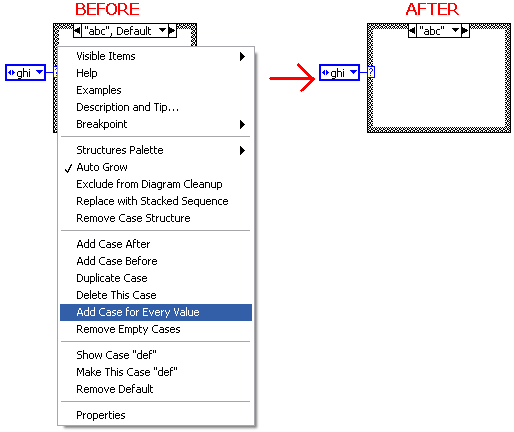
Wire a Case Structure with an enum. Now pop up on it and select "Add Case For Every Value." In today's LabVIEW, this adds new frames to the structure so that every enum value is handled by a unique frame. This makes creating the structure initially easy, and it gives you a way to walk through and make sure that you've filled in code for every frame. But today, the Case Structure has includes the "Default" case when the Case Structure is first wired. That is done so that wiring a Case Structure with an enum does not result in a broken VI. When a programmer provides a unique case for every value, the Default state is now redundant, and the only thing it does is create the potential for error if you ever add to the enum. Thus I would propose that if you use "Add Case For Every Value", then LV should remove the Default tag from the first case.


AddCaseForEveryValue.png

Currently the only image formats still commonly used today that can be imported into custom controls are non-scalable bitmap formats. The only supported vector formats that I know of are WMF and EMF, which is almost never used anymore to my knowledge. Even worse, it doesn't support features now expected in vector formats, such as gradients and alpha transparency. So if you're developing a custom control, you have to either use an antiquated format or a bitmap format.


LabVIEW 2011 introduced the new Silver control set, which to my knowledge still use LabVIEW's internal PICC format, which is completely undocumented. Rather than adding gradients and other new features to this private, undocumented format and using that, it would have made a lot more sense to add support for SVG, a modern, full-featured vector format that is commonly used, and used that for the Silver controls.


Not only are the two vector formats LabVIEW supports ancient formats, but their inclusion almost seems like an afterthought. Imported WMF and EMF images aren't anti-aliased like the Silver controls. Because of this, it's practically impossible to create any modern-looking custom controls that look good scaled unless you don't want any diagonal lines or curves, in which case you might as well just use a bitmap.


Sorry for the abrupt end!

Put a copy of the Empty String/Path? on the Variant palette since "this function is also designed to work with variants...; see https://www.ni.com/docs/en-US/bundle/labview/page/glang/empty_string_path.html .


For an example of the difficulty in finding this function, see https://forums.ni.com/t5/forums/editpage/board-id/170/message-id/1248895


For precedent of the same functions on different palettes see the Array to Cluster and Cluster to Array functions on both the array and the cluster palettes.

It would be useful if QuickDrop supported a way of dropping multiple instances of the same item in one go. It is sometimes desirable to do so. For example, we may want to drop three numeric constants in one go.

1 (edited).png


The QuickDrop action above would result in three numeric constants being dropped, as seen below.

2 (edited).png


Selecting an error wire, then executing the sequence: Ctrl+Space >> typing "rn" >> increasing the Number of Items to x3 >> Ctrl+I would result in three property nodes being inserted into the error wire, as seen below.

4 (edited).png


Notes

  • It would be great if the multiplier could be typed as part of the QuickDrop search string. For example, typing "rn x3" or "x3 rn" would then drop or insert three property nodes. This would mean that the whole action can be done from the keyboard, which would be quicker. However, it seems difficult to implement due to the search string needing to be intelligently split into two parts.
  • Perhaps a much easier implementation that would be almost as quick would be to type "rn" >> press Tab (this would tab to the "Number of Instances" control) >> type "3".


Thanks

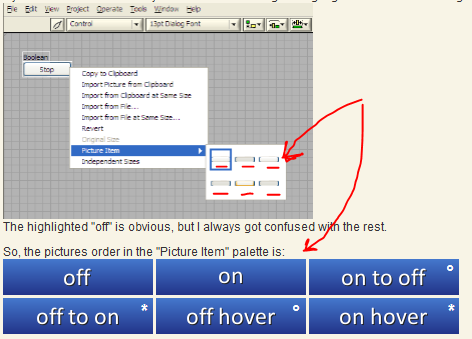
When customizing a boolean control, there are 6 pictures you can set. On, Off, On to Off transition, Off to On transition, Off Hover and On Hover. But setting those pictures can be a pain since they aren't labeled. Here is a screen shot of a page from the UI Interest group. Adding those labels to the menu would be very helpful when creating custom buttons.


Boolean Picture Item Labels.PNG

This is related to this issue, https://forums.ni.com/t5/LabVIEW-Idea-Exchange/Run-Code-Cleanup-profile-Nattify-VI-on-Save/idi-p/4291727

and is a more general request.


Have the ability to run custom scripting code on a save event.


What problem does it solve?


For me personally, I am working on an autoformatter. It would be nice to run that everytime something is saved. Right now I have to monitor the source folder from outside LabVIEW (using Python) and then use G-CLI to run my formatted. I'm sure there are probably other ways to do it and an onSave hook seems like the best choice. 

I'm sure there are plenty of other use cases. Perhaps some kind of linting or enforcing some sort of style guide. ie if you save a VI without a description, it won't let you unless you enter a description. Perhaps even every time you save a file, run some unit tests?


Ideal Solution


Ideally the scripting code would have access to the reference of the thing being saved. The easiest thing to envision is a VI, but why not also classes, libraries, the project itself? Maybe also some indication of what triggered the save. Was it a saveall, a save all this library, etc. Maybe if it is a saveall, you get a list of all the things being saved, before anything happens?

The IDE would then wait to continue until the scripting code completes, maybe even failing to save on an error or a boolean - not sure if that is the best behaviour as in a bug in your scripting code could cause you not to be able to save - so maybe some way to override the hook?


Maybe include a way to autogenerate a VI with the correct connector pane.


Maybe it makes sense to generalize this to add more hooks into LabVIEW? Perhaps a call to update the project provider to something more usable/less user-hostile?

I saw this idea which I really liked and I realised that this would also be nice.....I do this type of 'insert subVI, delete broken wires' action all day.


error_wires.png


I searched I think what I am proposing is a little similar to this idea but I think in the difference with the idea I'm putting forward is that labview will only automatically delete a section of the broken wire when the 'short circuit' is sending data around a VI as well as through it!


The second part of the idea - where the 'merge errors' vi can be configured to appear automatically when two 'sources' are wired to one sink would be useful when you are parallelising subVIs on the block diagram. I'd also suggest that if this option is configured and the source wires are deleted (so that only one source is linked to one sink) have the merge error vi disappear!!!


I'll be gutted if I've wasted my time on another duplicate.....I keep not finding other peoples great ideasSmiley Happy


Currently, DETT looks like this:

Taylorh140_0-1588782161680.png

But it should look like a proper profiler allowing for exploring and easily visualizing performance, threads, call stacks and memory usage at a glance (similar to this):

Taylorh140_1-1588782422432.png


Has this ever happened to your application?


RootWin.PNG


Well, it happened to me many times. I never figured out when this happens and when it doesn't, but I do know of a certain way to disable it - add the line HideRootWindow=TRUE to the application's INI file.


The problem with that solution is that when you build a new EXE, LV creates a new INI file which overrides the old one, unless you explicitly create your own INI file and tell LV to use it.


So, the solution to this is simple and this is the idea - LV should add the line HideRootWindow=TRUE to the application's INI file by default. Problem solved. Alternatively, maybe the whole root window thing is not needed anymore and NI can simply get rid of it.


If You drag a tunnel of a loop, case structure or any other structure along the border over a corner, then

the connected wire becomes hidden behind the frame.


Sometimes, the wire looks alike it is connected to another wire instead - like in the example below.

I fell into that trap, because I've just seen the frame to the right and didn't expect, that the wire was

connected to the tunnel near the bottom.

wire_behind_frame.png

Wouldn't it be great to break up the wire with a 90° corner and place it in the visible area?

     wire_not_behind_frame.png


More similar situations like this are posted in this thread:

http://forums.ni.com/t5/LabVIEW/wire-vanishes-behind-frame-of-case-structure/td-p/3221167

This idea came to me from Darren's Nugget 2-23-2018 on Data Agnostic Probes I thought it might be useful to write a Probe.vim or specifically, a data type malleable probe to gain the ability to have some access to the data itself in a general smart probe and maintain the ability to display the data in a type specific manner.


One example would be a "Data History Probe" that displays the history values of any data type.  I'm sure there are other good uses.

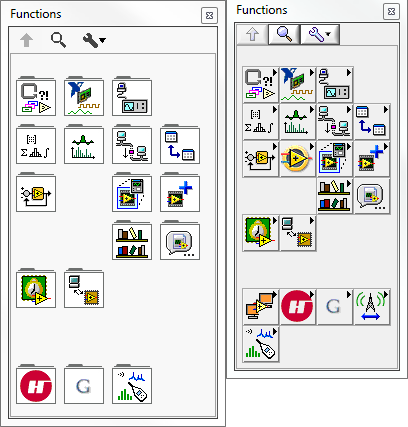
After reading Restore High Contrast Icons I procrastinated as long as possible before installing LV2016.  When I finally did, I was disappointed by the additional space required for the palettes; all of them!  I have been using LabVIEW since 5.0 and switched to an Icon view of the palettes shortly after getting comfortable with the graphics.  Now, I have to move my mouse further to get to each sub-menu and VI selection.  It's a waste of developer's time and apparently done for absolutely no good reason except to make a change; very similar to the washed out icons.

This extra space needs to be removed or at least an option provided to set the spacing back to the condensed spacing always available.

These images to show the relative size of the palettes LV2016 vs. 2015.

Controls Palette

ControlsPalette

BoolenPalette

Functions Palette

FunctionsPalette.png

ArrayPalette


Yes, this might seem trivial, until you think about traversing several palettes to get to your needed VI.


FTPPalette

*Random example, if one were doing FTP development they'd pin the menu.

** The original size of the above graphic is 1030 pixels wide; less than 800 for 2015.


Quit messing with what works and has become the standard with regards to options.  At least when that ridiculous "default" setting for icons instead of terminals was introduced we could undo the setting in Options

It seems that NI has hired some non-G experts to mess up the interface simply so they can enumerate all the "great" improvements they've made.  Or, was all the extra space to make sure newbies couldn't miss the folder tab, since connecting the "right arrow" on an icon to it being a sub-folder would be too difficult for children?


Codewars - Achieve mastery through coding practice and developer mentorship


What language is missing in this list??

wiebeCARYA_0-1662972904604.png


Codewars for LabVIEW should be mostly community driven, but NI would have to set it up.

The array "Startup/Always Included" carries these Vi's into pre/post build action VI's.

The order of the vi's in this array depends on the order they have been added to/created in the project when, not the order they can be seen on the project window itself.

Here's the project window:

GICSAGM_0-1718176051948.png

Here's the order within prebuild vi:

GICSAGM_1-1718176157393.png


The order is NOT the same. "startup" is the first but if you delete from the project and then re-add it, it will become the last.


I suggest that the order in pre/post build VI should be:

first - startup.vi

following: always included vi's in the same order they appear in the project window.


Also, the always included list should have a 'mechanism' to change the order of the vi's in the list - be it up/down arrow buttons on the side that would move the selected vi or a similar command in a "right click" drop down menu.


In this way, any pre/post build action that may involve any of these vi's can be clearly defined and remain stable during the lifetime of the project without running into the risk of getting the wrong vi to "work" on or having to edit the pre/post build vi to add or edit the vi's names every time there is a change in the startup/always included list.


In LV 2010 the string constant display style is a nice new addition based on the ideas here and here.

The implementation is consistent with how the radix indicator works on numeric constants in that you must navigate to the visible items shortcut menu and turn them on discretely.

If I want to take a string constant, show it in '\' format and turn on the descriptor, it requires two separate operations.


I propose that the descriptor (or radix for numeric constants) be automatically shown when displaying any mode other than the default.


String formatting.PNG

Not only would this add to the readability of these constants but would eliminate the extra step to have to discretely show this valuable piece of self documentation.

If the developer did not want the descriptor shown, they they could manually turn it off.

I remember when I first discovered the "Show Item Paths" option in the "Project" menu. This is such a useful view, but for some reason we are only seeing the tip of the iceberg!


I propose that the project window be enhanced to support other useful VI properties too:


properties2.png


Among other things, this would allow us to very easily identify VIs (or controls, or libraries, ... ) with non-standard properties. (Have you ever revisited an old project and tried to figure out which VIs are reentrant, or inlined?)


What properties should be available?

  • Ideally, this view would support ALL properties for ALL project items ( - at least those that have a compact text representation).
  • If that proves impractical for some good technical reason then I'd suggest we at least get access to the Execution properties.
  • It would be great if we could choose which columns to display from available item properties. These columns could then be toggled on/off (just like the existing "Paths" column):


menus2.png

An added bonus would be the ability to sort by any column:


  • My preferred implementation would be to allow the user to click on any column name to toggle between ascending and descending view. (This type of thing has been suggested a few times for multicolumn listboxes...)
  • On the other hand, I'd be happy enough if this worked the same as it currently does with "Paths", i.e. using the "Arrange By" option (>> Right-click on a parent item in the project and arrange the child items by Name, Type, Path, etc)


I think this would be a BIG step in the right direction towards leveraging the existing project interface to provide some REALLY useful information.


Spoiler
If anyone is wondering about the "Runs On Error" property then you should visit this idea.